

The Wireless Speaker is an audio solution designed for both standalone use and seamless integration into a Loxone. It's a portable speaker featuring a 2-way system with passive radiator. It is powered by 24V and receives its audio signal via Wi-Fi or Bluetooth.
Spis treści
- Uruchomienie
- LED Status
- Factory Reset
- Wejścia, wyjścia, właściwości
- Uwagi dotyczące bezpieczeństwa
- Dokumenty
Uruchomienie↑
To set up the speaker, connect the power adapter and plug it into a wall outlet. When the LED turns solid orange, use your phone or tablet to join the "wspXXXX" Wi‑Fi network. If the setup page does not open automatically, open a web browser and go to 192.168.123.1 to add the speaker to your local network. Note that pairing mode is active for 30 minutes after the speaker is powered on, requiring a reboot to connect if this time has expired. After successful configuration, the speaker will restart and can then be used as a standalone player with AirPlay or Spotify Connect.
For integration into a Loxone system, ensure the speaker and Miniserver are connected to the same network. The speaker is ready for pairing when the Status LED cycles red, orange, and green. In Loxone Config, run an Audio Device Search, or use the Loxone App (Device Search) to run a Network Speaker Search. Follow the prompts to complete the room assignment and configuration. You can perform the entire setup directly through the Loxone App, with no need to access Loxone Config.
LED Status↑
| Status LED | Opis |
|---|---|
|
|
Booting |
|
|
Wi-Fi pairing active |
|
|
Paired, no communication with system or network |
|
|
LOXONE pairing mode |
|
|
Error |
|
|
Firmware updating |
|
|
Standby / playing |


Wi-Fi standalone mode
| Status LED | Opis | LED States |
|---|---|---|
|
|
Blue flashing for 10 seconds | Bluetooth connected |
|
|
Green flashing for 10 seconds | AirPlay / Spotify Connect playback |


Factory Reset↑
If the Wireless Speaker was previously paired with a Miniserver and is now to be used in another installation, the pairing must first be released. Connect to the Miniserver and delete the Wireless Speaker from the programming. Then save the program into the Miniserver.
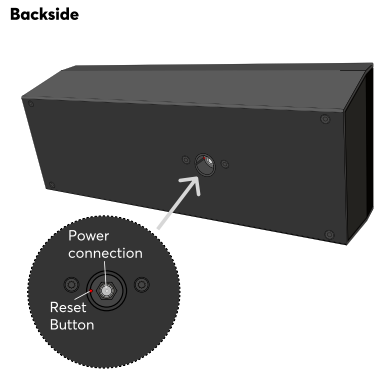
If this is not (or no longer) possible, you can reset the Wireless Speaker to factory settings. After the speaker has fully booted, press the reset button for 1 second using a paper clip or similar object. Avoid applying excessive force while pressing the button. A confirmation sound will indicate that the reset was successful. Alternatively, you can restore factory settings via the web interface. After the reset is complete, the Wireless Speaker is ready to be paired again.

|
Without these steps a previously paired Wireless Speaker cannot be paired with another Miniserver! |
The web interface of the Wireless Speaker provides access to network settings, status information, and diagnostic tools. You can access the interface using either the speaker’s IP address or its hostname. When searching for audio devices in Loxone Config, the search results include the IP address or hostname of the Wireless Speaker.
If the Wireless Speaker is not yet paired with a Miniserver, the login credentials for the web interface are admin/admin.
Once the Wireless Speaker is paired, the login credentials of a user of the user group Full Access (Administrators) of the paired Miniserver are required.
The Wireless Speaker can perform firmware updates automatically when new versions become available. This requires Automatic Updates to be enabled in the project properties. The Wireless Speaker will automatically adopt this setting.
Aktory↑
| Krótki opis | Zakres wartości |
|---|---|
| Wireless Speaker 1 | ∞ |
Wejścia diagnostyczne↑
| Krótki opis | Opis | Jednostka | Zakres wartości |
|---|---|---|---|
| Ograniczenia wzmacniacza | Jeśli temperatura wzmacniacza osiągnie punkt krytyczny, głośność strefy zostanie zmniejszona. Może to być spowodowane przeciążeniem lub zbyt wysoką temperaturą otoczenia. | - | 0/1 |
| Status online Wireless Speaker 1 | Wskazuje, czy urządzenie jest dostępne przez Miniserver. Diagnostyka urządzeń Air Diagnostyka urządzeń Tree Diagnostyka rozszerzeń |
Cyfrowy | 0/1 |
| Wyłączanie od temperatury | Wejście jest aktywne, gdy wyjścia urządzenia zostały wyłączone z powodu wysokiej temperatury urządzenia. Możliwe przyczyny: Zbyt wysoka temperatura otoczenia, przeciążenie wyjść. | Cyfrowy | 0/1 |
Właściwości↑
| Krótki opis | Opis | Jednostka | Zakres wartości | Wartość standardowa |
|---|---|---|---|---|
| Numer seryjny | Określa numer seryjny urządzenia. | - | - | - |
| Monitoruj status online | Jeśli opcja ta jest zaznaczona, użytkownik zostanie powiadomiony za pośrednictwem Statusu systemu lub Mailera, jeśli urządzenie przestanie być dostępne lub przejdzie w tryb offline. | - | - | - |
| Maksymalna głośność | Określa maksymalną (fizyczną) moc wyjściową wzmacniacza w procentach, a tym samym ogranicza maksymalną możliwą głośność dla tego wyjścia. Wartości głośności od 0 do 100% odtwarzacza audio lub aplikacji są odpowiednio skalowane. | % | 0...100 | 100 |
| Współczynnik wzmocnienia | Reguluje głośność tego wyjścia w decybelach. Ta regulacja pomaga zrównoważyć poziomy dźwięku w różnych głośnikach lub środowiskach, zapewniając spójne wyjście audio. Głośność jest skalowana i ograniczana zgodnie z określoną głośnością maksymalną. | - | -6...6 | 0 |
Uwagi dotyczące bezpieczeństwa↑
The device is maintenance-free and should only be cleaned with a dry cloth. It is designed for indoor use within a temperature range of -10°C to 50°C (14°F to 122°F).