

The Door Lock Air Inductive is a wireless door lock based on Loxone Air technology. It enables remote control and status feedback of doors via the Loxone system, ideal for new builds and retrofit projects, without the need for additional wiring. Thanks to inductive power supply, the lock is maintenance-free. No battery replacement is required.
Datasheet Door Lock Air Inductive
Spis treści
Montaż↑

|
Ensure the inductive station in the door frame is precisely aligned with the inductive component of the door lock. Proper alignment is critical for optimal performance and reliable charging. |
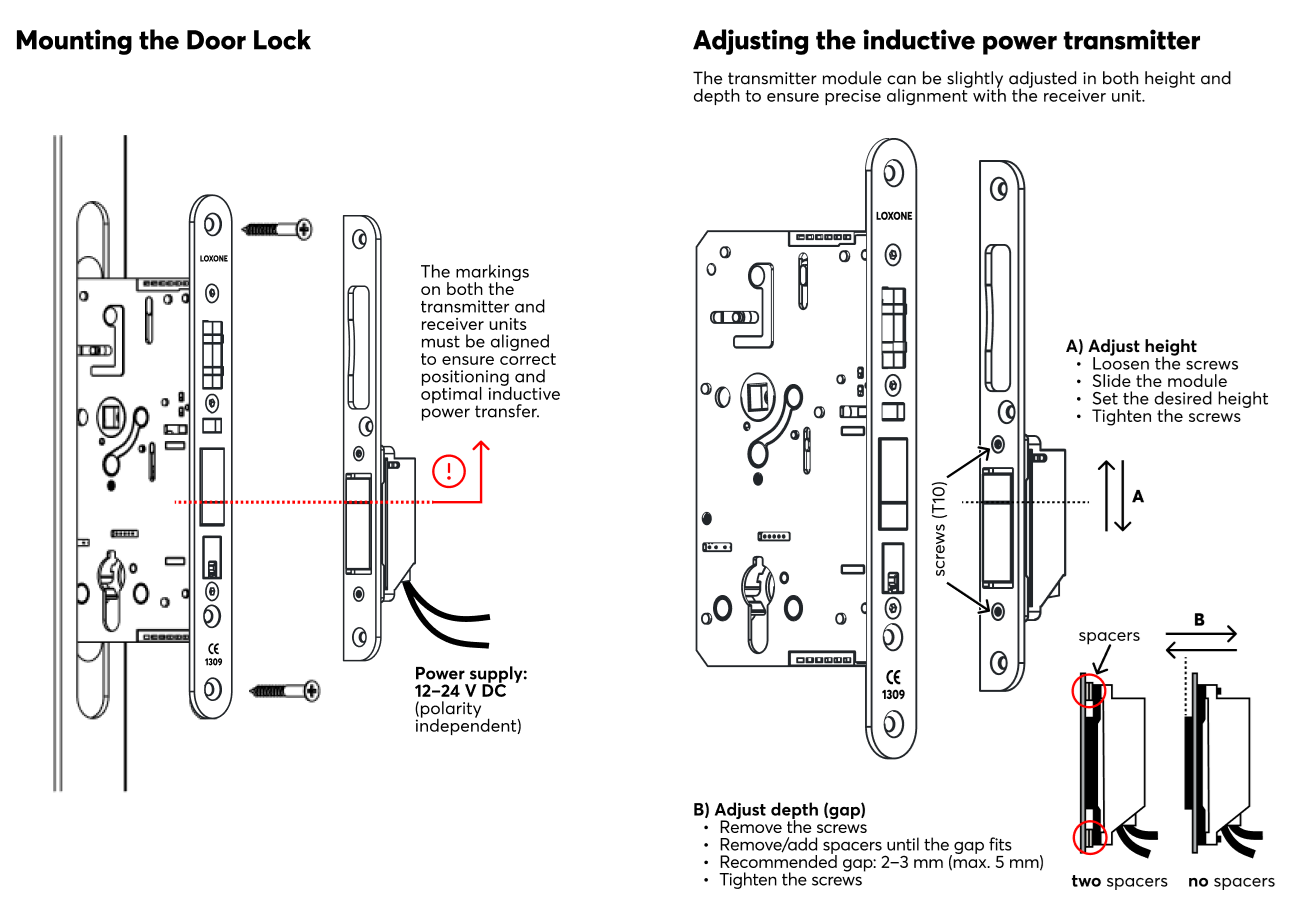
Link to PDF, created from Südmetal document.
Uruchomienie↑
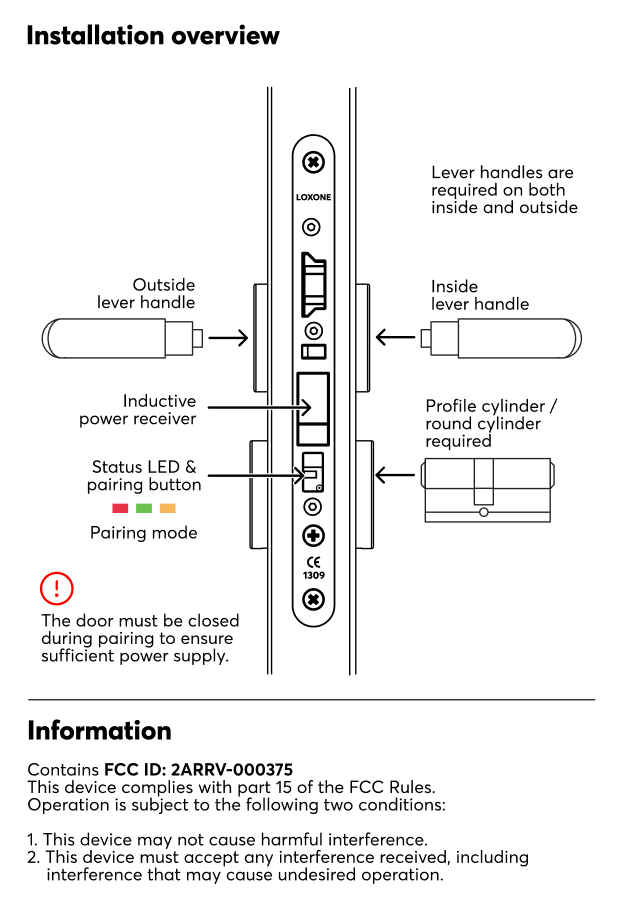
W stanie dostawy tryb parowania będzie aktywny po podłączeniu zasilania. Jest to sygnalizowane miganiem diody LED stanu na czerwono/zielono/pomarańczowo.

|
Because the device requires the door to be closed for power, the LED may be difficult to see during the process. Ensure the door is fully shut to maintain a continuous power supply during pairing. |
Następnie wykonaj procedurę parowania w interfejsie Air.
To activate the pairing mode manually, hold down the pairing button for at least 5 seconds then immediately close the door. The door must be closed to receive power from the inductive station. If the door remains open, the device will lose power, and the pairing mode will be interrupted.
|
|
After pressing the pairing button, the door must be closed immediately. The Door Lock is powered by the inductive station only when the door is closed. If the door remains open, the device will run out of power and the pairing process cannot be completed. |
Czujniki↑
| Krótki opis | Opis | Zakres wartości |
|---|---|---|
| Position | Current position of the door. Can be used with Door and Windows Monitor 1=closed 3=open 4=closed and unlocked 5=closed and locked 6=open and unlocked 7=open and locked 0=unknown/offline |
0...7 |
| Unlocked | Input is active when lock is unlocked | 0/1 |
| Unlocked by Key | Input is active when lock is unlocked by key | 0/1 |
| Closed | Input is active when the door is closed | 0/1 |
Aktory↑
| Krótki opis | Opis | Zakres wartości |
|---|---|---|
| Unlock Door | Pulse on the output unlocks the door | 0/1 |
Wejścia diagnostyczne↑
| Krótki opis | Opis | Jednostka | Zakres wartości |
|---|---|---|---|
| Status online Door Lock Air | Wskazuje, czy urządzenie jest dostępne przez Miniserver. Diagnostyka urządzeń Air Diagnostyka urządzeń Tree Diagnostyka rozszerzeń |
Cyfrowy | 0/1 |
| Wyłączenie napięcia | Wejście jest aktywne, gdy urządzenie jest w trybie offline z powodu zbyt niskiego napięcia zasilania. Możliwe przyczyny: bateria rozładowana lub zbyt długie odłączenie od zasilania | Cyfrowy | 0/1 |
| Niski poziom baterii | To wejście aktywuje się, gdy poziom naładowania baterii wynosi <= 15%. Urządzenie dostarcza wartości dla czujnika, gdy jest zasilane z baterii. |
Cyfrowy | 0/1 |
| Pojemność baterii | Ten sensor podaje aktualny stan naładowania beterii. Jeśli urządzenie zasilane jest zewnętrznie napięciem 24V, wartość wynosi stale 100. |
% | ∞ |
| Czas odpowiedzi - ostatnia aktywacja | - | ∞ |
Właściwości↑
| Krótki opis | Opis | Wartość standardowa |
|---|---|---|
| Monitoruj status online | Jeśli opcja ta jest zaznaczona, użytkownik zostanie powiadomiony za pośrednictwem Statusu systemu lub Mailera, jeśli urządzenie przestanie być dostępne lub przejdzie w tryb offline. | - |
| Numer seryjny | Numer seryjny urządzenia Air. Automatyczne parowanie można włączyć w Air Base. Automatyczne parowanie można włączyć w Airbase na określony czas. |
- |
| Potwierdzenie dźwiękowe | Dźwiękowe potwierdzenie otwarcia lub zamknięcia drzwi | - |
Uwagi dotyczące bezpieczeństwa↑
Instalacja musi być przeprowadzona przez wykwalifikowanego elektryka zgodnie z obowiązującymi przepisami.
Dokumenty↑
Datasheet Door Lock Air Inductive