Loxone Hörmann Tree je kompaktní rozhraní pro integraci pohonů garážových vrat Hörmann.
Aktuální seznam kompatibilních pohonů Hörmann je k dispozici online.
Obsah
Montáž↑
Zařízení Hörmann Tree se připojuje k BUS konektoru kompatibilního pohonu vrat Hörmann pomocí dodaného propojovacího kabelu. Vždy se řiďte návodem k použití, abyste se ujistili, že používáte správný BUS konektor.

U modelů HCP1 je zařízení okamžitě připraveno k párování.
Pohon vrat je rozpoznán automaticky.
U modelů HCP2 je nutné nejprve aktivovat funkci BUS-Scan na pohonu dveří, aby se zapnulo napájení zařízení a bylo možné jej spárovat. Postup aktivace se liší v závislosti na modelu pohonu:
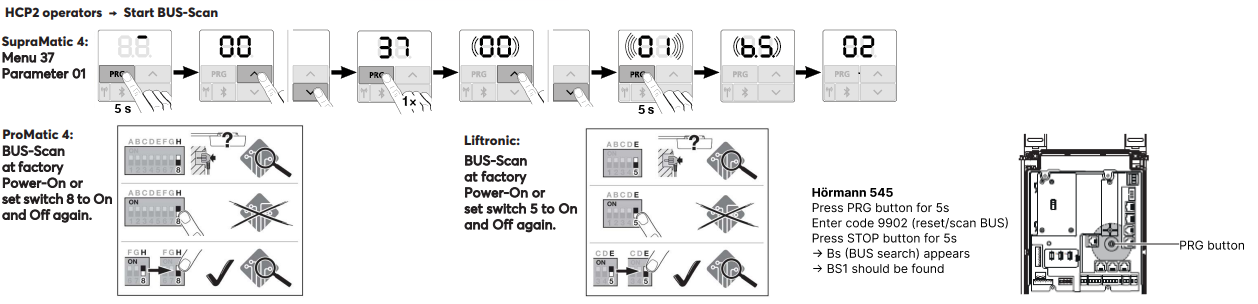
Po zapnutí funkce BUS-Scan (napájení) lze zařízení spárovat.
Pohon dveří je poté automaticky rozpoznán.
Zprovoznění↑
Pro uvedení do provozu musí být zařízení napájeno a musí být možné navázat připojení k Miniserveru přes Tree rozhraní.
Poté postupujte podle postupu párování v Tree rozhraní.
Programování↑
Loxone Hörmann Tree se programuje a nastavuje pomocí funkčního bloku Garáž / Brána v Loxone Config:
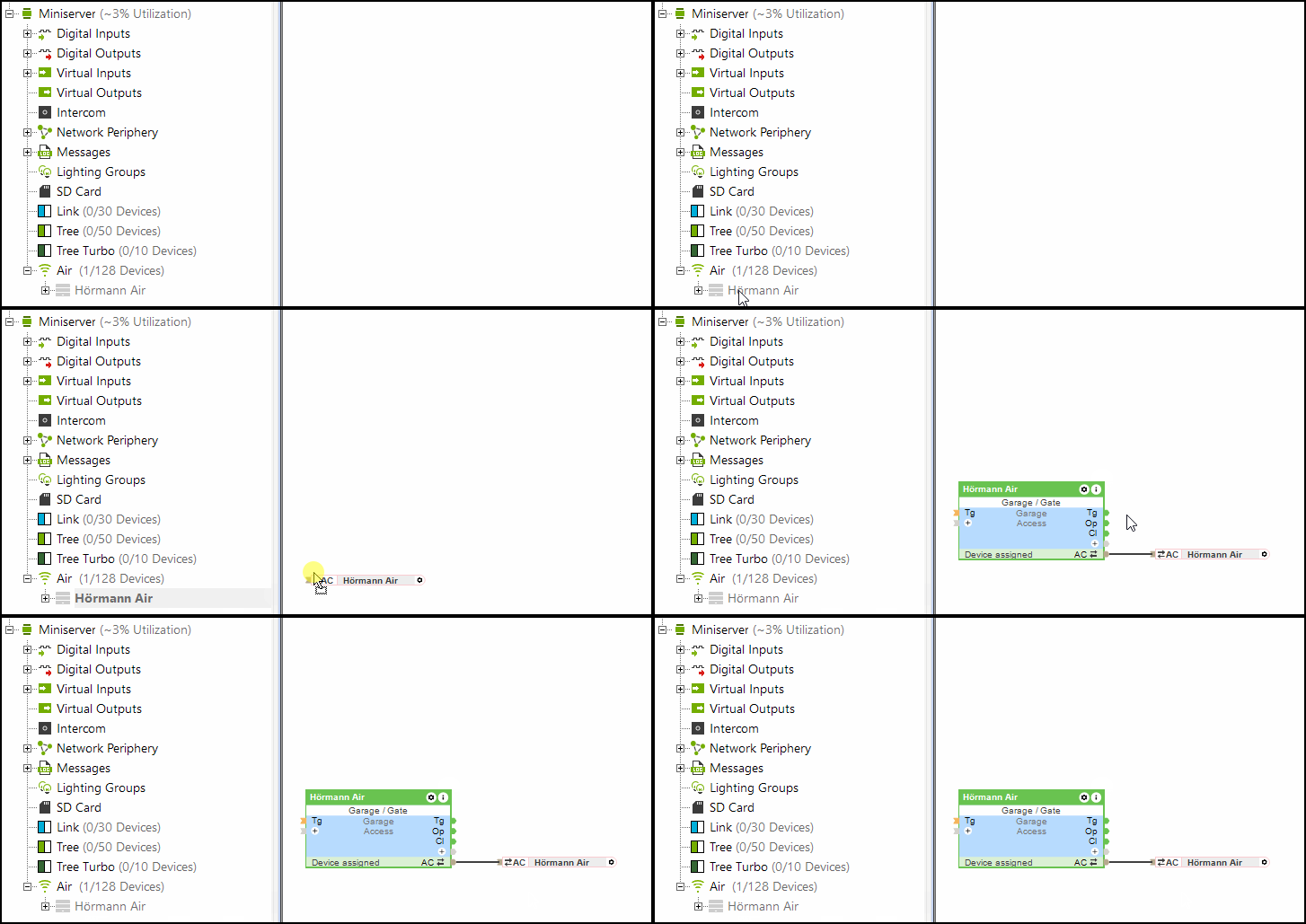
Vstup (Po) (částečně otevřený) bloku „Garáž / Brána“ podporuje také systém Hörmann Tree.
Omezení↑
U pohonů HCP1 se během aktualizace může na pohonu krátce zobrazit chyba. Funkčnost tím není ovlivněna. Po opětovném odeslání příkazu se chyba již nezobrazí.
Při použití systému Hörmann Tree nelze současně používat senzor klimatu Hörmann HKSI.
Software Index↑
Pomocí softwarového indexu lze ověřit kompatibilitu s Loxone Hörmann Tree; seznam podporovaných pohonů je k dispozici online.
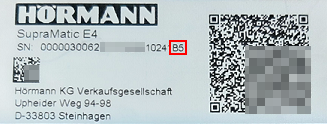
Sériové číslo spolu se software indexem (začínajícím velkým písmenem) najdete na štítku pohonu garážových vrat Hörmann.
Diagnostika↑
Pokud pohon Hörmann zaznamenal varování nebo chybu, zobrazí se systémová zpráva. Zkontrolujte prosím přímo na zařízení zobrazený chybový kód nebo stav. Podrobné pokyny k řešení potíží najdete v návodu k použití zařízení podle zobrazeného stavu.
Aktory↑
| Krátký popis | Popis | Rozsah hodnot |
|---|---|---|
| API konektor | Inteligentní konektor založený na rozhraní API. API Commands | - |
| Světlo | Zapne osvětlení pohonu vrat. Osvětlení se také automaticky zapne při každém otevření nebo zavření vrat a svítí po dobu nastavenou v pohonu. | 0/1 |
Vstupy pro diagnostiku↑
| Krátký popis | Popis | Jednotky | Rozsah hodnot |
|---|---|---|---|
| Online status Hörmann Tree | Uvádí, zda je zařízení dostupné pro Miniserver. Diagnostika Air zařízení Diagnostika Tree zařízení Diagnostika Extensionu | Digital | 0/1 |
| Informace o aktoru | Digital | 0/1 | |
| Chyba komunikace | Digital | 0/1 | |
| Žádná komunikace | Digital | 0/1 |
Vlastnosti↑
| Krátký popis | Popis | Výchozí hodnota |
|---|---|---|
| Monitorovat Online status | Pokud je tato možnost zaškrtnuta, budete přes Stav systému nebo Mailer upozorněni, pokud zařízení nebude dostupné nebo bude offline. | - |
| Sériové číslo | Určuje sériové číslo zařízení. Zadejte 'Auto' pro automatické spárování Tree zařízení s neznámým sériovým číslem. Tuto funkci lze použít pouze v případě, že na samostatném serveru Miniserver je pouze jedno Tree zařízení stejného typu (nikoli v nastavení Client-Gateway). Uložte do Miniserveru pro spárování Tree zařízení. Poté musí být program načten z Miniserveru, aby se přeneslo aktuální sériové číslo Tree zařízení do programu. | - |
| Automatické učení doby trvání jízdy | Automatické učení doby trvání jízdy | - |