Loxone Hörmann Tree to kompaktowy moduł interfejsu służący do integracji napędów do bram garażowych firmy Hörmann.
Aktualna lista kompatybilnych napędów firmy Hörmann jest dostępna w Internecie.
Spis treści
- Montaż
- Uruchomienie
- Programowanie
- Ograniczenia
- Software Index
- Diagnostyka
- Wejścia, wyjścia, właściwości
- Dokumenty
Montaż↑
Urządzenie Hörmann Tree podłącza się do złącza BUS kompatybilnego napędu do bram firmy Hörmann za pomocą dostarczonego kabla adapterowego. Należy zawsze zapoznać się z instrukcją obsługi, aby upewnić się, że używane jest właściwe złącze BUS.

W przypadku modeli HCP1 urządzenie jest od razu gotowe do sparowania.
Napęd do otwierania drzwi jest rozpoznawany automatycznie.
W przypadku modeli HCP2 należy najpierw włączyć funkcję BUS-Scan w napędzie do bram, aby uruchomić zasilanie urządzenia i umożliwić jego sparowanie. Sposób aktywacji różni się w zależności od modelu napędu do bram:
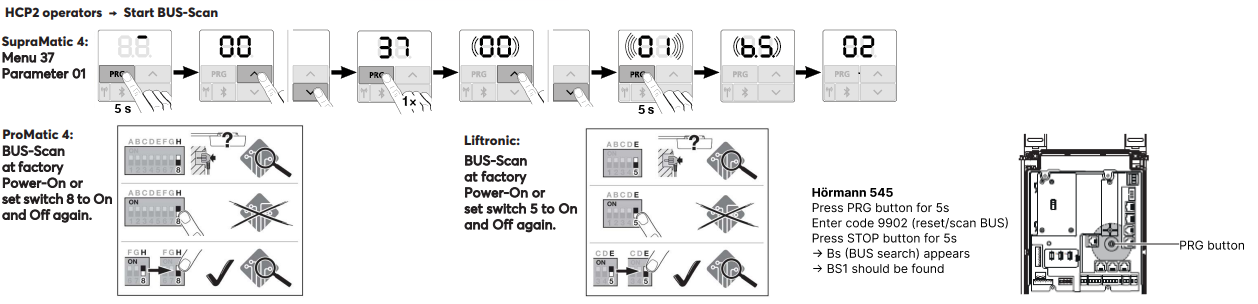
Po włączeniu funkcji BUS-Scan (zasilanie) można przeprowadzić parowanie urządzenia.
Następnie napęd drzwi zostanie automatycznie rozpoznany.
Uruchomienie↑
W celu uruchomienia urządzenie musi być zasilane, a połączenie z Miniserverem musi być możliwe za pośrednictwem interfejsu Tree.
Następnie postępuj zgodnie z procedurą parowania w interfejsie Tree.
Programowanie↑
Urządzenie Loxone Hörmann Tree programuje się i konfiguruje za pomocą bloku funkcyjnego Garaż / Brama w programie Loxone Config:
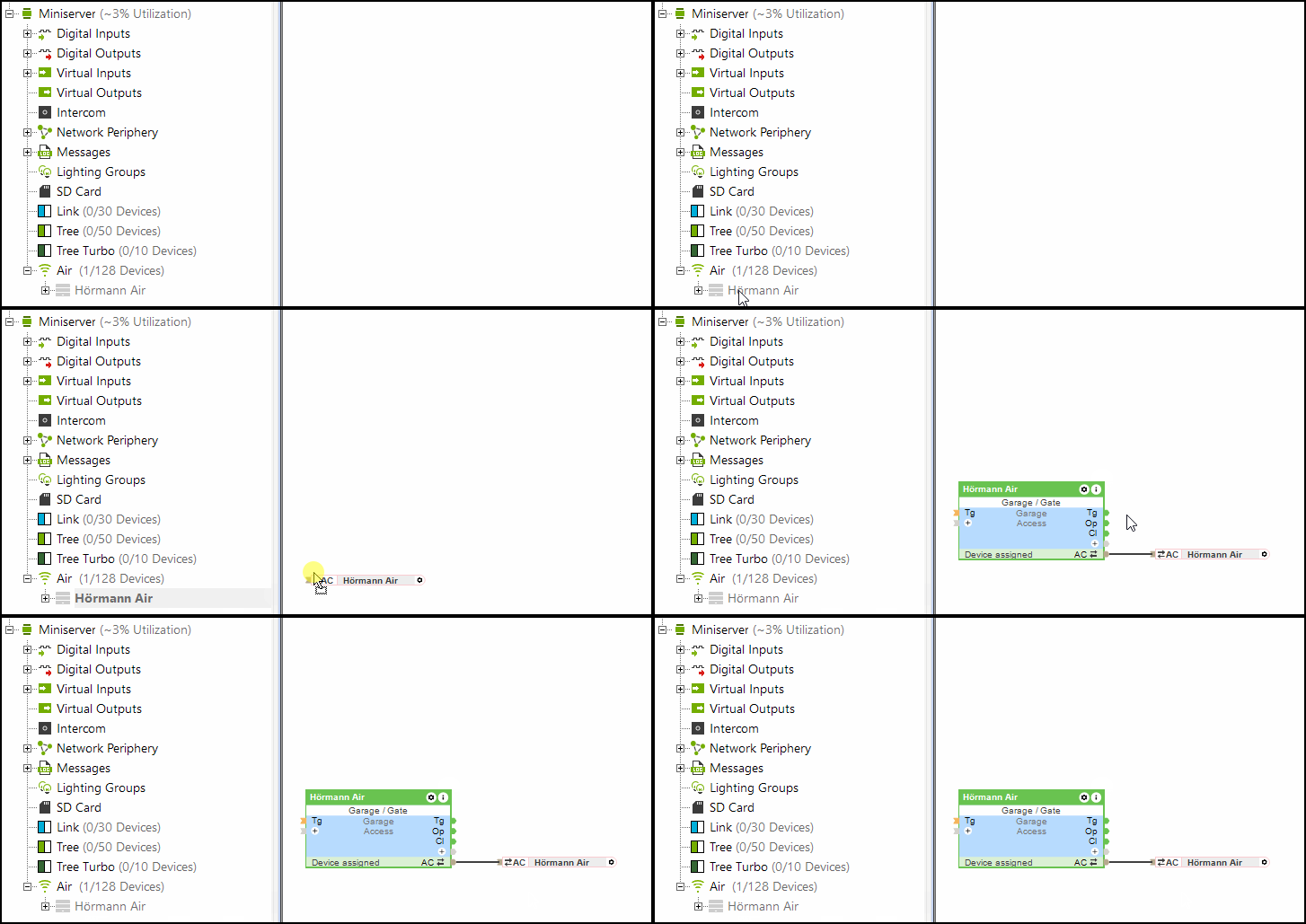
Wejście (Po) (częściowo otwarte) bloku „Garaż/Brama” jest również obsługiwane przez system Hörmann Tree.
Ograniczenia↑
W przypadku napędów HCP1 podczas aktualizacji na napędzie może na krótko pojawić się komunikat o błędzie. Nie ma to wpływu na działanie urządzenia. Po ponownym wysłaniu polecenia komunikat o błędzie znika.
W przypadku korzystania z systemu Hörmann Tree nie można jednocześnie używać czujnika klimatycznego Hörmann HKSI.
Software Index↑
Za pomocą indeksu oprogramowania można sprawdzić zgodność z systemem Loxone Hörmann Tree; lista obsługiwanych napędów jest dostępna online.
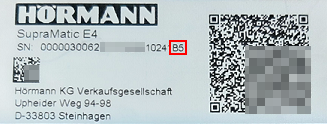
Numer seryjny wraz z indeksem oprogramowania (zaczynającym się od wielkiej litery) znajduje się na etykiecie napędu do bramy garażowej firmy Hörmann.
Diagnostyka↑
Jeśli napęd Hörmann wykrył ostrzeżenie lub błąd, wyświetli się komunikat systemowy. Proszę sprawdzić urządzenie bezpośrednio, aby zapoznać się z wyświetlonym kodem błędu lub statusem. Szczegółowe instrukcje dotyczące rozwiązywania problemów można znaleźć w instrukcji obsługi urządzenia, w zależności od wskazanego statusu.
Aktory↑
| Krótki opis | Opis | Zakres wartości |
|---|---|---|
| API Connector | Inteligentne złącze oparte na API. API Commands | - |
| Światło | Włącza oświetlenie mechanizmu otwierającego drzwi. Oświetlenie włącza się również automatycznie przy każdym otwarciu lub zamknięciu drzwi i pozostaje włączone przez czas określony w ustawieniach mechanizmu otwierającego. | 0/1 |
Wejścia diagnostyczne↑
| Krótki opis | Opis | Jednostka | Zakres wartości |
|---|---|---|---|
| Status online Hörmann Tree | Wskazuje, czy urządzenie jest dostępne przez Miniserver. Diagnostyka urządzeń Air Diagnostyka urządzeń Tree Diagnostyka rozszerzeń | Cyfrowy | 0/1 |
| Informacje o aktorze | Cyfrowy | 0/1 | |
| Błąd komunikacji | Cyfrowy | 0/1 | |
| Brak komunikacji | Cyfrowy | 0/1 |
Właściwości↑
| Krótki opis | Opis | Wartość standardowa |
|---|---|---|
| Monitoruj status online | Jeśli opcja ta jest zaznaczona, użytkownik zostanie powiadomiony za pośrednictwem Statusu systemu lub Mailera, jeśli urządzenie przestanie być dostępne lub przejdzie w tryb offline. | - |
| Numer seryjny | Określa numer seryjny urządzenia. Wprowadź „Auto”, aby automatycznie sparować urządzenie Tree o nieznanym numerze seryjnym. Ta opcja może być używana tylko wtedy, gdy istnieje tylko jedno rozszerzenie tego samego typu na samodzielnym Miniserverze (nie w konfiguracji klient-gateway). Zapisz w Miniserverze, aby sparować urządzenie Tree. Następnie należy załadować program z Miniservera, aby przenieść rzeczywisty numer seryjny urządzenia Tree do programu. | - |
| Automatyczne nauczanie czasów jazdy | Automatyczne nauczanie czasów jazdy | - |