

The Wireless Speaker is an audio solution designed for both standalone use and seamless integration into a Loxone. It's a portable speaker featuring a 2-way system with passive radiator. It is powered by 24V and receives its audio signal via Wi-Fi or Bluetooth.
Inhaltsverzeichnis
- Inbetriebnahme
- LED Status
- Factory Reset
- Eingänge, Ausgänge, Eigenschaften
- Sicherheitshinweise
- Dokumente
Inbetriebnahme↑
To set up the speaker, connect the power adapter and plug it into a wall outlet. When the LED turns solid orange, use your phone or tablet to join the "wspXXXX" Wi‑Fi network. If the setup page does not open automatically, open a web browser and go to 192.168.123.1 to add the speaker to your local network. Note that pairing mode is active for 30 minutes after the speaker is powered on, requiring a reboot to connect if this time has expired. After successful configuration, the speaker will restart and can then be used as a standalone player with AirPlay or Spotify Connect.
For integration into a Loxone system, ensure the speaker and Miniserver are connected to the same network. The speaker is ready for pairing when the Status LED cycles red, orange, and green. In Loxone Config, run an Audio Device Search, or use the Loxone App (Device Search) to run a Network Speaker Search. Follow the prompts to complete the room assignment and configuration. You can perform the entire setup directly through the Loxone App, with no need to access Loxone Config.
LED Status↑
| Status LED | Beschreibung |
|---|---|
|
|
Gerät startet |
|
|
WLAN-Einlernmodus aktiv |
|
|
Eingelernt, keine Kommunikation mit dem System oder Netzwerk |
|
|
LOXONE Einlernmodus |
|
|
Fehler |
|
|
Firmware wird aktualisiert |
|
|
Standby / playing |


Wi-Fi standalone mode
| Status LED | Beschreibung | LED Statusanzeige |
|---|---|---|
|
|
Blue flashing for 10 seconds | Bluetooth verbunden |
|
|
Green flashing for 10 seconds | AirPlay / Spotify Connect playback |


Factory Reset↑
If the Wireless Speaker was previously paired with a Miniserver and is now to be used in another installation, the pairing must first be released. Connect to the Miniserver and delete the Wireless Speaker from the programming. Then save the program into the Miniserver.
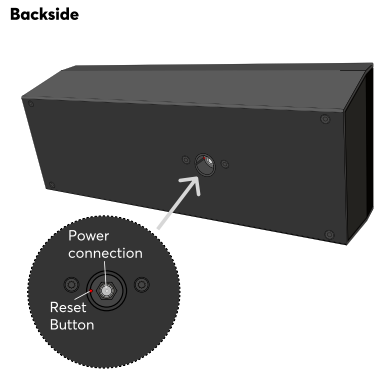
If this is not (or no longer) possible, you can reset the Wireless Speaker to factory settings. After the speaker has fully booted, press the reset button for 1 second using a paper clip or similar object. Avoid applying excessive force while pressing the button. A confirmation sound will indicate that the reset was successful. Alternatively, you can restore factory settings via the web interface. After the reset is complete, the Wireless Speaker is ready to be paired again.

|
Without these steps a previously paired Wireless Speaker cannot be paired with another Miniserver! |
The web interface of the Wireless Speaker provides access to network settings, status information, and diagnostic tools. You can access the interface using either the speaker’s IP address or its hostname. When searching for audio devices in Loxone Config, the search results include the IP address or hostname of the Wireless Speaker.
If the Wireless Speaker is not yet paired with a Miniserver, the login credentials for the web interface are admin/admin.
Once the Wireless Speaker is paired, the login credentials of a user of the user group Full Access (Administrators) of the paired Miniserver are required.
The Wireless Speaker can perform firmware updates automatically when new versions become available. This requires Automatic Updates to be enabled in the project properties. The Wireless Speaker will automatically adopt this setting.
Aktoren↑
| Kurzbeschreibung | Wertebereich |
|---|---|
| Wireless Speaker 1 | ∞ |
Diagnose-Eingänge↑
| Kurzbeschreibung | Beschreibung | Einheit | Wertebereich |
|---|---|---|---|
| Verstärker-Drosselung | Erreicht die Temperatur des Verstärkers einen kritischen Punkt, wird die Lautstärke der Zone reduziert. Gründe dafür können Überlastung oder eine zu hohe Umgebungstemperatur sein. | - | 0/1 |
| Onlinestatus Wireless Speaker 1 | Gibt an, ob das Gerät für den Miniserver erreichbar ist. Diagnose bei Air Geräten Diagnose bei Tree Geräten Diagnose bei Extensions |
Digital | 0/1 |
| Temperaturabschaltung | Eingang ist aktiv, wenn die Ausgänge des Geräts aufgrund zu hoher Gerätetemperatur abgeschaltet wurden. Mögliche Gründe: Zu hohe Umgebungstemperaturen, Überlastung der Ausgänge. | Digital | 0/1 |
Eigenschaften↑
| Kurzbeschreibung | Beschreibung | Einheit | Wertebereich | Standardwert |
|---|---|---|---|---|
| Seriennummer | Gibt die Seriennummer des Geräts an. | - | - | - |
| Onlinestatus überwachen | Wenn aktiviert, werden Sie über den Systemstatus oder über den Mailer benachrichtigt, wenn das Gerät nicht mehr erreichbar bzw. offline ist. | - | - | - |
| Maximallautstärke | Bestimmt die maximale (physikalische) Ausgangsleistung des Verstärkers in Prozent, und beschränkt damit die maximal mögliche Lautstärke für diesen Ausgang. Die Lautstärkewerte von 0-100% des Audio Players bzw. der App werden entsprechend skaliert. | % | 0...100 | 100 |
| Verstärkungs-Faktor | Stellt die Lautstärke dieses Ausgangs in Dezibel ein. Diese Einstellung hilft dabei, die Pegel zwischen verschiedenen Lautsprechern oder Umgebungen auszugleichen und so eine konsistente Audiowiedergabe sicherzustellen. Die Lautstärke wird entsprechend der angegebenen Maximallautstärke skaliert und begrenzt. | - | -6...6 | 0 |
Sicherheitshinweise↑
The device is maintenance-free and should only be cleaned with a dry cloth. It is designed for indoor use within a temperature range of -10°C to 50°C (14°F to 122°F).