De Loxone Hörmann Tree is een compacte interfacemodule voor de integratie van Hörmann-garagedeuraandrijvingen.
Een actuele lijst met compatibele Hörmann-aandrijvingen is online beschikbaar.
Inhoudsopgave
- Montage
- Inbedrijfname
- Programmeren
- Beperkingen
- Software-index
- Diagnose
- Ingangen, uitgangen, eigenschappen
- Documenten
Montage↑
De Hörmann Tree wordt via de meegeleverde adapterkabel aangesloten op de BUS-aansluiting van een compatibele Hörmann-deuropener. Raadpleeg altijd de handleiding om er zeker van te zijn dat u de juiste BUS-aansluiting gebruikt.

Bij HCP1-modellen is het apparaat direct klaar om te worden gekoppeld.
De deuropener wordt automatisch herkend.
Bij HCP2-modellen moet eerst de BUS-Scan op de deuraandrijving worden geactiveerd om de stroomtoevoer naar het apparaat in te schakelen, zodat het kan worden gekoppeld. De manier van activeren verschilt per deuraandrijving:
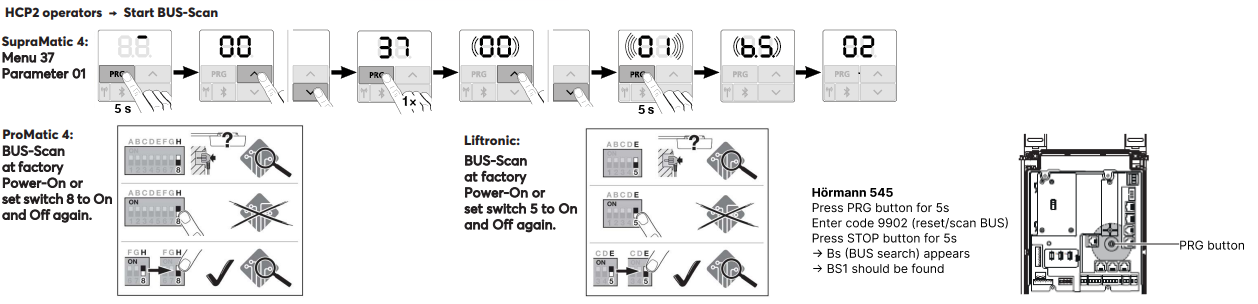
Nadat de BUS-Scan (voeding) is geactiveerd, kan het apparaat worden gekoppeld.
De deuraandrijving wordt dan automatisch herkend.
Inbedrijfname↑
Voor de inbedrijfstelling moet het apparaat van stroom worden voorzien en moet er een verbinding met de Miniserver mogelijk zijn via de Tree Interface.
Volg dan de koppelprocedure op de Tree interface.
Programmeren↑
De Loxone Hörmann Tree wordt geprogrammeerd en geconfigureerd met behulp van de Garage / Poort bouwsteen in Loxone Config:
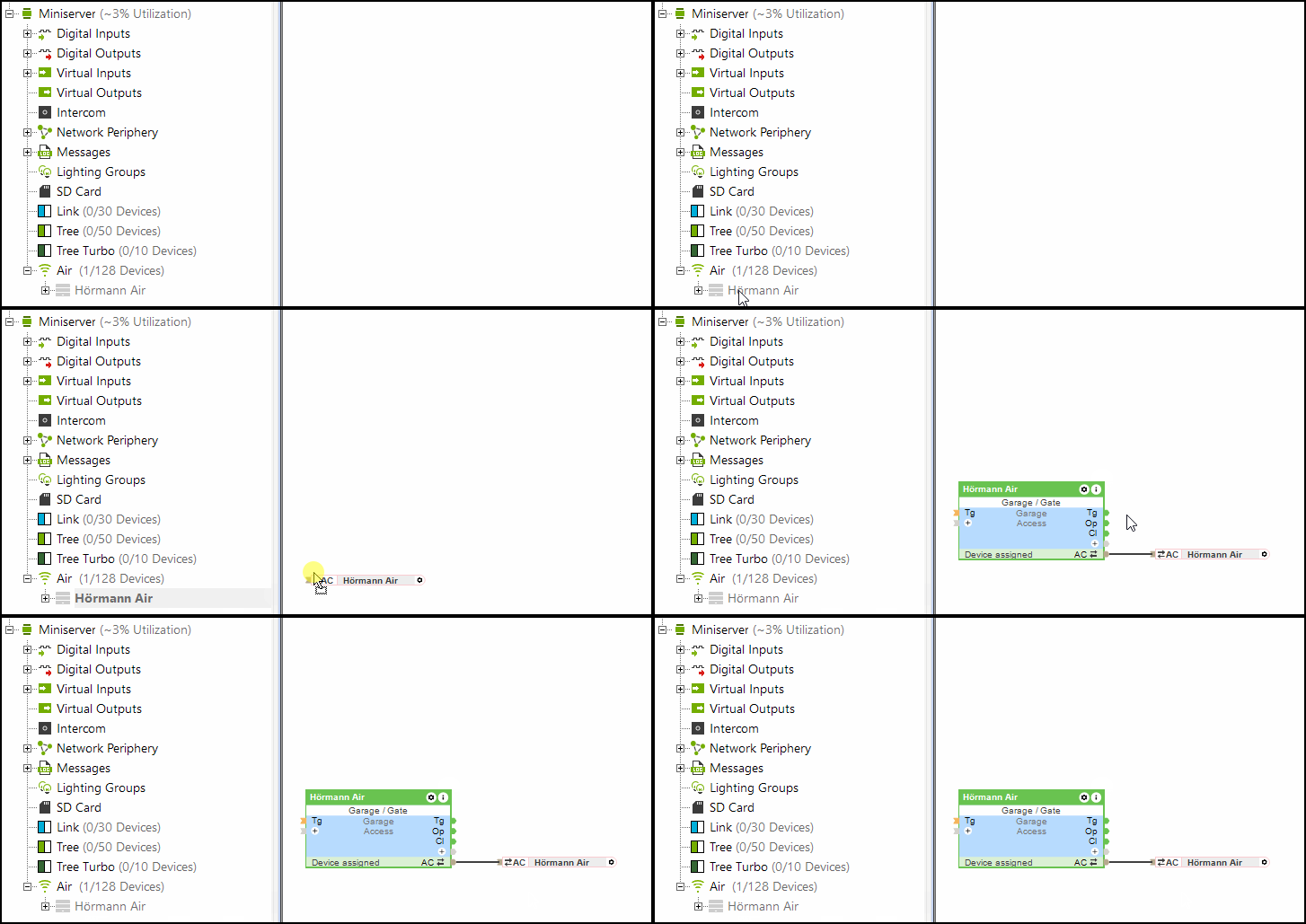
De (Po) ingang (gedeeltelijk open) van de Poort bouwsteen wordt ook ondersteund door Hörmann Tree.
Beperkingen↑
Bij HCP1-aandrijvingen kan tijdens een update kortstondig een fout worden weergegeven op de aandrijving. De functie wordt niet beïnvloed. Na het opnieuw verzenden van een commando wordt de fout niet meer weergegeven.
Bij gebruik van de Hörmann Tree kan de Hörmann HKSI klimaatsensor niet parallel worden gebruikt.
Software-index↑
Met de software-index kan de compatibiliteit met Loxone Hörmann Tree worden gecontroleerd; de ondersteunde aandrijvingen staan online vermeld.
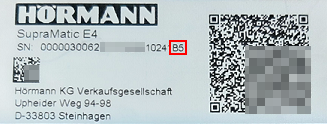
U kunt het serienummer samen met de software-index (beginnend met een hoofdletter) vinden op het label van de Hörmann garagedeuropener.
Diagnose↑
Als de Hörmann aandrijving een waarschuwing of fout heeft gedetecteerd, moet er een systeemmelding actief zijn. Controleer direct het apparaat om de weergegeven foutcode of status te zien. Raadpleeg voor gedetailleerde instructies voor het oplossen van problemen de handleiding van het apparaat op basis van de aangegeven status.
Actoren↑
| Korte beschrijving | Beschrijving | Waardebereik |
|---|---|---|
| API Connector | Intelligente API gebaseerde connector. API Commands | - |
| Licht | Schakelt de verlichting van de deuraandrijving in. De verlichting wordt ook automatisch ingeschakeld telkens wanneer de deur opengaat of sluit, en blijft branden gedurende de in de aandrijving ingestelde tijd. | 0/1 |
Diagnose ingangen↑
| Korte beschrijving | Beschrijving | Eenheid | Waardebereik |
|---|---|---|---|
| Online status Hörmann Tree | Geeft aan of het apparaat door de Miniserver kan worden bereikt. Diagnose voor Air-apparaten Diagnose voor Tree-apparaten Diagnose voor Extensions | Digitaal | 0/1 |
| Actor informatie | Digitaal | 0/1 | |
| Communicatie fout | Digitaal | 0/1 | |
| Geen communicatie | Digitaal | 0/1 |
Eigenschappen↑
| Korte beschrijving | Beschrijving | Standaardwaarde |
|---|---|---|
| Onlinestatus bewaken | Indien aangevinkt dan wordt je via de Systeemstatus op de hoogte gesteld via de Loxone App of Mailer, als het apparaat niet langer beschikbaar of offline is. | - |
| Serienummer | Specificeert het serienummer van het apparaat. Voer 'Auto' in om automatisch een Tree apparaat met onbekend serienummer te koppelen. Dit kan alleen worden gebruikt als er maar één Tree apparaat van hetzelfde type op een standalone Miniserver aanwezig is (niet in een Client-Gateway-configuratie). Sla op in de Miniserver om het Tree apparaat te koppelen. Daarna moet het programma worden geladen vanuit de Miniserver om het actuele serienummer van het Tree apparaat over te brengen naar het programma. | - |
| Automatisch aanleren van reistijden | Automatisch aanleren van reistijden | - |