

Ovládá úrovně jasu Touch Pure Flex Air a Tree.
Values for display and backlight brightness are calculated based on Presence (P) and whether the room is illuminated by daylight or artificial lighting (L). The display lights up when CBrB is not 0 or when inputs P or Don are active.
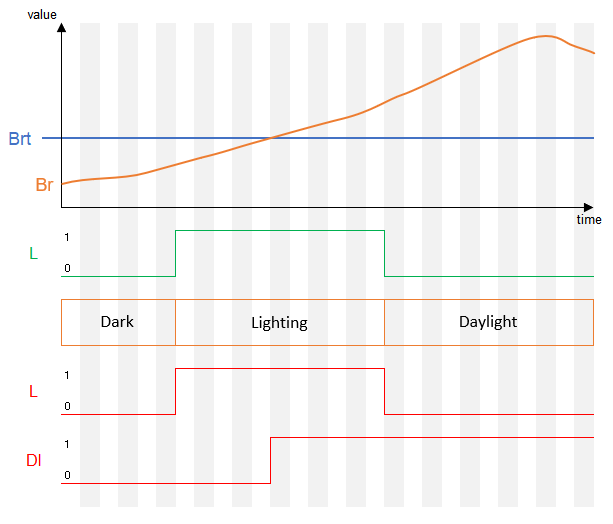
A room is considered dark if neither daylight nor artificial lighting (L) is active or current brightness is below threshold. Artificial lighting (L) is prioritized over daylight when calculating the brightness (CBrB).
Daylight is considered active when the current room brightness exceeds the Brightness threshold (Brt), and no artificial light sources (L) are on.
When the API output is connected to the Lighting Controller, it provides the values for artificial lighting (L), Room brightness (Br) and Brightness threshold (Brt), muting the inputs of the Touch Pure Flex Controller.
Výchozí hodnoty parametrů jasu jsou nastaveny na základě typu místnosti při vytvoření bloku nebo při připojení prvního zařízení Touch Pure Flex.
Obsah
- Vstupy
- Výstupy
- Parametry
- Vlastnosti
- Integrace Ovládání Touch Pure Flex s Ovládáním osvětlení
- Tma, osvětlení nebo denní světlo
- Časový diagram
Vstupy↑
| Zkratka | Krátký popis | Popis | Jednotky | Rozsah hodnot |
|---|---|---|---|---|
| P | Presence | Presence is active. Activates the display. | - | 0/1 |
| DnD | Do not Disturb | Display and backlight stays off when the device is idle. | - | 0/1 |
| LbT | Light by Touch | Když je aktivní, první dotyk aktivuje displej, ale neprovede příkaz. | - | 0/1 |
| L | Lighting active | Místnost je osvětlena umělým osvětlením. Tento vstup se nepoužívá, když je přes API konektor připojeno Ovládání osvětlení. | - | 0/1 |
| Br | Room brightness | Aktuální jas místnosti. Tento vstup se nepoužívá, když je připojeno Ovládání osvětlení prostřednictvím API konektoru. | lux | ∞ |
| Set | Set Brightness | Individuální nastavení jasu displeje. Hodnota zůstane aktivní, dokud nebudou detekovány změny v přítomnosti, jasu místnosti nebo umělého osvětlení. | % | ∞ |
| Off | Off | Uzamkne blok. Dominantní vstup. |
- | 0/1 |
| Don | Display On | Activate display. Display Brightness BrD will be used. Input is overruled by DnD | - | 0/1 |
| Bl | Backlight On | Activate backlight. If current brightness CBrB is 0, default brightness BrDef will be used. Input is overruled by DnD | - | 0/1 |
| Txt | Display Text | Set custom display text. Display Brightness BrD will be used. Input is overruled by DnD | - | - |
Výstupy↑
| Zkratka | Krátký popis | Popis | Jednotky | Rozsah hodnot |
|---|---|---|---|---|
| CBrB | Current Brightness Backlight | Current Backlight brightness for connected devices. When Backlight Bl is active, BrDef is used as fallback if the value is 0. | - | ∞ |
| P | Presence | Přítomnost je aktivní. | - | 0/1 |
| L | Lighting Active | Osvětlení je aktivní. | - | 0/1 |
| B | Bright | Aktivní, když je jas místnosti nad prahovou hodnotou. | - | 0/1 |
| Br | Room brightness | Aktuální jas místnosti. | lux | ∞ |
| BrD | Brightness Display & status LEDs | Brightness used for the display when the display is active, and for the status LEDs when any LED is active. Brightness equals CBrB. If CBrB is 0, BrDef is used. Ensures the display and LEDs remain visible even when the backlight is inactive. | - | ∞ |
| API | API Connector | Inteligentní konektor založený na rozhraní API. API Commands |
- | - |
Parametry↑
| Zkratka | Krátký popis | Popis | Jednotky | Rozsah hodnot | Výchozí hodnota |
|---|---|---|---|---|---|
| BrDP | Dark and Presence Brightness | Brightness for rooms with presence, without daylight or artificial lighting. | % | 0...100 | 10 |
| BrDnP | Dark and no Presence Brightness | Brightness for rooms without presence, without daylight or artificial lighting. | % | 0...100 | 0 |
| BrLP | Lighting and Presence Brightness | Brightness for rooms with presence and artificial lighting but actual room brightness below the threshold Brt. | % | 0...100 | 70 |
| BrLnP | Lighting and no Presence Brightness | Brightness for rooms without presence with artificial lighting but actual room brightness below the threshold Brt. | % | 0...100 | 0 |
| BrBP | Bright and Presence Brightness | Brightness for rooms with presence and room brightness above the threshold Brt. | % | 0...100 | 70 |
| BrBnP | Bright and no Presence Brightness | Brightness for rooms without presence and room brightness above the threshold Brt. | % | 0...100 | 0 |
| BrDef | Default Brightness | Default brightness used as a fallback for the backlight CBrB or display BrD if the calculated brightness CBrB is 0. | % | 0...100 | 70 |
| Brt | Brightness threshold | Pokud jas v místnosti překročí maximální hodnotu, aktivuje se nastavení denního světla. Tento parametr se nepoužívá, pokud je Ovládání osvětlení připojeno prostřednictvím API konektoru. | lux | 0...∞ | 30 |
Vlastnosti↑
| Krátký popis | Popis | Výchozí hodnota |
|---|---|---|
| Předvolba jasu | Nastaví hodnotu jasu na doporučenou úroveň na základě barvy Touch Pure Flex. | - |
Integrace Ovládání Touch Pure Flex s Ovládáním osvětlení↑
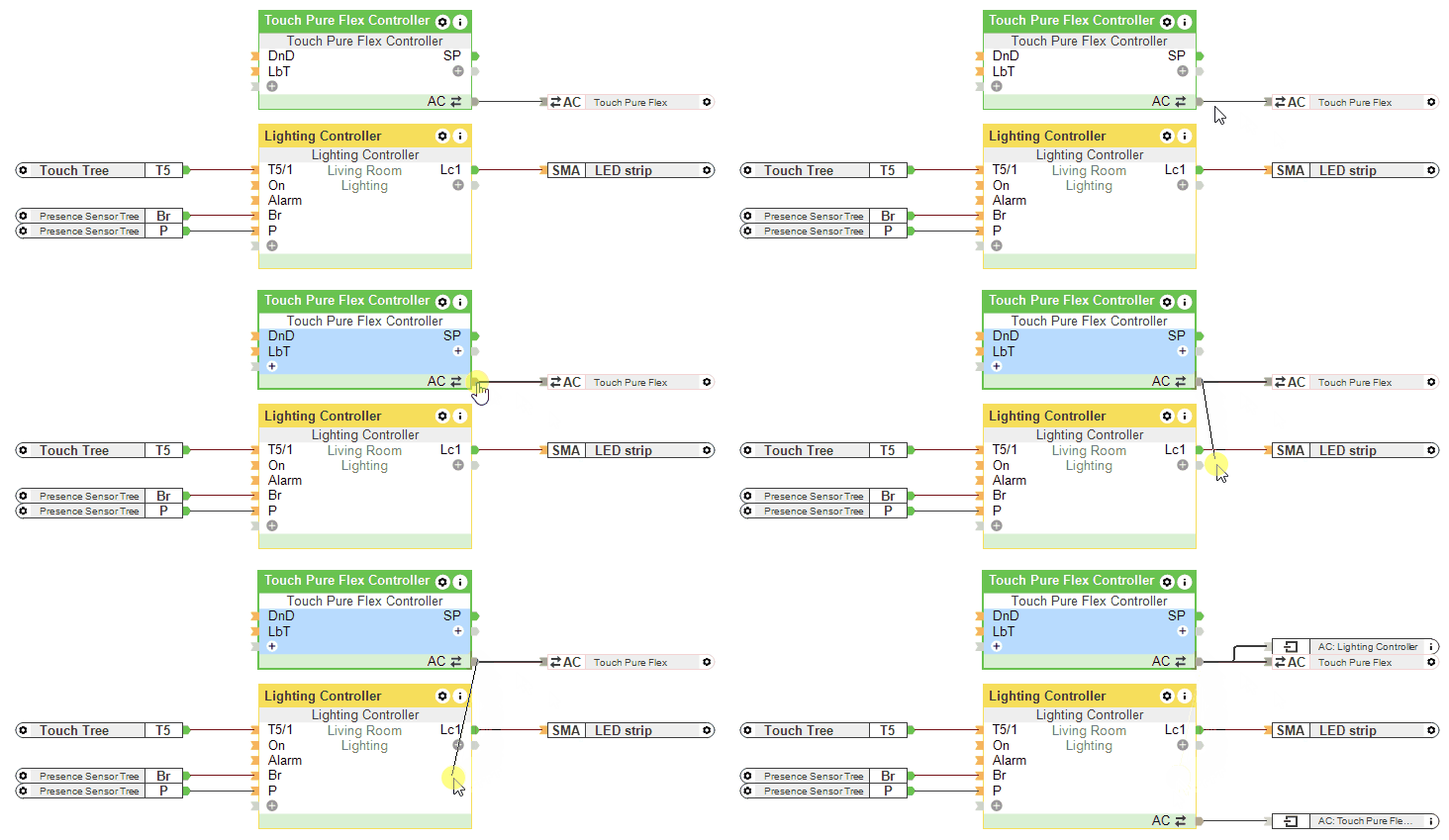
If a Lighting Controller is connected via the API Connector, the inputs L, Br and the parameter Brt of the Touch Pure Flex Controller are not used.
Tma, osvětlení nebo denní světlo↑
Časový diagram↑
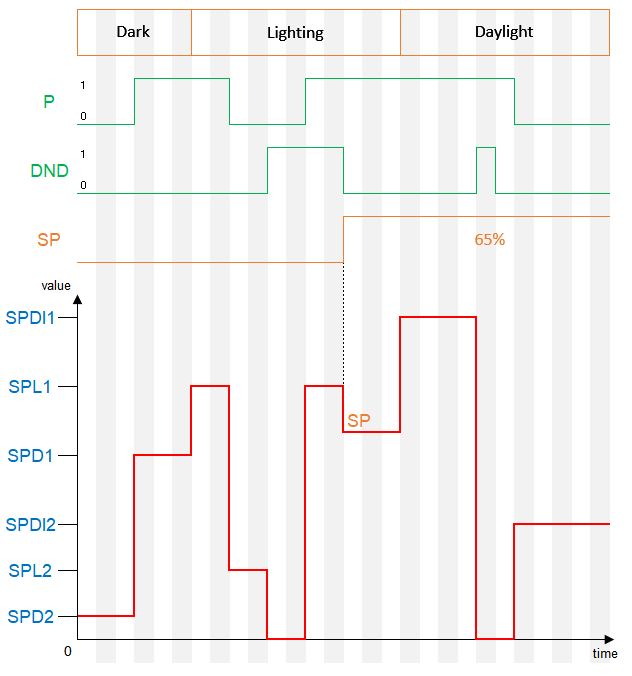
When the brightness is set to 0% through a block parameter and the input LbT is active, the brightness defined in the device properties will be used when the display is touched.