

The Wireless Speaker is an audio solution designed for both standalone use and seamless integration into a Loxone. It's a portable speaker featuring a 2-way system with passive radiator. It is powered by 24V and receives its audio signal via Wi-Fi or Bluetooth.
Contenido
- Puesta en marcha
- Estado del LED
- Factory Reset
- Entradas, salidas y propiedades
- Instrucciones de seguridad
- Documentos
Puesta en marcha↑
To set up the speaker, connect the power adapter and plug it into a wall outlet. When the LED turns solid orange, use your phone or tablet to join the "wspXXXX" Wi‑Fi network. If the setup page does not open automatically, open a web browser and go to 192.168.123.1 to add the speaker to your local network. Note that pairing mode is active for 30 minutes after the speaker is powered on, requiring a reboot to connect if this time has expired. After successful configuration, the speaker will restart and can then be used as a standalone player with AirPlay or Spotify Connect.
For integration into a Loxone system, ensure the speaker and Miniserver are connected to the same network. The speaker is ready for pairing when the Status LED cycles red, orange, and green. In Loxone Config, run an Audio Device Search, or use the Loxone App (Device Search) to run a Network Speaker Search. Follow the prompts to complete the room assignment and configuration. You can perform the entire setup directly through the Loxone App, with no need to access Loxone Config.
Estado del LED↑
| Estado del LED | Descripción |
|---|---|
|
|
Booting |
|
|
Wi-Fi pairing active |
|
|
Paired, no communication with system or network |
|
|
LOXONE pairing mode |
|
|
Error |
|
|
Firmware updating |
|
|
Standby / playing |


Wi-Fi standalone mode
| Estado del LED | Descripción | LED States |
|---|---|---|
|
|
Blue flashing for 10 seconds | Bluetooth connected |
|
|
Green flashing for 10 seconds | AirPlay / Spotify Connect playback |


Factory Reset↑
If the Wireless Speaker was previously paired with a Miniserver and is now to be used in another installation, the pairing must first be released. Connect to the Miniserver and delete the Wireless Speaker from the programming. Then save the program into the Miniserver.
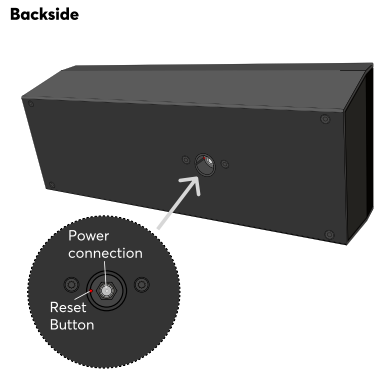
If this is not (or no longer) possible, you can reset the Wireless Speaker to factory settings. After the speaker has fully booted, press the reset button for 1 second using a paper clip or similar object. Avoid applying excessive force while pressing the button. A confirmation sound will indicate that the reset was successful. Alternatively, you can restore factory settings via the web interface. After the reset is complete, the Wireless Speaker is ready to be paired again.

|
Without these steps a previously paired Wireless Speaker cannot be paired with another Miniserver! |
The web interface of the Wireless Speaker provides access to network settings, status information, and diagnostic tools. You can access the interface using either the speaker’s IP address or its hostname. When searching for audio devices in Loxone Config, the search results include the IP address or hostname of the Wireless Speaker.
If the Wireless Speaker is not yet paired with a Miniserver, the login credentials for the web interface are admin/admin.
Once the Wireless Speaker is paired, the login credentials of a user of the user group Full Access (Administrators) of the paired Miniserver are required.
The Wireless Speaker can perform firmware updates automatically when new versions become available. This requires Automatic Updates to be enabled in the project properties. The Wireless Speaker will automatically adopt this setting.
Actuadores↑
| Resumen | Rango de valores |
|---|---|
| Altavoz inalámbrico 1 | ∞ |
Entradas de diagnóstico↑
| Resumen | Descripción | Unidad | Rango de valores |
|---|---|---|---|
| Límite del amplificador | Si la temperatura del amplificador alcanza un punto crítico, la potencia de la zona disminuirá. Esto puede deberse a una sobrecarga o a una temperatura ambiente excesiva. | - | 0/1 |
| Estado de conexión Altavoz inalámbrico 1 | Indica si el Miniserver puede acceder al dispositivo. Diagnóstico para dispositivos Air Diagnóstico para dispositivos Tree Diagnóstico de Extension |
Digital | 0/1 |
| Desconexión por temperatura | La entrada está activa, cuando las salidas del dispositivo se han desconectado debido a la alta temperatura del dispositivo. Posibles causas: Temperatura ambiente demasiado alta, salidas sobrecargadas. | Digital | 0/1 |
Propiedades↑
| Resumen | Descripción | Unidad | Rango de valores | Valor por defecto |
|---|---|---|---|---|
| Número de serie | Especifica el número de serie del dispositivo. | - | - | - |
| Monitorizar | Si está marcado, se le notificará a través del Estado del Sistema o del Servicio de Correo si el dispositivo ya no está disponible o se desconecta. | - | - | - |
| Volumen máximo | Determina la potencia de salida máxima (física) del amplificador en porcentaje y, por lo tanto, limita el volumen máximo posible para esta salida de audio. Los valores de volumen del 0 al 100% del bloque de función 'Reproductor Audio' de la interfaz de usuario se escalan en consecuencia. | % | 0...100 | 100 |
| Ganancia | Ajusta el volumen de esta salida en decibelios. Este control ayuda a equilibrar los niveles de sonido entre diferentes altavoces o entornos, asegurando una salida de audio consistente. El volumen se escala y limita de acuerdo con el volumen máximo especificado. | - | -6...6 | 0 |
Instrucciones de seguridad↑
The device is maintenance-free and should only be cleaned with a dry cloth. It is designed for indoor use within a temperature range of -10°C to 50°C (14°F to 122°F).