array(24) {
  ["id"]=>
  int(19654)
  ["name"]=>
  string(15) "Training center"
  ["slug"]=>
  string(15) "training-centre"
  ["challenge"]=>
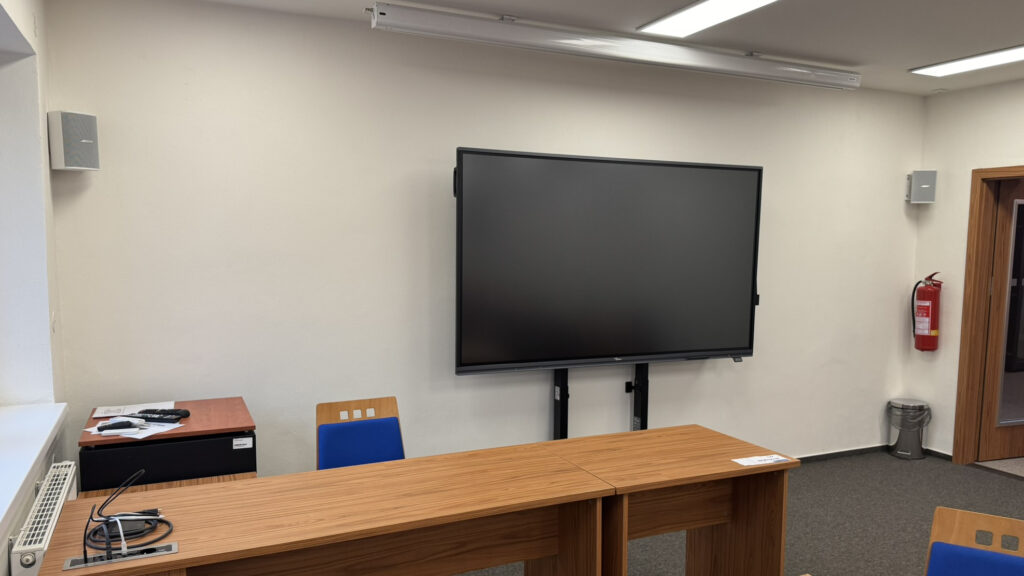
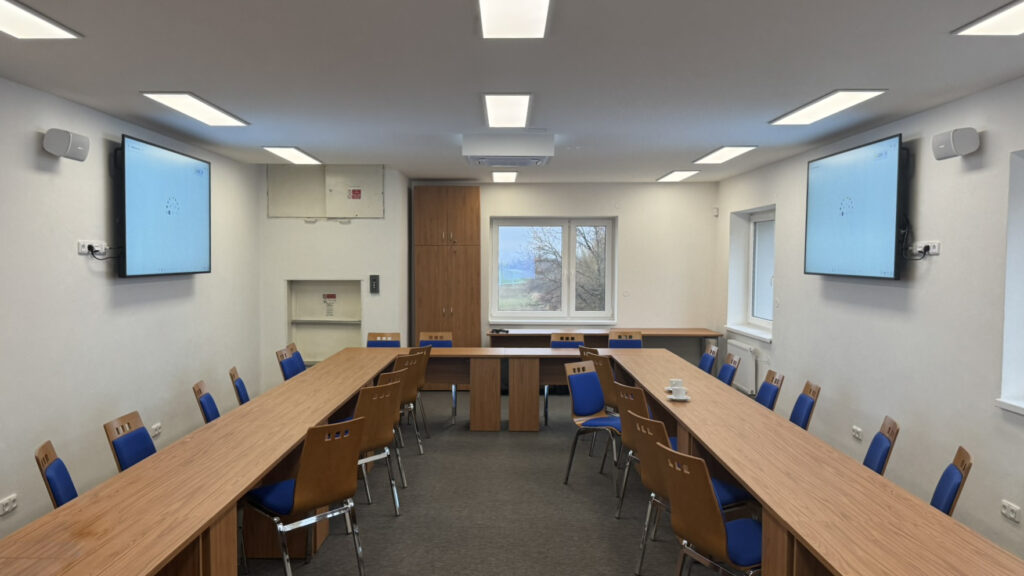
  string(285) "[THIS CONTENT IS AUTOMATICALLY TRANSLATED BY GOOGLE TRANSLATE] The building had a functional Loxone installation, the customer wanted to expand it with audio video control functions in two lecture halls for easy control of AV equipment via scenarios, i.e. room settings with one click."
  ["solution"]=>
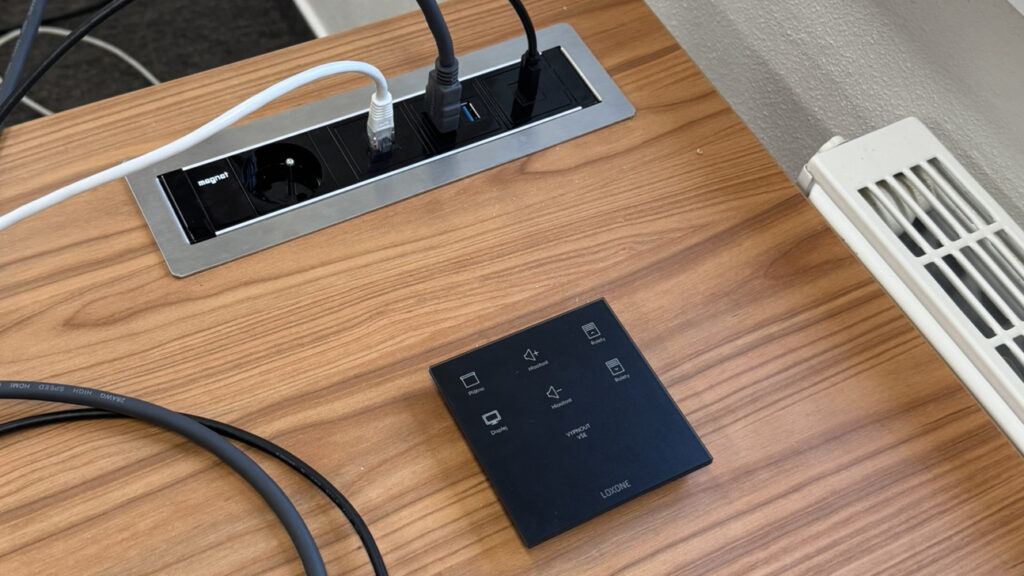
  string(686) "[THIS CONTENT IS AUTOMATICALLY TRANSLATED BY GOOGLE TRANSLATE] For easy user control, we chose Loxone Touch Pure Flex, where we selected the desired buttons according to the customer's wishes. With one click, the screen, projector, interactive touch screen, side view monitors, sound and other components are turned on, adjusted or turned off, without the user having to use a single remote control.


With this solution, we replaced 5 remote controls in one room, instead of which, for the desired action, it is enough to press one button on the Loxone Touch Pure Flex. Just connect a laptop and in a few seconds you have everything set up and ready for the presentation."
  ["partner_quote"]=>
  string(0) ""
  ["partner_quote_name"]=>
  string(0) ""
  ["partner_quote_position"]=>
  string(0) ""
  ["more_info_url"]=>
  string(0) ""
  ["preview_image"]=>
  string(82) "https://portal.loxone.com/admin/wp-content/uploads/2025/03/1743156505-768x432.jpeg"
  ["application_areas"]=>
  array(1) {
    [0]=>
    string(10) "multimedia"
  }
  ["tags"]=>
  array(0) {
  }
  ["project_type"]=>
  array(3) {
    [0]=>
    string(8) "retrofit"
    [1]=>
    string(19) "special_application"
    [2]=>
    string(6) "office"
  }
  ["copyright"]=>
  NULL
  ["images"]=>
  array(3) {
    [0]=>
    array(2) {
      ["image"]=>
      string(83) "https://portal.loxone.com/admin/wp-content/uploads/2025/03/1743156505-1024x576.jpeg"
      ["copyright"]=>
      string(14) "Petr Dolejší"
    }
    [1]=>
    array(2) {
      ["image"]=>
      string(83) "https://portal.loxone.com/admin/wp-content/uploads/2025/03/1743156508-1024x576.jpeg"
      ["copyright"]=>
      string(14) "Petr Dolejší"
    }
    [2]=>
    array(2) {
      ["image"]=>
      string(83) "https://portal.loxone.com/admin/wp-content/uploads/2025/03/1743156514-1024x576.jpeg"
      ["copyright"]=>
      string(14) "Petr Dolejší"
    }
  }
  ["country"]=>
  string(2) "CZ"
  ["city"]=>
  string(4) "Hať"
  ["build_year"]=>
  string(4) "2025"
  ["square_meters"]=>
  string(0) ""
  ["account_data"]=>
  array(4) {
    ["id"]=>
    string(36) "8d348d5d-d432-443e-afb3-25e6e8a9a477"
    ["name"]=>
    string(18) "SEKO system s.r.o."
    ["website"]=>
    string(26) "https://www.sekosystem.cz/"
    ["partner_website"]=>
    string(42) "/partner/709 00-ostrava 9/seko-system-sro/"
  }
  ["conference"]=>
  string(4) "none"
  ["products"]=>
  array(4) {
    [0]=>
    array(2) {
      ["sku"]=>
      string(6) "100609"
      ["name"]=>
      string(36) "Touch Pure Flex IP44 Tree Anthracite"
    }
    [1]=>
    array(2) {
      ["sku"]=>
      string(6) "100428"
      ["name"]=>
      string(11) "Audioserver"
    }
    [2]=>
    array(2) {
      ["sku"]=>
      string(6) "100395"
      ["name"]=>
      string(17) "Nano 2 Relay Tree"
    }
    [3]=>
    array(2) {
      ["sku"]=>
      string(6) "100013"
      ["name"]=>
      string(15) "RS232 Extension"
    }
  }
  ["video"]=>
  string(0) ""
  ["fallback"]=>
  array(8) {
    ["name"]=>
    string(15) "Training center"
    ["challenge"]=>
    string(285) "[THIS CONTENT IS AUTOMATICALLY TRANSLATED BY GOOGLE TRANSLATE] The building had a functional Loxone installation, the customer wanted to expand it with audio video control functions in two lecture halls for easy control of AV equipment via scenarios, i.e. room settings with one click."
    ["solution"]=>
    string(686) "[THIS CONTENT IS AUTOMATICALLY TRANSLATED BY GOOGLE TRANSLATE] For easy user control, we chose Loxone Touch Pure Flex, where we selected the desired buttons according to the customer's wishes. With one click, the screen, projector, interactive touch screen, side view monitors, sound and other components are turned on, adjusted or turned off, without the user having to use a single remote control.


With this solution, we replaced 5 remote controls in one room, instead of which, for the desired action, it is enough to press one button on the Loxone Touch Pure Flex. Just connect a laptop and in a few seconds you have everything set up and ready for the presentation."
    ["partner_quote"]=>
    string(0) ""
    ["partner_quote_name"]=>
    string(0) ""
    ["partner_quote_position"]=>
    string(0) ""
    ["more_info_url"]=>
    string(0) ""
    ["video"]=>
    string(0) ""
  }
}
THIS CONTENT IS AUTOMATICALLY TRANSLATED BY GOOGLE TRANSLATE. The building had a functional Loxone installation, the customer wanted to expand it with audio video control functions in two lecture halls for easy control of AV equipment via scenarios, i.e. room settings with one click.
Solution
THIS CONTENT IS AUTOMATICALLY TRANSLATED BY GOOGLE TRANSLATE. For easy user control, we chose Loxone Touch Pure Flex, where we selected the desired buttons according to the customer's wishes. With one click, the screen, projector, interactive touch screen, side view monitors, sound and other components are turned on, adjusted or turned off, without the user having to use a single remote control.
With this solution, we replaced 5 remote controls in one room, instead of which, for the desired action, it is enough to press one button on the Loxone Touch Pure Flex. Just connect a laptop and in a few seconds you have everything set up and ready for the presentation.