The AC Unit Controller function block is used to control air conditioning units.
Table of Contents
- Inputs
- Parameters
- Outputs
- Properties
- Temperature Control
- Combining AC Unit Controller and Intelligent Room Controller
- AC Unit Controller Integration in Intelligent Room Controller
- History
Inputs↑
The functionality of the Auto level for Mode, Fan speed and Airflow direction can be found in the instructions for the air conditioner used. Depending on the air conditioner, the number of available levels varies.
If the setting is set to Auto, the regulation is managed entirely by the AC unit. This means that when all parameters are set to Auto, the AC unit automatically determines the operating mode, fan speed, and airflow direction.
| Abbreviation | Summary | Description | Unit | Value Range |
|---|---|---|---|---|
| Tg | Toggles between On and Off | - | 0/1 | |
| On | Set to On | - | 0/1 | |
| Off | Off / Lock | Pulse (< 200 ms): AC unit and Status output are switched off. Pulse (> 200 ms): AC unit is switched off, Block is locked, all outputs are reset while input is on. Pulse (> 500 ms): The name of the connected sensor is used in the user interface. | - | 0/1 |
| ϑt | Target Temperature | ° | ∞ | |
| ϑc | Current Temperature | When connected, this input is used for temperature regulation. The AC Unit Controller uses the value to adjust the control behavior based on the measured room temperature. If not connected, the internal unit regulates on its own. When managed by an Intelligent Room Controller, the room temperature is assigned by the Room Controller. | - | ∞ |
| Mode | Mode 1-5 | 1 = Auto 2 = Heat 3 = Cool 4 = Dry 5 = Fan Available modes can be set in the mode settings of the block. | - | 1...5 |
| Fan | Fan speed 0-7 | 0 = Off 1 = Auto 2 = Silent 3 = Very Low 4 = Low 5 = Medium 6 = High 7 = Very High Available fan speeds can be set in the fan speed settings of the block. | - | 0...7 |
| ADir | Airflow direction up/down 1-8 | 1 = Auto 2-6 = Position 1-5 7 = Swing 8 = No Swing Available airflow directions can be set in the airflow direction settings of the block. Vertical vane adjustment is not supported on any AC Control type. This limitation is primarily due to restrictions in the interfaces used to communicate with the air conditioning units. While some models could theoretically support this feature, it has not been implemented to maintain consistency in controls across all types. | - | 1...8 |
| Rtd | Reset to default | Resets parameters and settings of the block to the default values as specified in the block preset. | - | 0/1 |
| Dwc | Door / window contact | 0 = closed, 1 = open If the device is turned on, it will be paused as long as one or more doors/windows are open. | - | 0/1 |
| Pt | Pause timer | Pauses the device for the duration set in parameter (Ptd). | - | 0/1 |
| Ls | Load shedding | If activated, the device pauses to prevent grid power peaks or similar issues, remaining paused as long as load shedding is active. | - | 0/1 |
| Sm | Silent Mode | When activated, fan speed is set, according to the 'Silent Mode Fan Speed' setting. When deactivated again, the fan speed will be set back to the fan speed last defined by the Fan input or the app. | - | 0/1 |
Parameters↑
| Abbreviation | Summary | Description | Unit | Value Range | Default Value |
|---|---|---|---|---|---|
| Ptd | Pause timer duration | Starts with the falling edge of input (Pt). Keeps the device paused for the specified duration. | s | 0...∞ | 7200 |
| Hys | Hysteresis | Hysteresis for switching on and off. This setting only applies when the target temperature is managed by the Intelligent Room Controller (enabled automatically). | ° | 0...∞ | 0.5 |
| O | Target Offset | Target temperature offset in relation to received target temperature. This setting only applies when the target temperature is managed by the Intelligent Room Controller (enabled automatically) and the controller is in Eco or Eco2 (building protection) mode. | ° | 0...∞ | 1 |
| minT | Minimum Target Temperature | Lowest target temperature which can be set in the App | ° | ∞ | 1 |
| maxT | Maximum Target Temperature | Highest target temperature which can be set in the App | ° | ∞ | 40 |
Outputs↑
| Abbreviation | Summary | Description | Value Range |
|---|---|---|---|
| Status | Device-Status | 0 = Off, 1 = On | 0/1 |
| Mode | Current Mode 1-5 | 1...5 | |
| Fan | Fan speed 0-7 | 0...7 | |
| Adir | Airflow direction up/down 1-7 | 1...7 | |
| ϑt | Target temperature | ∞ | |
| ϑc | Current temperature | ∞ | |
| API | API Connector | Intelligent API based connector. Can link several functions between devices and blocks. API Commands | - |
Properties↑
| Summary | Description | Value Range | Default Value |
|---|---|---|---|
| Mode names | Configure usage and naming of operating modes | - | - |
| Airflow names | Configure usage and naming of airflow-directions | - | - |
| Fanspeed names | Configure usage and naming of fanspeeds | - | - |
| Silent Mode Fan Speed | Fan Speed which is set when silent mode is activated | - | - |
| Default Airflow | Airflow-direction which is set when the AC is switched off | - | - |
| Default Fan Speed | Fan Speed which is set when the AC is switched off | - | - |
| Default target temperature mode | Specifies whether the system uses the last applied default target temperature or a manually defined fixed value. | - | - |
| Number of activity entries | Number of entries in the activity log. 0: log is disabled The activity log tracks relevant changes since program start. | 0...100 | 20 |
Temperature Control↑
Temperature control is always performed by the AC unit. The AC Unit Controller function block, as well as any connected Intelligent Room Controller, only provide target values.
The setting "Forward ϑc to AC Unit" can be used to influence the control behavior of the AC unit. How the temperature value is incorporated into the control depends on the supported model.
Direct Temperature Control
For these devices, the temperature value applied at input "ϑc" is directly forwarded to the indoor unit and used for temperature control:
Setpoint Compensation
For these devices, the temperature value cannot be directly transferred to the indoor unit. Instead, the temperature measured by the AC unit is used, and the setpoint is adjusted accordingly to achieve the desired room temperature:
Combining AC Unit Controller and Intelligent Room Controller↑
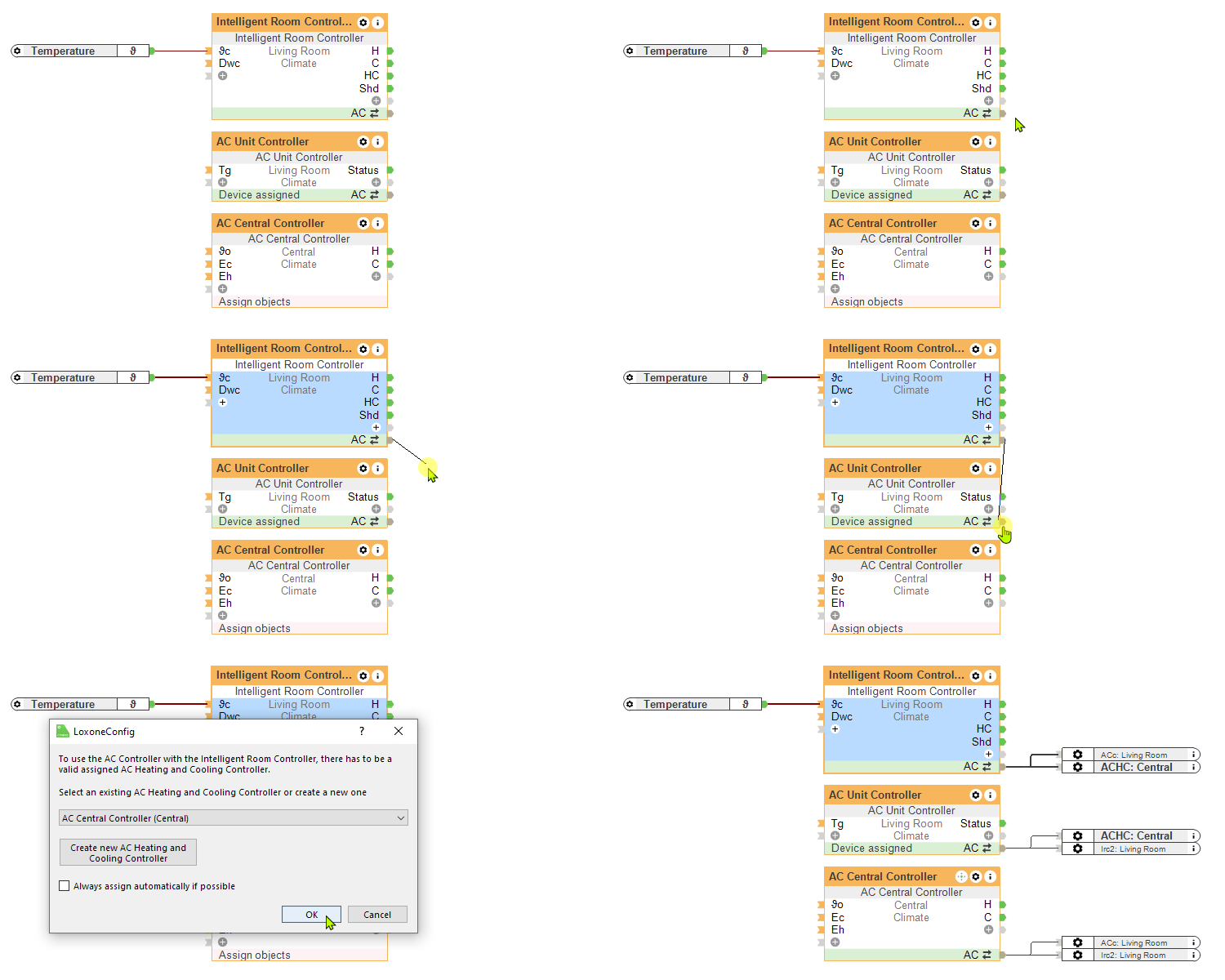
The combination of the Intelligent Room Controller and AC Unit Controller blocks enables the automatic operation of your air conditioner.
Eco Mode
In Eco Mode, the air conditioner operates as energy-efficiently as possible while preventing the room from overheating. Once the room has been cooled by the configured hysteresis, the air conditioner automatically turns off. Eco mode is intended for times when no one is in the building.

Eco Max, Eco Min, ϑc values from the Intelligent Room Controller are used.
Comfort Mode
In Comfort Mode, the air conditioner maintains the desired temperature with minimal noise. If the comfort temperature is exceeded, it automatically begins cooling. Once the desired temperature is reached, it runs consistently at a low level to maintain the temperature. Comfort mode is intended for times when someone is in the building.

ϑcc, ϑch, ϑc values from the Intelligent Room Controller are used.
A manual change on the AC block (e.g., changing the fan speed) signals occupancy, so the connected IRC is automatically switched to Comfort mode for this day to achieve the better cooling curve.
AC Unit Controller Integration in Intelligent Room Controller↑
History↑
In the user interface, the history of the function block can be displayed.
A maximum of 100 entries can be shown.
When you restart or save to the Miniserver, the history is cleared.
