With this function block, all Gates and Garage Door blocks can be controlled together
Double-click on the block to open the dialogue for selecting the linked blocks
Table of Contents
Properties↑
| Summary | Description | Default Value |
|---|---|---|
| Selection | All selected Gate/Garage function blocks can be controlled together. | - |
Inputs↑
| Abbreviation | Summary | Description | Value Range |
|---|---|---|---|
| Tg | Toggle | Toggles between open, stop, close. For single button control. | 0/1 |
| Co | Complete open | Stopping not possible. | 0/1 |
| Cc | Complete close | Stopping not possible. | 0/1 |
| T5 | T5 control | Button 1: Complete open Button 4: Complete close | ∞ |
| Off | Off / Lock | Pulse (< 200 ms): Stops movement. Pulse (> 200 ms): Block is locked. Dominating input. Pulse (> 500 ms): The name of the connected sensor is used in the user interface. | 0/1 |
| DisPc | Disable periphery control | Disables inputs Tg, Co, Cc, T5 when On. (e.g Child lock, cleaning) Control via user interface is still possible. | 0/1 |
| Po | Partially Open | Moves door to partially open position if current position is different. | 0/1 |
Outputs↑
| Abbreviation | Summary | Description | Value Range |
|---|---|---|---|
| API | API Connector | Intelligent API based connector. Can link several functions between devices and blocks. API Commands | - |
| No | Open gates | Number of open gates | ∞ |
| Nc | Closed gates | Number of closed gates | ∞ |
Basic Programming↑
A double click on the block opens the following window:
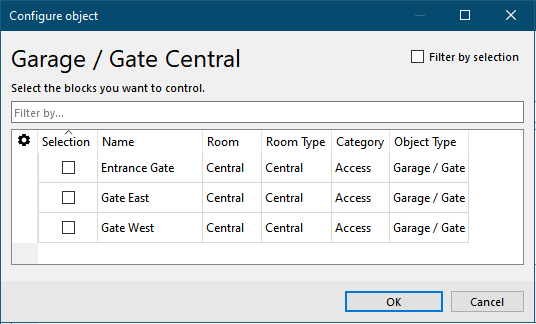
Select the Garage / Gate blocks that you want to control from a central location. The central block will always execute the requested movement at the selected blocks, regardless of whether the doors are currently moving or not.
Central commands are not blocked by an active (DisPc) input at the respective function block. If a function block is used in the central block, this is indicated by the central symbol on the respective block.
The functions that can be used on the central block depend on the linked blocks and are set via their parameters. If a function block does not support a function, it cannot be controlled.