The Energy Monitor facilitates the collection of production data, for example a PV system.
The Energy Monitor can be used to record production data of an inverter. The data can be processed by the object inputs in combination with a counter.
In addition, the block can visualize production data, financial savings and a battery storage in the user interface.
 | This function block is no longer being developed further and has been replaced by the Energy Flow Monitor in combination with the Meter blocks. |
Table of Contents
- Inputs
- Outputs
- Parameters
- Properties
- Supported inverters
- Data Sources
- Communication with any sensors
- Communication with inverter
- Device Numbers
- Calculation
- Cabling
Inputs↑
| Abbreviation | Summary | Description | Unit | Value Range |
|---|---|---|---|---|
| Ptot | Production total | This input is only visible in certain configurations. | kWh | 0...∞ |
| Ppwr | Production power | This input is only visible in certain configurations. | kW | ∞ |
| Gi | Grid energy import | kWh | 0...∞ | |
| Gpwr | Grid power | Positive value: Energy is imported from the grid. Negative value: Energy is exported to the grid. | kW | ∞ |
| Ge | Grid energy export | kWh | 0...∞ | |
| Spwr | Energy storage power | Positive value: Energy storage is being discharged. Negative value: Energy storage is being charged. This input is only visible in certain configurations. | kW | ∞ |
| SoC | Energy storage state of charge | This input is only visible in certain configurations. | % | 0...100 |
| Err | Error | - | ∞ | |
| R | Reset | Reset counter values. The name of the connected sensor is used in the user interface. | - | 0/1 |
Outputs↑
| Abbreviation | Summary | Description | Unit | Value Range |
|---|---|---|---|---|
| Ppwr | Production power | kW | ∞ | |
| Pd | Production today | kWh | 0...∞ | |
| Pm | Production this month | kWh | 0...∞ | |
| Py | Production this year | kWh | 0...∞ | |
| Ptot | Production total | kWh | 0...∞ | |
| Cpwr | Consumption power | kW | ∞ | |
| Cd | Consumption today | kWh | 0...∞ | |
| Cm | Consumption this month | kWh | 0...∞ | |
| Cy | Consumption this year | kWh | 0...∞ | |
| Ctot | Consumption total | kWh | 0...∞ | |
| Ed | Export today | kWh | 0...∞ | |
| Em | Export this month | kWh | 0...∞ | |
| Ey | Export this year | kWh | 0...∞ | |
| Etot | Export total | kWh | 0...∞ | |
| Yd | Yield today | Currency | ∞ | |
| Ym | Yield this month | Currency | ∞ | |
| Yy | Yield this year | Currency | ∞ | |
| Ytot | Yield total | Currency | ∞ | |
| Sci | Status code inverter | - | ∞ | |
| Eci | Error code inverter | - | ∞ | |
| Gpwr | Grid power | Positive value: Energy is imported from the grid. Negative value: Energy is exported to the grid. | kW | ∞ |
| Spwr | Energy storage power | Positive value: Energy storage is being discharged. Negative value: Energy storage is being charged. | kW | ∞ |
| SoC | Energy storage state of charge | % | 0...100 | |
| Itot | Import total | kWh | 0...∞ | |
| API | API Connector | Intelligent API based connector. Can link several functions between devices and blocks. API Commands | - | - |
Parameters↑
| Abbreviation | Summary | Description | Unit | Value Range | Default Value |
|---|---|---|---|---|---|
| Pre | kWh price export | Currency | ∞ | 0,2 | |
| Pri | kWh price import | Currency | ∞ | 0,2 | |
| CO2 | Kg/kWh for CO2 savings | Kg/kWh | 0...∞ | 0,42 | |
| Abs | Absolute value | Handling of inputs (Gi) and (Ge): 0 = Each new value is added incrementally to the total value. 1 = Value is used absolute and equals the reading of the meter. | - | 0/1 | 0 |
Properties↑
| Summary | Description | Value Range | Default Value |
|---|---|---|---|
| Data Source | Data source (inverter type), e.g. Fronius, Kostal The data polled once every minute. If the inputs are used as data source, the function block is also updated whenever the input values change. | - | - |
| Battery capacity | Capacity of the battery in kWh | ∞ | 0 |
Supported inverters↑
Directly in the function block via Ethernet (TCP/IP):
Fronius Primo, Symo
Fronius GEN24 Plus are supported from firmware 1.14.1.
This requires activation of the Solar API interface on the inverter.
Kostal Piko inverters that support the RS485 protocol via TCP (Port 81)
Via template (Modbus TCP/RTU, RS485, RS232):
Kostal Plenticore template for Modbus TCP (port 1502)
Solar Edge
SMA
Further templates are available on Loxone Library.
Data Sources↑
As data sources you can choose different connections:
- Object Inputs: processing the data from the inputs of the block (in conjunction with a counter)
- Fronius: reading the data from an Internet-capable inverter
- Kostal: reading the data from an Internet-capable inverter
Communication with any sensors↑
As a data source in the properties "object inputs" are selected, the linkage of the individual sensors can be taken from the screenshot.

Communication with inverter↑
To receive the data of your inverter, you must select "Fronius" or "Kostal" as the data source in the properties window and enter the IP address and the device number. The data is polled cyclically every minute.

Device Numbers↑
Fronius:
The device number is displayed in the Fronius web interface under Settings->Inverter. In addition, this can be determined via the function "GetActiveDeviceinfo" on the recorder.
URL: http://"IP"/solar_api/v1/GetActiveDeviceInfo.cgi?deviceClass=Inverter
Kostal:
The device number is identical to the RS485 address. This is visible in the Kostal web interface on the main page and on the settings page.
Calculation↑
If the production is greater than the consumption, the yield is calculated from the sum of exported energy times the export tariff, and consumption times the import tariff. Consumption is calculated as: Produced Energy + Imported Energy - Delivered Energy. The consumption is calculated every 10 min and as soon as all connected inputs have changed. If the consumption is greater than the production, the yield is calculated from the produced energy times the import tariff.
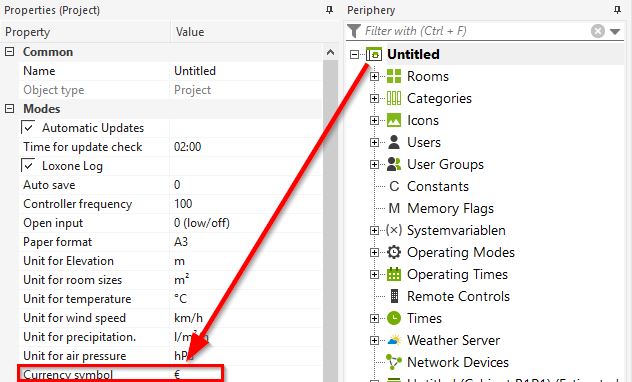
The currency can be set in the document properties.
Cabling↑
For more information on proper cabling, see here .