The LOXONE Down Light Pure RGBW Tree is a recessed LED downlight that combines high-quality tunable white light (2 200 – 6 500 K) with vibrant colored light. It is powered by 24 V DC and controlled directly via the LOXONE Tree interface.
Datasheet Down Light 4 Pure RGBW Tree
Datasheet Down Light 6 Pure RGBW Tree
Table of Contents
Mounting↑

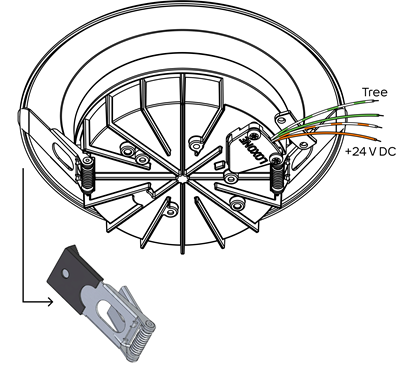
Connect the 24 V power supply (orange/orange-white wires) and the Tree data lines (green/green-white wires).
Fold back the retaining clips and insert the spotlight into the mounting opening until it snaps into place. Make sure that no cables are pinched.
 | We recommend using a separate LED power supply for a group of Down Lights to avoid interference from other devices. All LOXONE power supplies are suitable for this purpose. |
 | If the luminaire comes into contact with metal structures in the building, proper equipotential bonding must be established to protect its electronics from interference or damage. |
| The luminaire may reach high surface temperatures during operation. Install it out of reach (typically >= 2.5 m above the finished floor level). |
Commissioning↑
For commissioning, the device must be supplied with power and a connection to the Miniserver must be possible via the Tree Interface.
The light indicates whether the device is connected correctly.
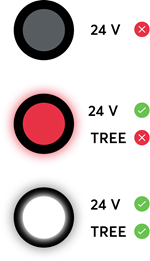
Then follow the pairing procedure on the Tree Interface.
Actuators↑
| Summary | Description | Value Range |
|---|---|---|
| Smart actuator RGBW | Smart actuator | ∞ |
Diagnostic Inputs↑
| Summary | Description | Unit | Value Range |
|---|---|---|---|
| Online Status Down Light Pure RGBW Tree | Indicates whether the device can be reached by the Miniserver. Diagnostics for Air devices Diagnostics for Tree devices Diagnostics for Extensions | Digital | 0/1 |
| System temperature | Provides the internal device temperature. This is often the temperature of the CPU or another location in the device. | ° | ∞ |
| Temperature Shutdown | Input is active, when the outputs of the device have been switched off due to high device temperature. Possible reasons: Ambient temperature too high, outputs overloaded. | Digital | 0/1 |
Properties↑
| Summary | Description | Default Value |
|---|---|---|
| Monitor Online Status | If checked, you will be notified via System Status or the Mailer if the device is no longer available or goes offline. | - |
| Serial Number | Specifies the serial number of the device. Enter 'Auto' to automatically pair a Tree device with unknown serial number. This can only be used if there is only one Tree device of the same type on a standalone Miniserver (not in a Client-Gateway setup). Save in the Miniserver to pair the Tree device. Afterwards the program must be loaded from the Miniserver to transfer the actual serial number of the Tree device into the program. | - |
| Lighting Group | Assigned Lighting Group. To create a new group simply start typing a name. | - |
Safety Instructions↑
Installation must be carried out by a qualified electrician in accordance with the applicable regulations.
Documents↑
Datasheet Down Light 4 Pure RGBW Tree
Datasheet Down Light 6 Pure RGBW Tree