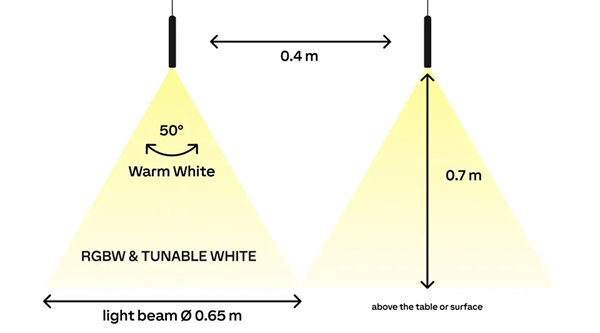
The LOXONE Pendulum Pure RGBW Tree is a premium suspended luminaire designed to create precise lighting accents above tables and highlight areas. It delivers high-quality illumination in an exceptionally slim form factor and integrates seamlessly into the LOXONE system via the Tree interface.
Datasheet Pendulum Pure RGBW Tree
Table of Contents
Mounting↑
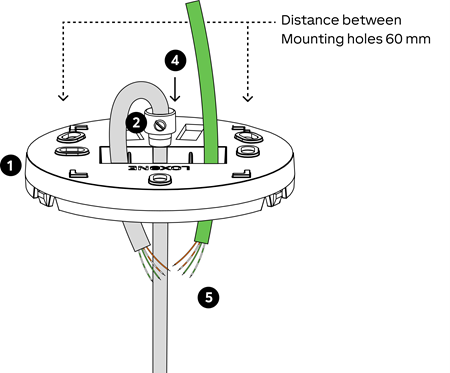
Secure the ceiling mounting base to the ceiling using two screws. Then adjust the desired suspension height using the strain relief on the connection cable.
 | The maximum distance between the ceiling and the top of the luminaire is 2 m. |
Strip approximately 90 mm of the outer cable sheath and hook the strain relief into the ceiling mounting base.
Connect the 24 V power supply (orange/orange-white wires) and the Tree data lines (green/green-white wires).
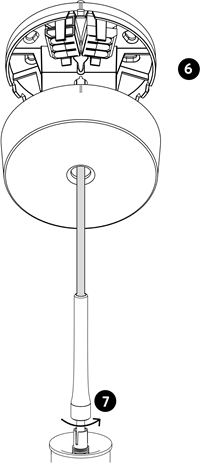
Align the canopy with the markings on the ceiling mounting base and secure it. Make sure that no cables are pinched.
If necessary, fine-adjust the suspension height directly on the luminaire.
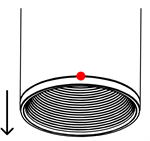
To remove the accent ring, press the marking and pull the ring downwards and outwards.
Commissioning↑
For commissioning, the device must be supplied with power and a connection to the Miniserver must be possible via the Tree Interface.
The light indicates whether the device is connected correctly.
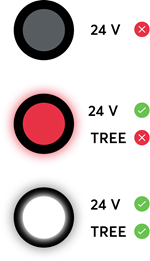
Then follow the pairing procedure on the Tree Interface.
Actuators↑
| Summary | Description | Value Range |
|---|---|---|
| Smart actuator RGBW | Smart actuator | ∞ |
Diagnostic Inputs↑
| Summary | Description | Unit | Value Range |
|---|---|---|---|
| Online Status Pendulum Pure RGBW Tree | Indicates whether the device can be reached by the Miniserver. Diagnostics for Air devices Diagnostics for Tree devices Diagnostics for Extensions | Digital | 0/1 |
| System temperature | Provides the internal device temperature. This is often the temperature of the CPU or another location in the device. | ° | ∞ |
| Temperature Shutdown | Input is active, when the outputs of the device have been switched off due to high device temperature. Possible reasons: Ambient temperature too high, outputs overloaded. | Digital | 0/1 |
Properties↑
| Summary | Description | Default Value |
|---|---|---|
| Monitor Online Status | If checked, you will be notified via System Status or the Mailer if the device is no longer available or goes offline. | - |
| Serial Number | Specifies the serial number of the device. Enter 'Auto' to automatically pair a Tree device with unknown serial number. This can only be used if there is only one Tree device of the same type on a standalone Miniserver (not in a Client-Gateway setup). Save in the Miniserver to pair the Tree device. Afterwards the program must be loaded from the Miniserver to transfer the actual serial number of the Tree device into the program. | - |
| Lighting Group | Assigned Lighting Group. To create a new group simply start typing a name. | - |
Safety Instructions↑
Installation must be carried out by a qualified electrician in accordance with the applicable regulations.
Documents↑
Datasheet Pendulum Pure RGBW Tree