

The Door Lock Air Inductive is a wireless door lock based on Loxone Air technology. It enables remote control and status feedback of doors via the Loxone system, ideal for new builds and retrofit projects, without the need for additional wiring. Thanks to inductive power supply, the lock is maintenance-free. No battery replacement is required.
Datasheet Door Lock Air Inductive
Table of Contents
Mounting↑

|
Ensure the inductive station in the door frame is precisely aligned with the inductive component of the door lock. Proper alignment is critical for optimal performance and reliable charging. |
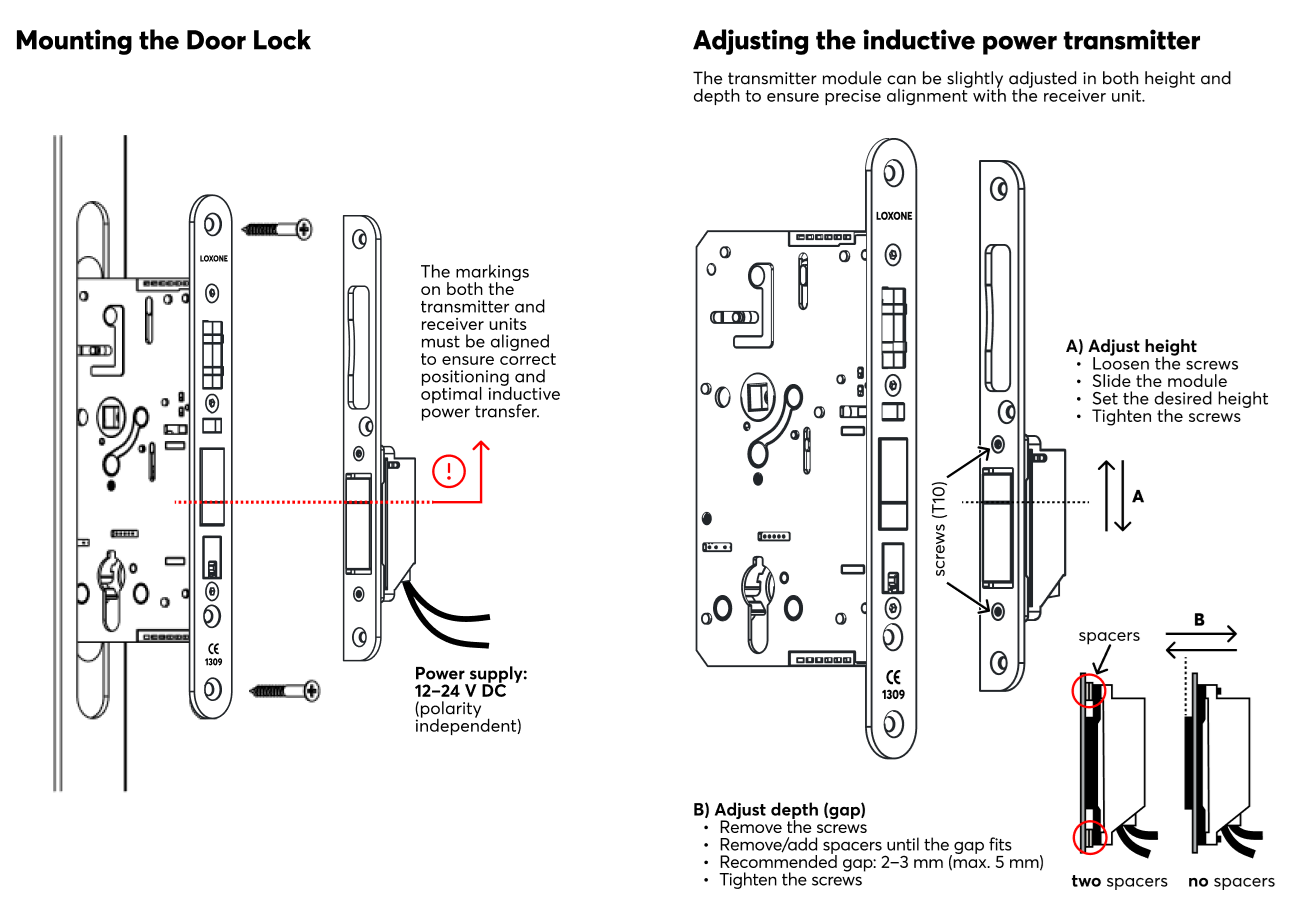
Link to PDF, created from Südmetal document.
Commissioning↑
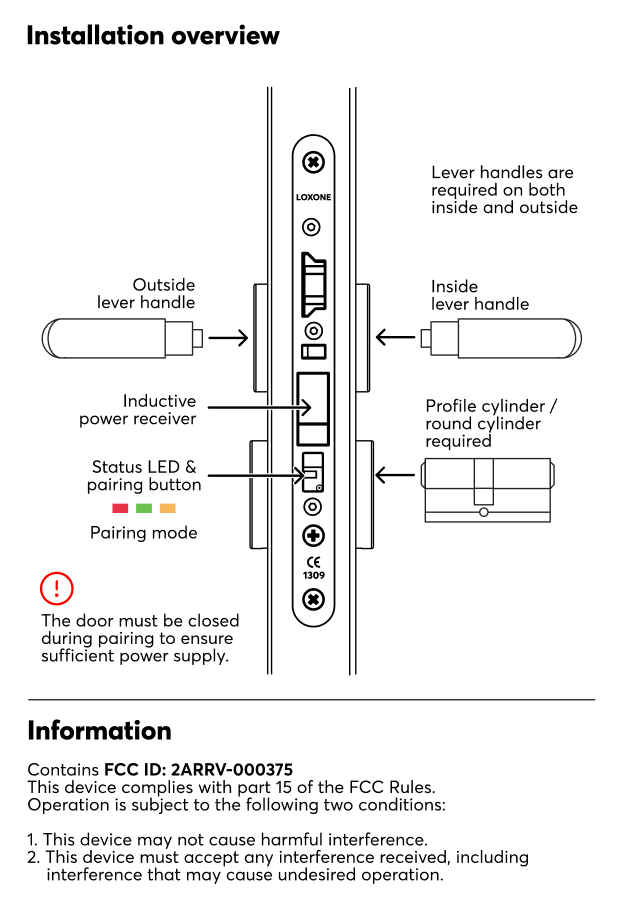
In delivery state, pairing mode will be active after the power supply has been established. This is indicated by the status LED flashing red/green/orange.

|
Because the device requires the door to be closed for power, the LED may be difficult to see during the process. Ensure the door is fully shut to maintain a continuous power supply during pairing. |
Then follow the pairing procedure on the Air Interface.
To activate the pairing mode manually, hold down the pairing button for at least 5 seconds then immediately close the door. The door must be closed to receive power from the inductive station. If the door remains open, the device will lose power, and the pairing mode will be interrupted.
|
|
After pressing the pairing button, the door must be closed immediately. The Door Lock is powered by the inductive station only when the door is closed. If the door remains open, the device will run out of power and the pairing process cannot be completed. |
Sensors↑
| Summary | Description | Value Range |
|---|---|---|
| Position | Current position of the door. Can be used with Door and Windows Monitor 1=closed 3=open 4=closed and unlocked 5=closed and locked 6=open and unlocked 7=open and locked 0=unknown/offline |
0...7 |
| Unlocked | Input is active when lock is unlocked | 0/1 |
| Unlocked by Key | Input is active when lock is unlocked by key | 0/1 |
| Closed | Input is active when the door is closed | 0/1 |
Actuators↑
| Summary | Description | Value Range |
|---|---|---|
| Unlock Door | Pulse on the output unlocks the door | 0/1 |
Diagnostic Inputs↑
| Summary | Description | Unit | Value Range |
|---|---|---|---|
| Online Status Door Lock Air | Indicates whether the device can be reached by the Miniserver. Diagnostics for Air devices Diagnostics for Tree devices Diagnostics for Extensions |
Digital | 0/1 |
| Voltage Shutdown | Input is active when the device is offline, because of its supply voltage dropping too low. Possible reasons: Battery empty or disconnected from supply too long | Digital | 0/1 |
| Battery Low | This input activates when the battery level is <= 15%. The device only supplies values to this sensor when it is powered by batteries. |
Digital | 0/1 |
| Battery Level | This sensor indicates the current battery level. If the device is externally supplied with 24v, the value of 100 is constantly shown. |
% | ∞ |
| Response time - last activation | - | ∞ |
Properties↑
| Summary | Description | Default Value |
|---|---|---|
| Monitor Online Status | If checked, you will be notified via System Status or the Mailer if the device is no longer available or goes offline. | - |
| Serial Number | Serial number of Air device. Automatic pairing can be enabled on the Air Base. Automatic pairing can be enabled on the Airbase for a set time. |
- |
| Audible acknowledgement | Audible confirmation when door is opened or closed | - |
Safety Instructions↑
Installation must be carried out by a qualified electrician in accordance with the applicable regulations.
Documents↑
Datasheet Door Lock Air Inductive