Using the +/- input trigger sets an appropriate value at the output for EIB dimmer
Table of Contents
Inputs↑
| Abbreviation | Summary | Description | Value Range |
|---|---|---|---|
| + | Dim+ | 0/1 | |
| - | Dim- | 0/1 | |
| DisPc | Disable periphery control | Disables all inputs. | 0/1 |
| On | On | On: Status = ON, Dimmer Value = 100% | 0/1 |
| Off | Off | Off: Status = OFF, Dimmer Value = 0%. Permanent ON will not block the control | 0/1 |
| Set | Sets output (Cdv) to value of input (Set) | ∞ | |
| S | Status | Connect this input to a EIB-sensor (group address switching or response of switching) | 0/1 |
| Cdv | Current dim value | Connect this input to a EIB-sensor (group address brightness or response of brightness) | ∞ |
Outputs↑
| Abbreviation | Summary | Description | Value Range |
|---|---|---|---|
| D | Dimmer output | Output D is the analog dimmer output and represents a relative "Dim by ±value%" command, where each + or − sends an additional dimming step. Connect this output to a EIB-dimmer actuator (group address dimming) | ∞ |
| S | Status | Switching output for turning On and Off dimmer This output is controlled by the inputs (On) and (Off). Connect this output to a EIB-dimming actuator (group address switching) | 0/1 |
| Cdv | Current dim value | Connect this output to a EIB-dimming actuator (group address brightness). | ∞ |
| API | API Connector | Intelligent API based connector. Can link several functions between devices and blocks. API Commands | - |
Parameters↑
| Abbreviation | Summary | Value Range | Default Value |
|---|---|---|---|
| Sts | Step size | ∞ | 5 |
| Rr | Repetition rate | ∞ | 0,2 |
EIB/KNX interface↑
The Loxone Miniserver Gen. 1 has a full-fledged EIB interface for a wide range of applications.
EIB sensors: Use of EIB sensors instead of classic buttons in a Loxone installation
User interface: Supplementing existing EIB installations for user interface
Logic: Supplementing existing EIB installations for logic
Presence Simulation↑
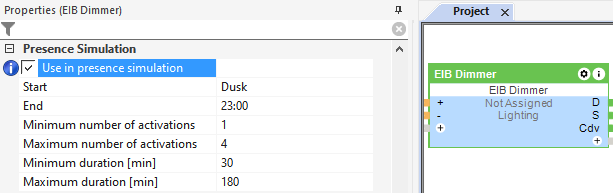
This function block has a presence simulation.
Activate and define the presence simulation in the properties window: