Loxone Hörmann Tree ist ein kompaktes Schnittstellenmodul zur Einbindung von Hörmann Torantrieben.
Eine aktuelle Liste kompatibler Hörmann‑Antriebe finden Sie online.
Inhaltsverzeichnis
- Montage
- Inbetriebnahme
- Programmierung
- Einschränkungen
- Softwareindex
- Diagnose
- Eingänge, Ausgänge, Eigenschaften
- Dokumente
Montage↑
Der Hörmann Tree wird mit dem beiliegenden Adapterkabel an die BUS-Buchse eines kompatiblen Hörmann-Torantriebs angeschlossen. Beachten Sie stets die Bedienungsanleitung, um sicherzustellen, dass Sie den richtigen BUS-Anschluss verwenden.

Bei HCP1 Antrieben ist das Gerät danach bereit zum Einlernen.
Der Antrieb wird anschließend automatisch erkannt.
Bei HCP2 Antrieben muss zunächst die BUS-Suche und damit die Spannungsversorgung für das Gerät am Antrieb aktiviert werden, um das Gerät danach einlernen zu können. Je nach Antrieb ist die Aktivierung unterschiedlich:
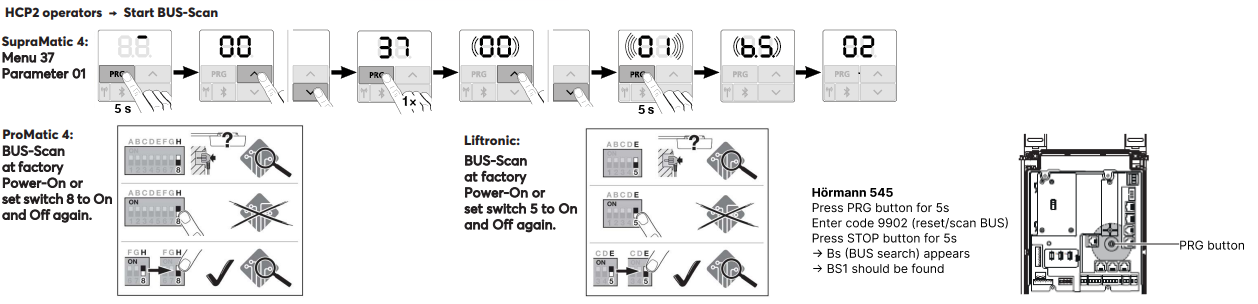
Nach dem Aktivieren der BUS-Suche (Spannungsversorgung) kann das Gerät eingelernt werden.
Der Antrieb wird anschließend automatisch erkannt.
Inbetriebnahme↑
Zur Inbetriebnahme muss das Gerät mit Spannung versorgt werden, und über die Tree Schnittstelle eine Verbindung zum Miniserver möglich sein.
Folgen Sie dann dem Einlernvorgang an der Tree Schnittstelle.
Programmierung↑
Loxone Hörmann Tree wird mit dem Baustein Tor in Loxone Config programmiert und eingestellt:
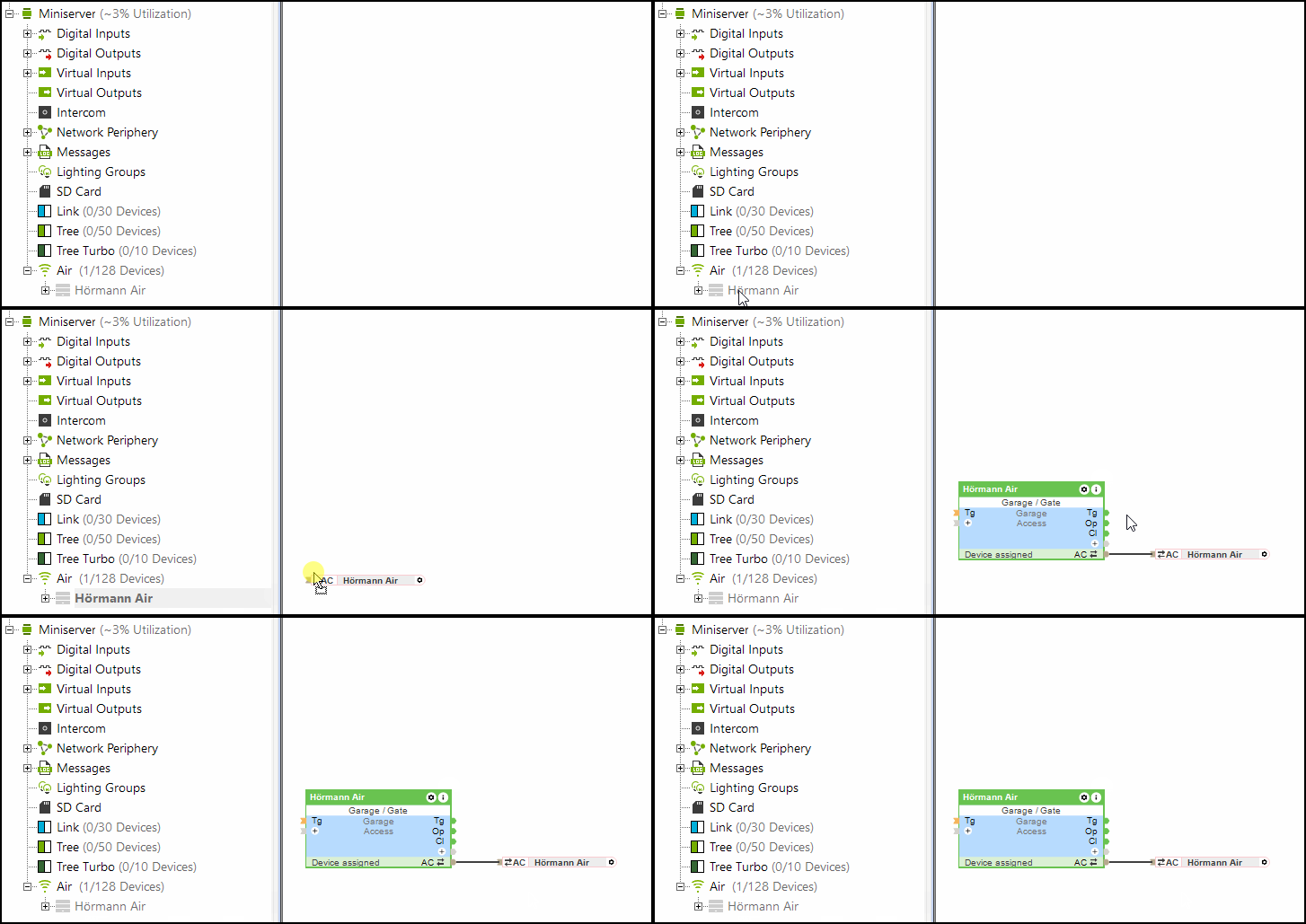
Der (Po) Eingang (teilweise öffnen) des Tor-Bausteins wird auch vom Hörmann Tree unterstützt.
Einschränkungen↑
Bei HCP1 Antrieben kann es während eines Updates vorkommen, dass kurzzeitig am Antrieb ein Fehler angezeigt wird. Die Funktion ist dabei nicht beeinträchtigt. Nach erneutem Senden eines Befehls wird der Fehler nicht mehr angezeigt.
Bei Verwendung des Hörmann Tree kann der Hörmann Klimasensor HKSI nicht parallel verwendet werden.
Softwareindex↑
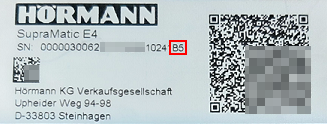
Mit dem Softwareindex kann die Kompatibilität zu Loxone Hörmann Tree überprüft werden, die unterstützten Torantriebe sind online aufgelistet.
Auf dem Typenschild des Hörmann Antriebes finden Sie die Seriennummer mit dem Softwareindex, dieser beginnt mit einem Großbuchstaben.
Diagnose↑
Wenn der Hörmann-Antrieb eine Warnung oder einen Fehler erkannt hat, wird eine Systemmeldung ausgegeben. Überprüfen Sie das Gerät direkt, um den angezeigten Fehlercode oder Status einzusehen. Für detaillierte Anweisungen zur Fehlerbehebung beachten Sie bitte die Geräteanleitung entsprechend dem angezeigten Status.
Aktoren↑
| Kurzbeschreibung | Beschreibung | Wertebereich |
|---|---|---|
| API Connector | Intelligenter API basierter Verbinder. API Commands | - |
| Licht | Aktiviert die Beleuchtung des Türantriebs. Die Beleuchtung wird außerdem automatisch aktiviert, sobald die Tür geöffnet oder geschlossen wird, und bleibt für die im Antrieb definierte Zeit eingeschaltet. | 0/1 |
Diagnose-Eingänge↑
| Kurzbeschreibung | Beschreibung | Einheit | Wertebereich |
|---|---|---|---|
| Onlinestatus Hörmann Tree | Gibt an, ob das Gerät für den Miniserver erreichbar ist. Diagnose bei Air Geräten Diagnose bei Tree Geräten Diagnose bei Extensions | Digital | 0/1 |
| Aktor-Information | Digital | 0/1 | |
| Kommunikationsfehler | Digital | 0/1 | |
| Keine Kommunikation | Digital | 0/1 |
Eigenschaften↑
| Kurzbeschreibung | Beschreibung | Standardwert |
|---|---|---|
| Onlinestatus überwachen | Wenn aktiviert, werden Sie über den Systemstatus oder über den Mailer benachrichtigt, wenn das Gerät nicht mehr erreichbar bzw. offline ist. | - |
| Seriennummer | Gibt die Seriennummer des Geräts an. Tragen Sie hier 'Auto' ein, um ein Tree-Gerät mit unbekannter Seriennummer automatisch einzulernen. Dies ist nur möglich, wenn sich auf einem eigenständigen Miniserver (nicht in einer Client-Gateway-Konfiguration) genau ein Tree-Gerät desselben Typs befindet. Speichern Sie anschließend im Miniserver, um das Tree-Gerät einzulernen. Laden Sie danach das Programm erneut aus dem Miniserver, um die tatsächliche Seriennummer des Tree-Geräts in das Programm zu übernehmen. | - |
| Fahrzeiten automatisch lernen | Fahrzeiten automatisch lernen | - |