El Loxone Hörmann Tree es un módulo de interfaz compacto para la integración de operadores de puertas de garaje Hörmann.
Una lista actualizada de operadores compatibles de Hörmann está disponible en línea.
Contenido
- Montaje
- Puesta en marcha
- Programación
- Limitaciones
- Índice de Software
- Diagnóstico
- Entradas, salidas y propiedades
- Documentos
Montaje↑
El Hörmann Tree está conectado al conector BUS de un abridor de puerta Hörmann compatible utilizando el cable adaptador proporcionado. Siempre consulte el manual para asegurarse de que está utilizando el conector BUS correcto.

Para los modelos HCP1, el dispositivo está inmediatamente listo para aprenderse.
El abridor de puertas se reconoce automáticamente.
Para los modelos HCP2, el BUS-Scan debe activarse primero en el abridor de puertas para activar el suministro de energía para el dispositivo y poder emparejarlo. La activación varía dependiendo del modelo del abridor de puertas:
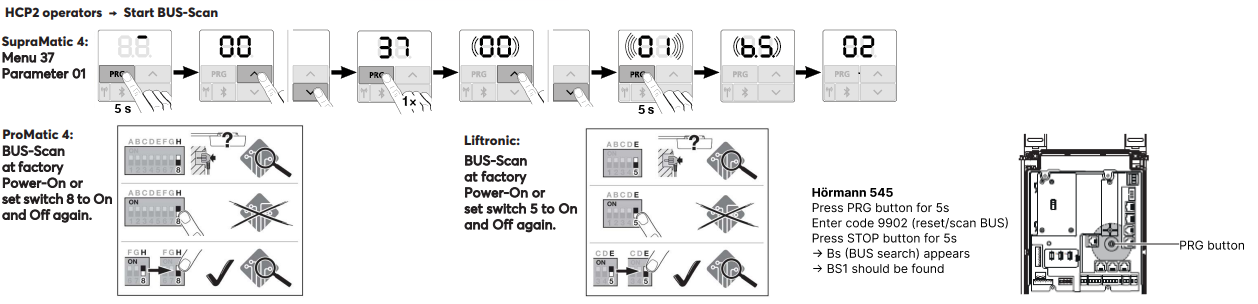
Después de activar el BUS-Scan (fuente de alimentación), el dispositivo puede ser aprendido.
El abridor de puertas es entonces reconocido automáticamente.
Puesta en marcha↑
Para la puesta en marcha, el aparato debe estar alimentado y debe ser posible la conexión con el Miniserver a través de la interfaz Tree.
A continuación, siga el procedimiento de aprendizaje en la interfaz Tree.
Programación↑
El Loxone Hörmann Tree se programa y configura utilizando el bloque de función de Garaje / Puerta en Loxone Config:
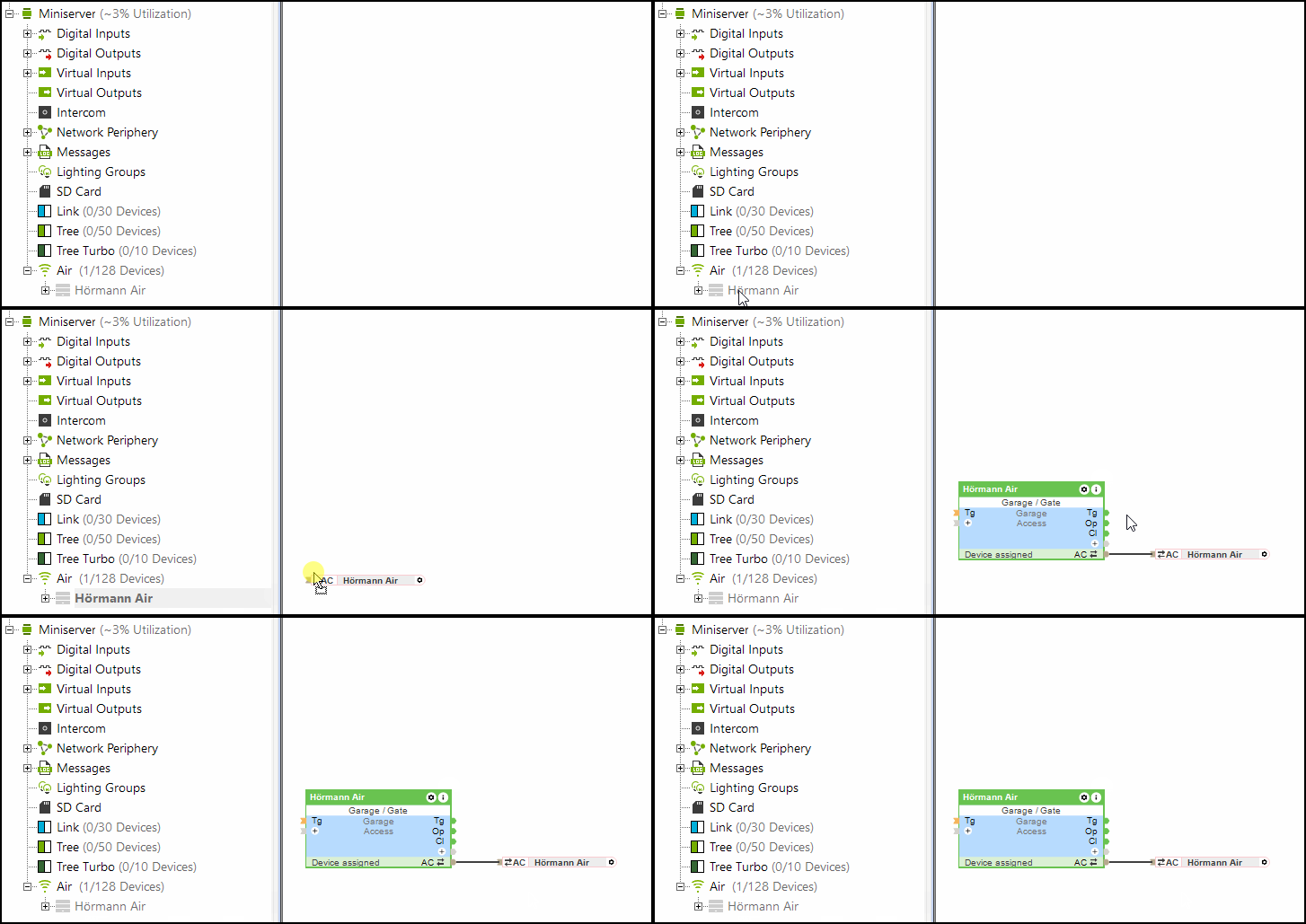
La entrada (Po) (parcialmente abierta) del bloque de Garaje/Puerta también es compatible con Hörmann Tree.
Limitaciones↑
Con los abridores HCP1, puede aparecer brevemente un error en la unidad durante una actualización. La función no se ve afectada. Después de enviar un comando nuevamente, el error ya no se muestra.
Al usar el Hörmann Tree, el sensor climático Hörmann HKSI no puede usarse en paralelo.
Índice de Software↑
Con el índice de software se puede verificar la compatibilidad con Loxone Hörmann Tree, los operadores compatibles están listados en línea.
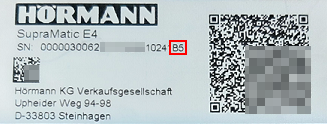
Puede encontrar el número de serie junto con el índice de software (comenzando con una letra mayúscula) en la etiqueta del abridor de puerta de garaje Hörmann.
Diagnóstico↑
Si el operador Hörmann ha detectado una advertencia o error, se activará un mensaje del sistema. Por favor, compruebe el dispositivo directamente para ver el código de error o el estado mostrado. Para instrucciones detalladas de solución de problemas, consulte el manual del dispositivo basándose en el estado indicado.
Actuadores↑
| Resumen | Descripción | Rango de valores |
|---|---|---|
| Conector API | Conector inteligente basado en API. API Commands | - |
| Luz | Activa la iluminación del abridor de puerta. La iluminación también se activa automáticamente cada vez que la puerta se abre o se cierra y permanece encendida durante el tiempo especificado en el abridor. | 0/1 |
Entradas de diagnóstico↑
| Resumen | Descripción | Unidad | Rango de valores |
|---|---|---|---|
| Estado de conexión Hörmann Tree | Indica si el Miniserver puede acceder al dispositivo. Diagnóstico para dispositivos Air Diagnóstico para dispositivos Tree Diagnóstico de Extension | Digital | 0/1 |
| Información del actuador | Digital | 0/1 | |
| Error de comunicación | Digital | 0/1 | |
| Sin comunicación | Digital | 0/1 |
Propiedades↑
| Resumen | Descripción | Valor por defecto |
|---|---|---|
| Monitorizar | Si está marcado, se le notificará a través del Estado del Sistema o del Servicio de Correo si el dispositivo ya no está disponible o se desconecta. | - |
| Número de serie | Especifica el número de serie del dispositivo. Ingrese 'Auto' para aprender automáticamente un dispositivo Tree con número de serie desconocido. Esto solo se puede utilizar si hay un solo dispositivo Tree del mismo tipo. Guarde en el Miniserver para aprender el dispositivo Tree. Después, el programa debe cargarse desde el Miniserver para transferir el número de serie real del dispositivo Tree al programa. | - |
| Aprender automáticamente los tiempos de recorrido completos | Aprender automáticamente los tiempos de recorrido completos | - |