Controls the brightness levels of Touch Pure Flex Air and Tree.
Values for display and backlight brightness are calculated based on Presence (P) and whether the room is illuminated by daylight or artificial lighting (L). The display lights up when CBrB is not 0 or when inputs P or Don are active.
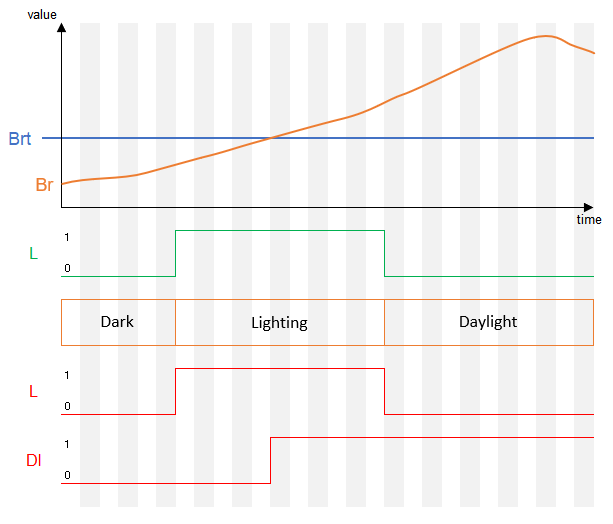
A room is considered dark if neither daylight nor artificial lighting (L) is active or current brightness is below threshold. Artificial lighting (L) is prioritized over daylight when calculating the brightness (CBrB).
Daylight is considered active when the current room brightness exceeds the Brightness threshold (Brt), and no artificial light sources (L) are on.
When the API output is connected to the Lighting Controller, it provides the values for artificial lighting (L), Room brightness (Br) and Brightness threshold (Brt), muting the inputs of the Touch Pure Flex Controller.
The default values for the brightness parameters are configured based on the room type when the block is created, or when the first Touch Pure Flex is connected.
Table of Contents
- Inputs
- Outputs
- Parameters
- Properties
- Touch Pure Flex Controller integration with Lighting Controller
- Dark, Lighting or Daylight
- Timing Diagram
Inputs↑
| Abbreviation | Summary | Description | Unit | Value Range |
|---|---|---|---|---|
| P | Presence | Presence is active. Activates the display. | - | 0/1 |
| DnD | Do not Disturb | Display and backlight stays off when the device is idle. | - | 0/1 |
| LbT | Light by Touch | When active, the first touch activates the display but does not execute a command. | - | 0/1 |
| L | Lighting active | The room is illuminated by artificial lighting. This input is not used when a Lighting Controller is connected via the API Connector. | - | 0/1 |
| Br | Room brightness | Current room brightness. This input is not used when a Lighting Controller is connected via the API Connector. | lux | ∞ |
| Set | Set Brightness | Individual display brightness. The value will remain active until changes in presence, room brightness or artificial lighting are detected. | % | ∞ |
| Off | Off | Locks the block. Dominating input. |
- | 0/1 |
| Don | Display On | Activate display. Display Brightness BrD will be used. Input is overruled by DnD | - | 0/1 |
| Bl | Backlight On | Activate backlight. If current brightness CBrB is 0, default brightness BrDef will be used. Input is overruled by DnD | - | 0/1 |
| Txt | Display Text | Set custom display text. Display Brightness BrD will be used. Input is overruled by DnD | - | - |
Outputs↑
| Abbreviation | Summary | Description | Unit | Value Range |
|---|---|---|---|---|
| CBrB | Current Brightness Backlight | Current Backlight brightness for connected devices. When Backlight Bl is active, BrDef is used as fallback if the value is 0. | - | ∞ |
| P | Presence | Presence is active. | - | 0/1 |
| L | Lighting Active | Lighting is active. | - | 0/1 |
| B | Bright | Active when room brightness is above the threshold. | - | 0/1 |
| Br | Room brightness | Current room brightness. | lux | ∞ |
| BrD | Brightness Display & status LEDs | Brightness used for the display when the display is active, and for the status LEDs when any LED is active. Brightness equals CBrB. If CBrB is 0, BrDef is used. Ensures the display and LEDs remain visible even when the backlight is inactive. | - | ∞ |
| API | API Connector | Intelligent API based connector. API Commands |
- | - |
Parameters↑
| Abbreviation | Summary | Description | Unit | Value Range | Default Value |
|---|---|---|---|---|---|
| BrDP | Dark and Presence Brightness | Brightness for rooms with presence, without daylight or artificial lighting. | % | 0...100 | 10 |
| BrDnP | Dark and no Presence Brightness | Brightness for rooms without presence, without daylight or artificial lighting. | % | 0...100 | 0 |
| BrLP | Lighting and Presence Brightness | Brightness for rooms with presence and artificial lighting but actual room brightness below the threshold Brt. | % | 0...100 | 70 |
| BrLnP | Lighting and no Presence Brightness | Brightness for rooms without presence with artificial lighting but actual room brightness below the threshold Brt. | % | 0...100 | 0 |
| BrBP | Bright and Presence Brightness | Brightness for rooms with presence and room brightness above the threshold Brt. | % | 0...100 | 70 |
| BrBnP | Bright and no Presence Brightness | Brightness for rooms without presence and room brightness above the threshold Brt. | % | 0...100 | 0 |
| BrDef | Default Brightness | Default brightness used as a fallback for the backlight CBrB or display BrD if the calculated brightness CBrB is 0. | % | 0...100 | 70 |
| Brt | Brightness threshold | If the room brightness exceeds the maximum value, the daylight settings are activated. This parameter is not used when a Lighting Controller is connected via the API Connector. | lux | 0...∞ | 30 |
Properties↑
| Summary | Description | Default Value |
|---|---|---|
| Brightness preset | Sets the brightness value to a recommended level based on the color of the Touch Pure Flex. | - |
Touch Pure Flex Controller integration with Lighting Controller↑
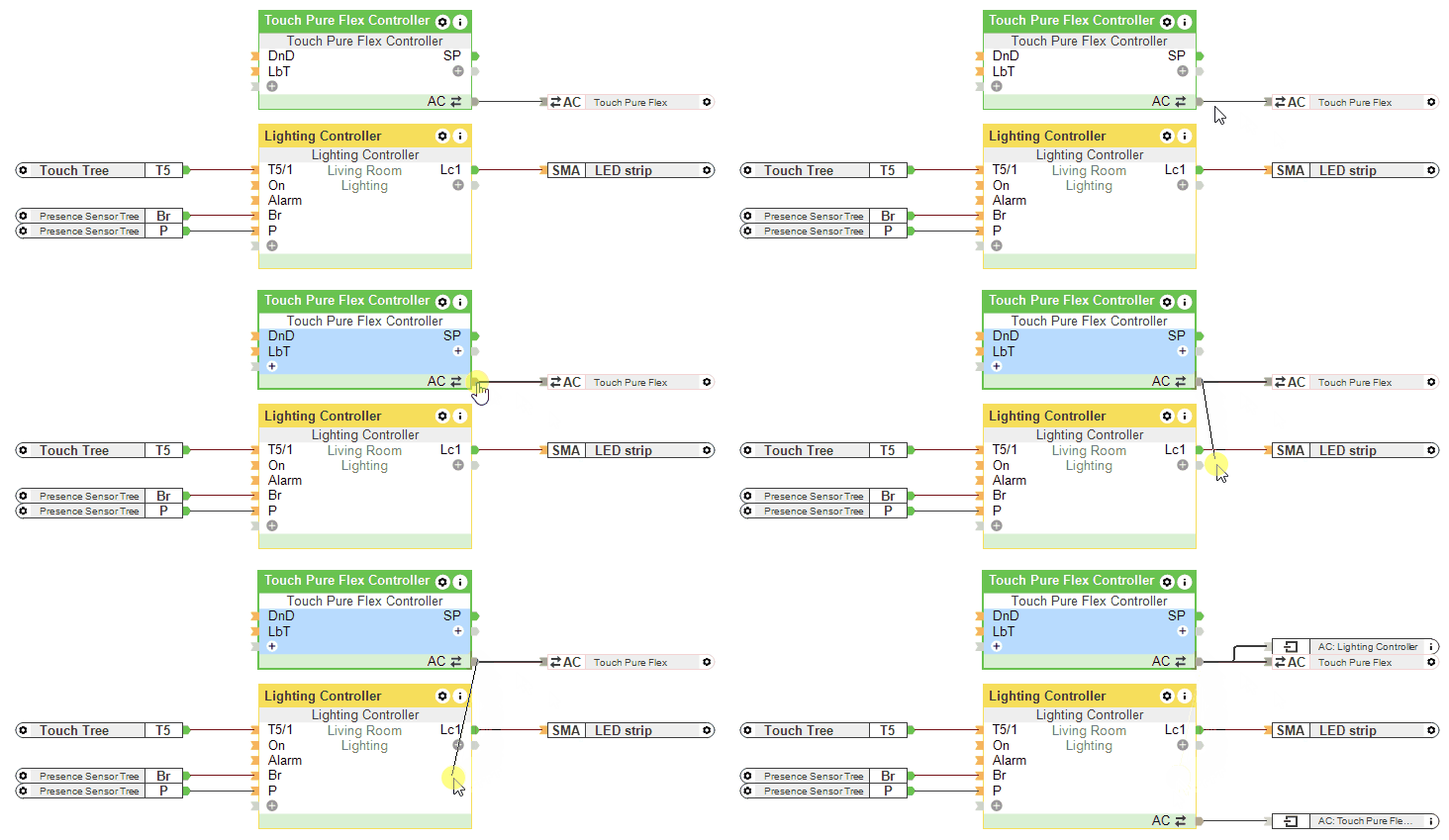
If a Lighting Controller is connected via the API Connector, the inputs L, Br and the parameter Brt of the Touch Pure Flex Controller are not used.
Dark, Lighting or Daylight↑
Timing Diagram↑
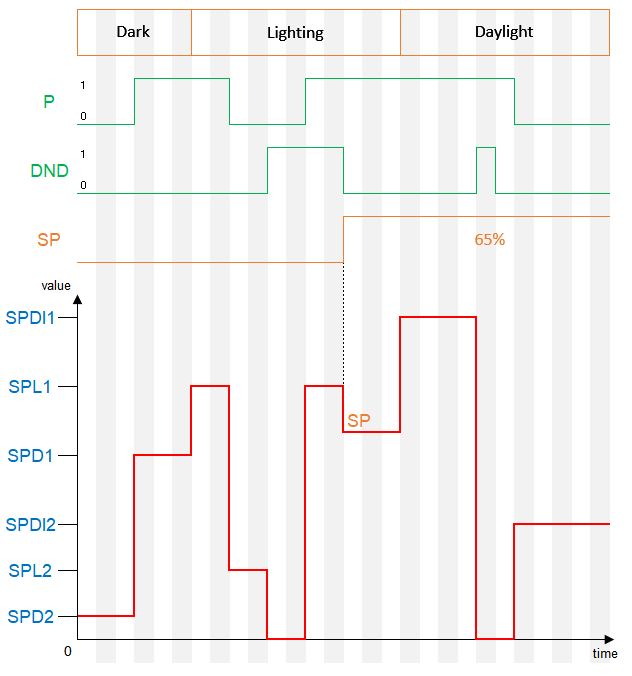
When the brightness is set to 0% through a block parameter and the input LbT is active, the brightness defined in the device properties will be used when the display is touched.