

The Door Lock Air Inductive is a wireless door lock based on Loxone Air technology. It enables remote control and status feedback of doors via the Loxone system, ideal for new builds and retrofit projects, without the need for additional wiring. Thanks to inductive power supply, the lock is maintenance-free. No battery replacement is required.
Datasheet Door Lock Air Inductive
Contenuto
Montaggio↑

|
Ensure the inductive station in the door frame is precisely aligned with the inductive component of the door lock. Proper alignment is critical for optimal performance and reliable charging. |
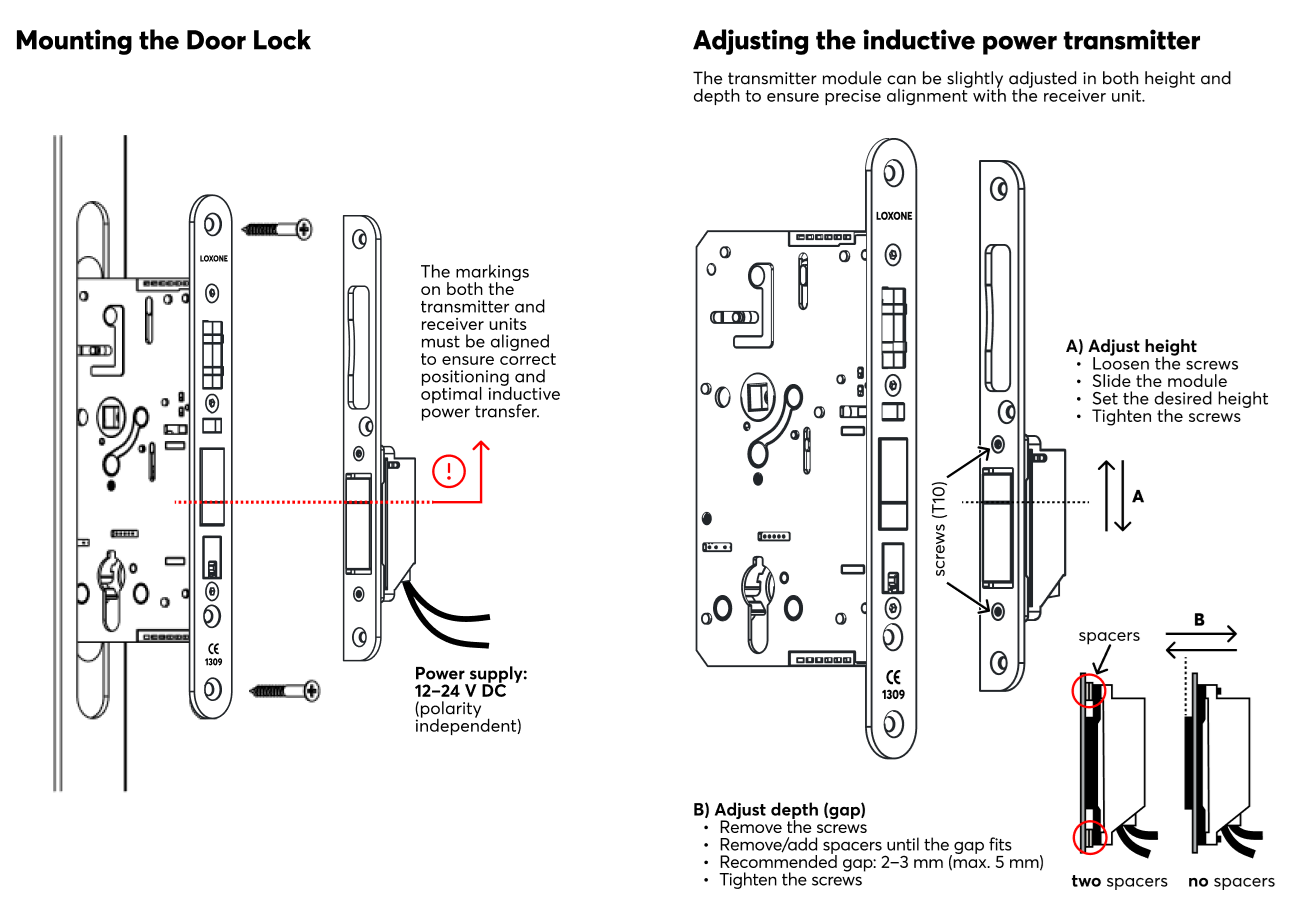
Link to PDF, created from Südmetal document.
Messa in servizio↑
Allo stato di consegna, la modalità di apprendimento sarà attiva dopo che è stata stabilita l'alimentazione. Ciò viene indicato dal lampeggio rosso/verde/arancione del LED di stato.

|
Because the device requires the door to be closed for power, the LED may be difficult to see during the process. Ensure the door is fully shut to maintain a continuous power supply during pairing. |
Poi seguire la procedura di apprendimento sull'Interfaccia Air.
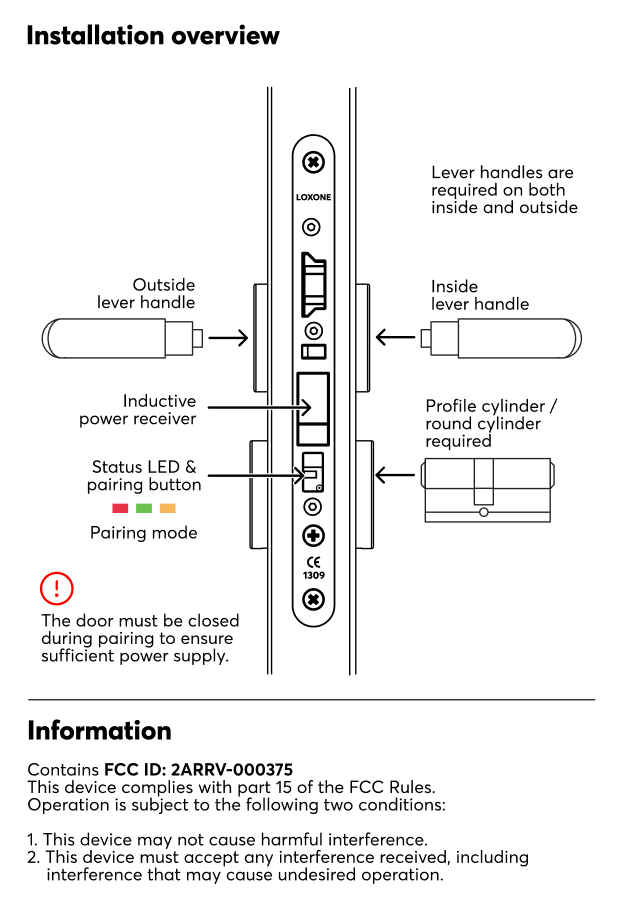
To activate the pairing mode manually, hold down the pairing button for at least 5 seconds then immediately close the door. The door must be closed to receive power from the inductive station. If the door remains open, the device will lose power, and the pairing mode will be interrupted.
|
|
After pressing the pairing button, the door must be closed immediately. The Door Lock is powered by the inductive station only when the door is closed. If the door remains open, the device will run out of power and the pairing process cannot be completed. |
Sensori↑
| Descrizione breve | Descrizione | Campo di valore |
|---|---|---|
| Position | Current position of the door. Can be used with Door and Windows Monitor 1=closed 3=open 4=closed and unlocked 5=closed and locked 6=open and unlocked 7=open and locked 0=unknown/offline |
0...7 |
| Unlocked | Input is active when lock is unlocked | 0/1 |
| Unlocked by Key | Input is active when lock is unlocked by key | 0/1 |
| Closed | Input is active when the door is closed | 0/1 |
Attuatori↑
| Descrizione breve | Descrizione | Campo di valore |
|---|---|---|
| Unlock Door | Pulse on the output unlocks the door | 0/1 |
Ingressi di diagnosi↑
| Descrizione breve | Descrizione | Unità | Campo di valore |
|---|---|---|---|
| Stato online Door Lock Air | Indica se il dispositivo è raggiungibile dal Miniserver. Diagnostica per dispositivi Air Diagnostica per dispositivi Tree Diagnostica per Estensioni |
Digitale | 0/1 |
| Interruzione di tensione | L'ingresso è attivo quando il dispositivo è offline, a causa della tensione di alimentazione che è troppo bassa. Possibili motivi: batteria scarica o disconnessa dalla fonte di alimentazione per troppo tempo | Digitale | 0/1 |
| Batteria scarica | Questo ingresso si attiva quando il livello della batteria è <= 15%. Il dispositivo fornisce valori solo a questo sensore quando viene è in funzione a batterie. |
Digitale | 0/1 |
| Livello batteria | Su questo sensore viene emesso lo stato corrente di carica delle batterie. Se il dispositivo viene fornito esternamente con 24 V, il valore è costante a 100. |
% | ∞ |
| Tempo di reazione - ultima attivazione | - | ∞ |
Proprietà↑
| Descrizione breve | Descrizione | Valore predefinito |
|---|---|---|
| Monitora lo stato online | Se selezionato, riceverai una notifica tramite lo Stato di Sistema o il Mailer, quando il dispositivo non è più disponibile o offline. | - |
| Numero seriale | Numero di serie del dispositivo Air. Il pairing automatico può essere abilitato sull'Air Base. Il pairing automatico può essere abilitato sull'Air Base per un tempo impostato. |
- |
| Segnale di conferma | Conferma acustica quando la porta viene aperta o chiusa | - |
Avvisi di sicurezza↑
L'installazione deve essere eseguita da un elettricista qualificato secondo le normative vigenti.
Documenti↑
Datasheet Door Lock Air Inductive