Loxone Hörmann Tree est un module d'interface compact destiné à l'intégration des opérateurs de porte de garage Hörmann.
Une liste mise à jour des opérateurs Hörmann compatibles est available online.
Table des matières
- Montage
- Mise en service
- Programmation
- Limitations
- Index des logiciels
- Diagnostic
- Entrées, sorties, propriétés
- Documents
Montage↑
Hörmann Tree se branche sur le connecteur BUS d'un actionneur de porte Hörmann compatible à l'aide du câble adaptateur fourni. Consultez toujours le manuel pour vous assurer que vous utilisez le bon connecteur BUS.

Pour les modèles HCP1, l'appareil est immédiatement prêt pour l'appairage.
L'actionneur de porte est immédiatement reconnu.
Pour les modèles HCP2, il faut d'abord activer la fonction BUS-Scan sur l'opérateur de porte afin d'alimenter l'appareil en électricité et de pouvoir l'appairer. La procédure d'activation varie selon le modèle d'opérateur de porte :
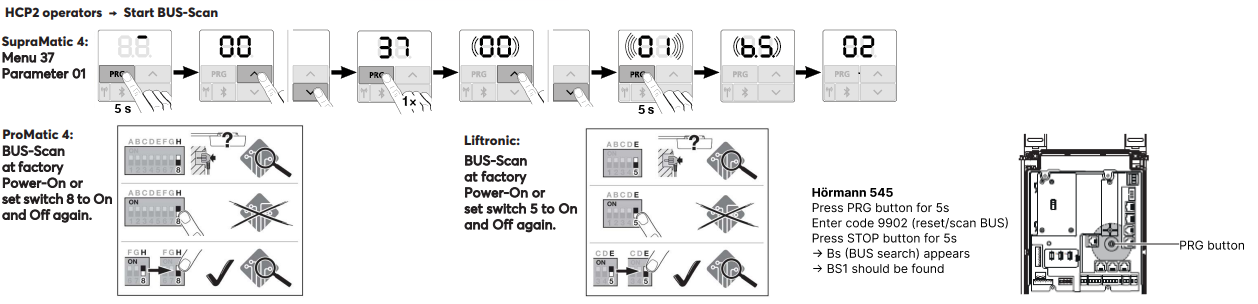
Une fois le BUS-Scan (alimentation) activé, l'appareil peut être appairé.
Le moteur de porte est alors automatiquement détecté.
Mise en service↑
Pour la mise en service, l'appareil doit être alimenté en courant et une connexion au Miniserver doit être possible via l'interface Tree.
Suivez ensuite la procédure d'appairage sur l'interface arborescente.
Programmation↑
Le Loxone Hörmann Tree est programmé et configuré à l'aide du Garage / Bloc fonction Controleur de portail dans Loxone Config :
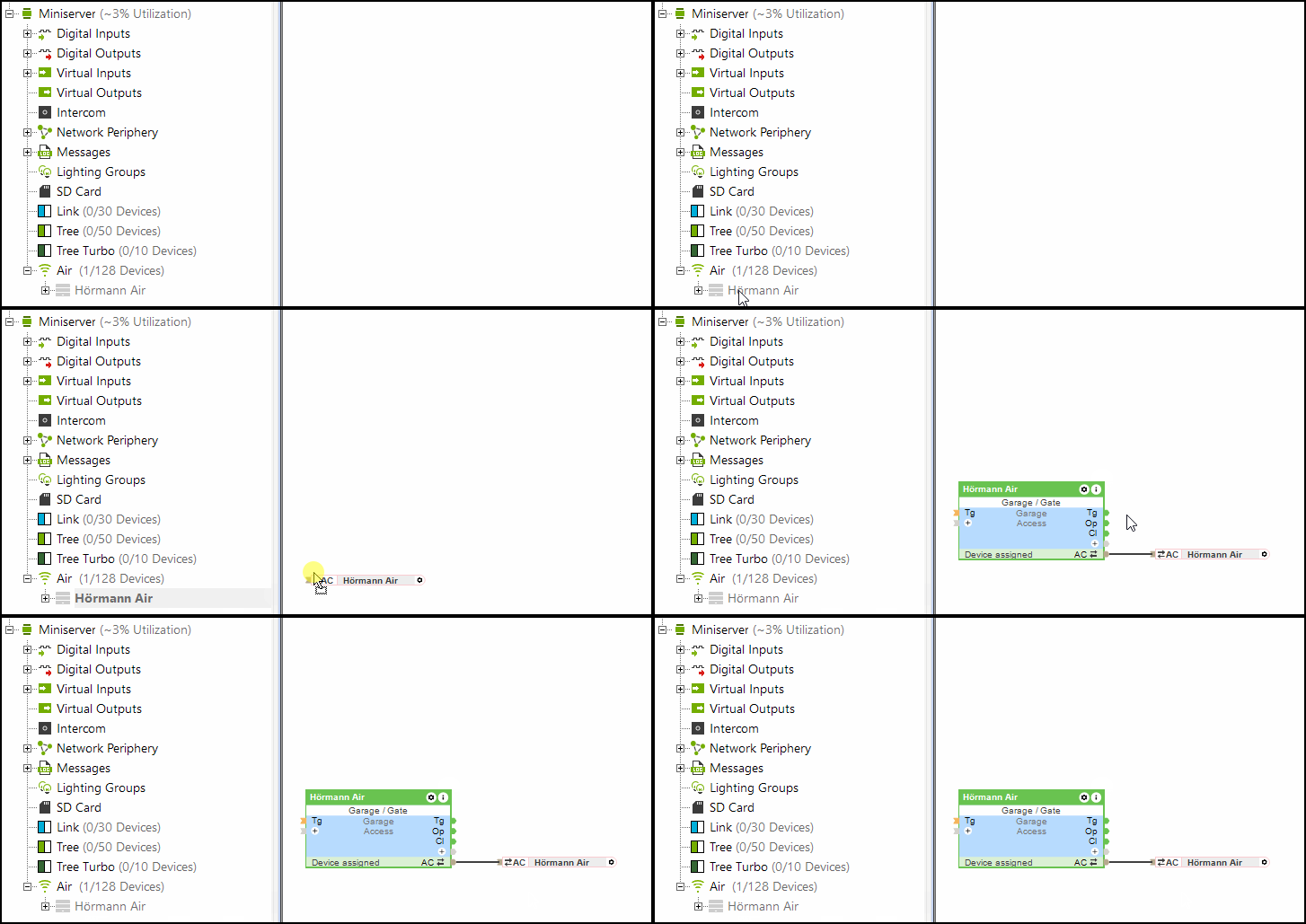
L'entrée (Po) (partiellement ouverte) du bloc Controleur de portail est également prise en charge par Hörmann Tree.
Limitations↑
Avec les opérateurs HCP1, une erreur peut s'afficher brièvement sur le lecteur pendant une mise à jour. Le fonctionnement n'est pas affecté. Après avoir renvoyé la commande, l'erreur disparaît.
Lors de l'utilisation du Hörmann Tree, le capteur climatique Hörmann HKSI ne peut pas être utilisé en parallèle.
Index des logiciels↑
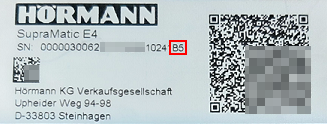
Avec l'index du logiciel, la compatibilité avec Loxone Hörmann Tree peut être vérifiée, les opérateurs pris en charge sont listés en ligne.
Vous trouverez le numéro de série ainsi que le code du logiciel (commençant par une majuscule) sur l'étiquette de l'opérateur de porte de garage Hörmann.
Diagnostic↑
Si la motorisation Hörmann a détecté un avertissement ou une erreur, un message système s'affiche. Veuillez vérifier directement l'appareil pour consulter le code d'erreur ou l'état affiché. Pour obtenir des instructions détaillées de dépannage, consultez le manuel de l'appareil en fonction de l'état indiqué.
Actionneurs↑
| Résumé | Description | Valeurs |
|---|---|---|
| Connecteur API | Connecteur intelligent basé sur API. Commandes API | - |
| Lumière | Active l'éclairage de l'opérateur de porte. L'éclairage s'allume également automatiquement à chaque ouverture ou fermeture de la porte et reste allumé pendant la durée définie dans l'opérateur. | 0/1 |
Entrées diagnostic↑
| Résumé | Description | Unité | Valeurs |
|---|---|---|---|
| Statut en ligne Hörmann Tree | Indique si l'appareil est accessible par le miniserveur. Diagnostics for Air devices Diagnostics pour les appareils Tree Diagnostics pour les extensions | Numérique | 0/1 |
| Informations actionneur | Numérique | 0/1 | |
| Erreur de communication | Numérique | 0/1 | |
| Pas de communication | Numérique | 0/1 |
Propriétés↑
| Résumé | Description | Valeur défaut |
|---|---|---|
| Surveiller le statut en ligne | Si cette case est cochée, vous serez informé via l'état du système ou le courrier électronique si l'appareil n'est plus disponible ou s'il est mis hors ligne. | - |
| Numéro de série | Spécifie le numéro de série de l'appareil. Entrez « Auto » pour coupler automatiquement un appareil Tree dont le numéro de série est inconnu. Cette option ne peut être utilisée que s'il n'y a qu'un seul appareil Tree du même type sur un Miniserver autonome (et non dans une configuration Client-Gateway). Enregistrez dans le Miniserver pour coupler l'appareil Tree. Ensuite, le programme doit être chargé à partir du Miniserver afin de transférer le numéro de série réel de l'appareil Tree dans le programme. | - |
| Apprentissage automatique des temps de trajet | Apprendre automatiquement les temps trajets | - |