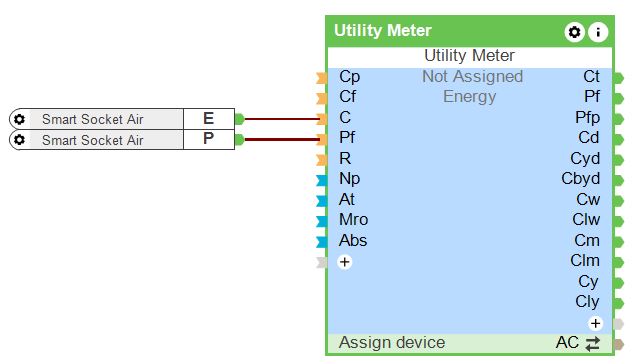
The Utility Meter can monitor the consumption or production of various utilities, electricity, water, gas, etc. using meters with pulse outputs.
Alternatively, the input (C) can be used to provide the absolute or differential consumption.
Only one input can be used at a time.
 | This function block is no longer being developed and has been replaced by the Meter blocks. |
Table of Contents
- Inputs
- Outputs
- Parameters
- S0-Meter on digital input
- S0-Meter connected to digital input set to frequency counter
- Energy monitoring with the Smart Socket Air
Inputs↑
| Abbreviation | Summary | Description | Value Range |
|---|---|---|---|
| Cp | Consumption pulse | For meters with pulse output connected to digital inputs. | 0/1 |
| Cf | Consumption frequency | For meters with pulse output connected to digital inputs used as frequency counter. Number of pulses since last reading. | ∞ |
| C | Consumption | For meters that send consumption directly as analog value. Parameter (Abs) defines wether the value is added or used as an absolute value. | 0...∞ |
| Pf | Power or flow | If this input for the current power or flow is used alone, the consumption is also calculated from it. Otherwise used only for output (Pf) and user interface. | ∞ |
| R | Reset | Pulse: Consumption values on outputs are reset. On: Block is locked. | 0/1 |
Outputs↑
| Abbreviation | Summary | Description | Value Range |
|---|---|---|---|
| Ct | Consumption total | 0...∞ | |
| Pf | Power or flow | Current power/flow calculated using parameter (At) when using (Cp) or (Cf). Value taken directly from input (Pf) if connected. | ∞ |
| Pfp | Power or Flow by pulses | Current power/flow calculated from one pulse to the next. Only available if input (Cp) is used. | ∞ |
| Cd | Consumption today | 0...∞ | |
| Cyd | Consumption yesterday | 0...∞ | |
| Cbyd | Consumption day before yesterday | 0...∞ | |
| Cw | Consumption this week | 0...∞ | |
| Clw | Consumption last week | 0...∞ | |
| Cm | Consumption this month | 0...∞ | |
| Clm | Consumption last month | 0...∞ | |
| Cy | Consumption this year | 0...∞ | |
| Cly | Consumption last year | 0...∞ | |
| API | API Connector | Intelligent API based connector. API Commands | - |
Parameters↑
| Abbreviation | Summary | Description | Unit | Value Range | Default Value |
|---|---|---|---|---|---|
| Np | Number of pulses per unit | Used to calculate the consumption using (Cp) or (Cf). | Puls/unit | ∞ | 800 |
| At | Averaging time | s | 0...∞ | 60 | |
| Mro | Meter reading offset | Value is added to output (Ct). | - | ∞ | 0 |
| Abs | Absolute value | Handling of consumption input (C): 0 = Each new value is added incrementally to the total consumption. 1 = Value is used absolute and equals the reading of the meter. | - | 0/1 | 0 |
S0-Meter on digital input↑
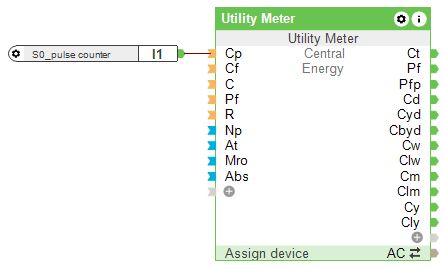
You can connect an S0-Meter directly to a digital input on the Miniserver or an Extension. Then link this input to input (Cp) of the Utility Meter block and enter the number of pulses per kWh from the meter in parameter (Np). This information can be found in the documentation of the S0-Meter.
S0-Meter connected to digital input set to frequency counter↑
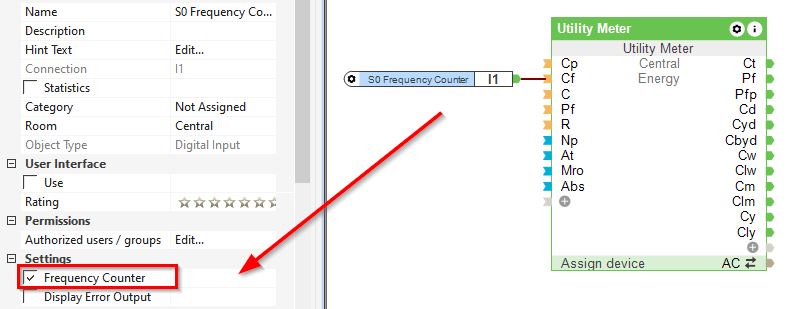
You can connect an S0-Meter directly to a digital input on an Extension. Connect the digital input to input (Cf) of the Utility Meter. It is important that the checkbox "Frequency Counter" is ticked (see screenshot). Then enter the number of pulses per kWh from the meter in parameter (Np). This information can be found in the documentation of the S0-Meter.
Energy monitoring with the Smart Socket Air↑
To record the energy measured by the Smart Socket Air, connect the energy and power inputs of the Smart Socket Air to the (C) and (Pf) inputs. Parameter (Abs) is set to 0.