XAL Light Air is one of the Loxone Air compatible luminaires from XAL.
It is available with 1-2 Luminary heads and optional sensors and buttons.
Table of Contents
Commissioning↑
Please follow the manufacturer's instructions for mounting, installation, and power supply to the Luminiaire.
In delivery state, pairing mode will be active after the power supply has been established.
This is indicated by the power button flashing as follows:
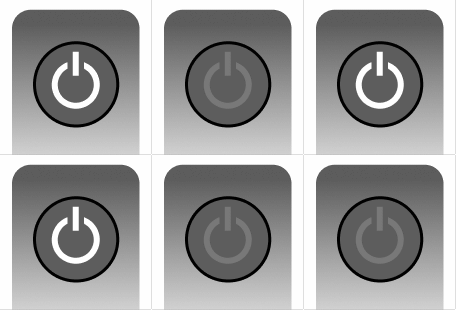
Then follow the pairing procedure on the Air Interface.
To activate the pairing mode manually, switch off the power for 10 seconds, then switch it back on. If no connection to a Miniserver can be established for two minutes, then pairing mode is activated for 30 minutes.
If the connection to the paired Air Interface gets lost, the luminaire is offline.
This is indicated by the power button flashing as follows:
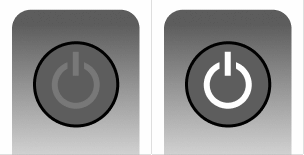
Button Assignment↑
There are up to 8 freely programmable buttons on the luminaire, which may be divided into up to two keypads.
The numbered button inputs in Loxone Config correspond to these buttons starting with the first keypad in ascending order. Below are two examples:
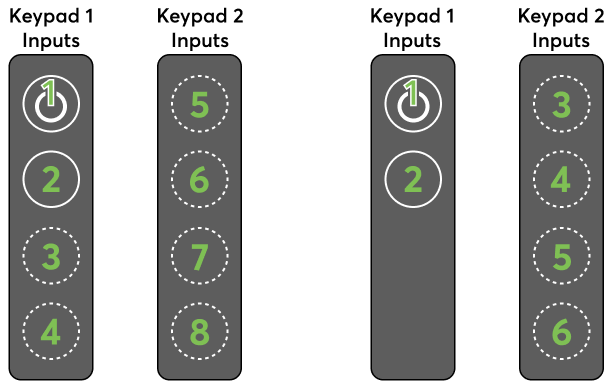
Diagnostic Inputs↑
| Summary | Description | Unit | Value Range |
|---|---|---|---|
| Online Status XAL Light Air | Indicates whether the device can be reached by the Miniserver. Diagnostics for Air devices Diagnostics for Tree devices Diagnostics for Extensions | Digital | 0/1 |
Sensors↑
Manually inserted devices show all possible Sensors and Actors.
When the device is paired or an existing device is replaced, all not supported IOs will be removed.
| Summary | Description | Unit | Value Range |
|---|---|---|---|
| Motion Sensor 1 | Motion Detection sensor 1 | - | 0/1 |
| Motion Sensor 2 | Motion Detection sensor 2 | - | 0/1 |
| Brightness | Brightness Sensor | Lx | ∞ |
| Button1 | General Button 1 | - | 0/1 |
| Button2 | General Button 2 | - | 0/1 |
| Button3 | General Button 3 | - | 0/1 |
| Button4 | General Button 4 | - | 0/1 |
| Button5 | General Button 5 | - | 0/1 |
| Button6 | General Button 6 | - | 0/1 |
| Button7 | General Button 7 | - | 0/1 |
| Button8 | General Button 8 | - | 0/1 |
| Temperature | Indoor Temperature Sensor | ° | ∞ |
| Humidity | Humidity Sensor | % | ∞ |
| CO2 | CO2 Sensor | ppm | ∞ |
| Sound | Sound Sensor | - | ∞ |
Actuators↑
| Summary | Description | Unit | Value Range |
|---|---|---|---|
| Direct Lighting | Smart Actuator for controlling lighting via compatible Lighting function blocks. | % | 0...100 |
| Indirect Lighting | Smart Actuator for controlling lighting via compatible Lighting function blocks. | % | 0...100 |
| Smart Actuator | - | ∞ | |
| Smart Actuator | - | ∞ |
Properties↑
| Summary | Description | Unit | Value Range | Default Value |
|---|---|---|---|---|
| Monitor Online Status | If checked, you will be notified via System Status or the Mailer if the device is no longer available or goes offline. | - | - | - |
| Disable Repeater functionality | Disable repeater functionality of this Air device. Loxone Air is based on mesh technology. Any air device connected to the power supply can repeat packets from other Air devices, thus extending the range and stability of the overall system. In large systems with a large number of air devices in a confined space, the communication between the air devices can lead to a very high radio channel utilization. A reliable accessibility of the air devices can not be guaranteed. Disabling repeater functionality on individual Air devices can help. Do not disable this function recklessly as this may affect the range and stability of the system. | - | - | - |
| Serial Number | Serial number of Air device. Automatic pairing can be enabled on the Air Base. Automatic pairing can be enabled on the Airbase for a set time. | - | - | - |
| Overrun time motion | Overrun time for motion sensor(s) | s | 10...600 | 90 |
| Brightness transmission cycle | Transmission cycle for brighness sensor(s) | s | 60...600 | 60 |
| Sensor transmission cycle | Transmission cycle for other analog sensors | s | 60...900 | 900 |
| Button Behaviour | Specifies the behavior when a button is pressed. Pulse: Sends a pulse on rising edge OnOff : Sends ON on rising edge and OFF on falling edge, used for long click | - | - | - |