Uses a given input value and sets a validated value on the output
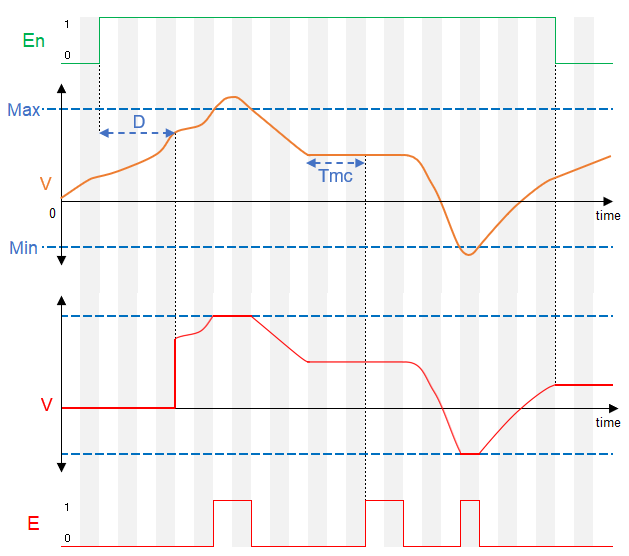
Validating the input value can be suppressed with input Enable. While this input is connected and set to off, changes of the input are ignored.
Invalid values are omited. Output Value always shows last valid value in the allowed range.
When input Enable is off, validation is disabled and outputs will keep the last valid values
Table of Contents
Inputs↑
| Abbreviation | Summary | Description | Value Range |
|---|---|---|---|
| V | Value | Value to be validated | ∞ |
| En | Enable | If input is connected, value will not be set on output until delay D has elapsed after enabling input. | 0/1 |
Parameters↑
| Abbreviation | Summary | Description | Unit | Value Range | Default Value |
|---|---|---|---|---|---|
| Tmc | Minimum Change Interval | If value is > 0, the value of the input must change in this interval. Interval is not checked if input Enable is off. | s | ∞ | 3600 |
| Min | Minimum Value | Smallest valid value. Output will not be set if input value is below minimum. | - | ∞ | -1000 |
| Max | Maximum Value | Largest valid value. Output will not be set if input value is above maximum. | - | ∞ | 1000 |
| D | Delay | Validated value will be set on output after configured delay, only if input Enable is connected and activated. For multiple value changes while waiting for delay, the last validated value will be set on output. With each activation of the Enable input, the delay is awaited once. | s | ∞ | 0 |
Outputs↑
| Abbreviation | Summary | Description | Value Range |
|---|---|---|---|
| V | Value | Validated output value | ∞ |
| E | Error | Output is active when input value is not valid or Minimum Change Interval timed out. | 0/1 |
Timing Diagram↑