The Table Lamp Air is a lamp with warm white light, RGB signal light, has an integrated Li-Ion battery and touch buttons
It is controlled and programmed wirelessly via a Miniserver and the Loxone Air technology.
Table of Contents
Commissioning↑
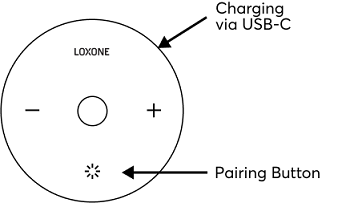
In delivery state, pairing mode will be active after the power supply has been established. This is indicated by the status LED flashing red/green/orange.
Then follow the pairing procedure on the Air Interface.
To activate the pairing mode manually, hold down the pairing button for at least 5 seconds after establishing power supply.
Pairing mode ONLY works when the device is plugged in. If the lamp is in pairing mode and then unplugged, it returns to the delivery state (switched off).
Sensors↑
| Summary | Description | Value Range |
|---|---|---|
| Charging status | 0: USB not connected 1: Battery is charging 2: Battery is fully charged 3: Charging error | 0...3 |
| T5 | T5 for Lighting and Audio | ∞ |
Actuators↑
| Summary | Description | Unit | Value Range |
|---|---|---|---|
| Disable T5 | Disables T5 Buttons | - | 0/1 |
| Smart Actuator RGB | - | ∞ | |
| Smart Actuator W | Smart Actuator Dimmer | % | 0...100 |
Diagnostic Inputs↑
| Summary | Description | Unit | Value Range |
|---|---|---|---|
| Online Status Table Lamp Air | Indicates whether the device can be reached by the Miniserver. Diagnostics for Air devices Diagnostics for Tree devices Diagnostics for Extensions | Digital | 0/1 |
| Battery Low | This input activates when the battery level is <= 15%. | Digital | 0/1 |
| Battery Level | This sensor indicates the current battery level. | % | ∞ |
Properties↑
| Summary | Description | Default Value |
|---|---|---|
| Monitor Online Status | If checked, you will be notified via System Status or the Mailer if the device is no longer available or goes offline. | - |
| Disable Repeater functionality | Disable repeater functionality of this Air device. Loxone Air is based on mesh technology. Any air device connected to the power supply can repeat packets from other Air devices, thus extending the range and stability of the overall system. In large systems with a large number of air devices in a confined space, the communication between the air devices can lead to a very high radio channel utilization. A reliable accessibility of the air devices can not be guaranteed. Disabling repeater functionality on individual Air devices can help. Do not disable this function recklessly as this may affect the range and stability of the system. | - |
| Serial Number | Serial number of Air device. Automatic pairing can be enabled on the Air Base. Automatic pairing can be enabled on the Airbase for a set time. | - |
| Actuator Type | Use device with Standard Actuator(s) or Smart Actuator(s) Smart Actuators support dynamic fade times and can only be used with the Lighting Controller. | - |
| Display charge status via LED | Activate the charge indicator LEDs. Orange LED: Battery is charging Green LED: Battery is fully charged | - |
| Button Behaviour | Specifies the behavior when a button is pressed. Pulse: Sends a pulse on rising edge OnOff: Sends ON on rising edge and OFF on falling edge, used for long click Automatic: Sends a pulse on rising edge for button 3 (lighting). Sends ON on rising edge and OFF on falling edge for buttons 2 & 5 (music) to enable volume up/down via long press | - |
| Audible acknowledgement | Audible acknowledgement on button press | - |
| Show Button 2 | Show individual button | - |
| Show Button 3 | Show individual button | - |
| Show Button 5 | Show individual button | - |