The Stereo Extension adds an additional stereo speaker output to the Audioserver/Miniserver Compact. The stereo channel can also be separated and used as two single channels for different rooms or spaces.
The Stereo Extension also features a digital SPDIF output.
Up to 10 Stereo Extensions can be connected to one Audioserver/Miniserver Compact.
Table of Contents
- Commissioning
- Wiring & Topology
- Tree Turbo Speed Requirements for Audio Devices
- Separate Stereo Outputs
- SPDIF Out
- Status LEDs Description
- Speaker Installation Planning
- Inputs, Outputs, Properties
- Safety Instructions
- Documents
Commissioning↑
The Stereo Extension is installed on a DIN rail in a suitable enclosure.
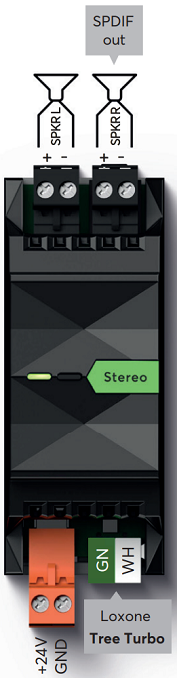
Connect the power supply (orange terminal) and Tree Turbo data lines (green/white terminals). The Stereo Extension will boot its operating system over the Tree Turbo interface, after switching on the power supply. The Audioserver or Miniserver Compact must also be ready for operation. After about one minute the Stereo Extension is ready and will blink orange.
After that, please proceed with Pairing Tree Turbo Devices
Note: The Stereo Extension does not require an IP address for basic operation and will appear in the search dialog without one. An IP address is only needed when using AirPlay or Spotify Connect. When physically adding or removing Tree Turbo devices, always power off the Audioserver or Miniserver Compact first to ensure correct detection.
To ensure correct heat dissipation:
Install the Stereo Extension upright in the distribution cabinet to ensure optimal heat dissipation.
Place audio components in the upper part of the distribution cabinet.
Maintain sufficient distance between Stereo Extensions to allow proper air circulation and prevent overheating.
Do not place heat-generating devices (e.g., power supplies, other Stereo Extensions, Audioservers, amplifiers, Ethernet devices, ...) underneath the Stereo Extension.
To avoid interference on speaker lines, route them separately from other cables.
Wiring & Topology↑
The following wiring topologies (Tree Turbo) are supported, with a maximum cable length of 150 m /492 ft:

We recommend using the Loxone Audio Cable for wiring. Use the green, green-white twisted pair for the Tree Turbo data line and the orange/white-orange pair with a cross-section of 1.5 mm² (AWG 16) for the 24 V DC power supply.
For longer cable runs or when connecting multiple Tree Turbo devices with high power consumption, additional power supplies can be installed near the devices, or multiple supply lines can be routed.
If separate power supplies are used, we recommend connecting the GNDs of all power supplies together.
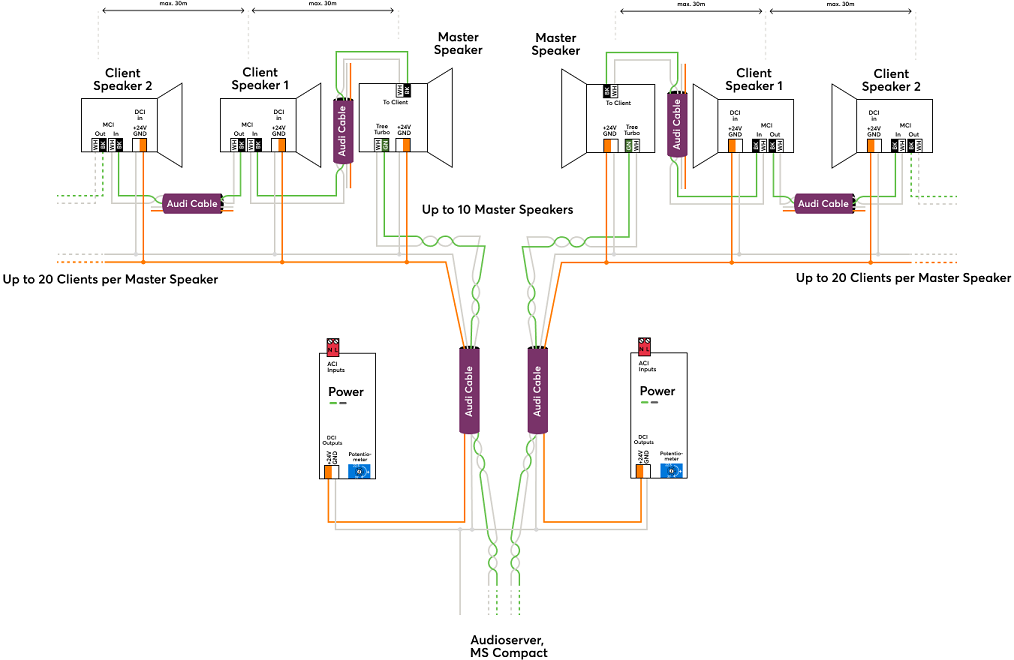
Detailed wiring with the Audio Cable
Master Install Speaker (Install Speaker 7 Master, Install Speaker 10 Master, Install Sub 10 Master):
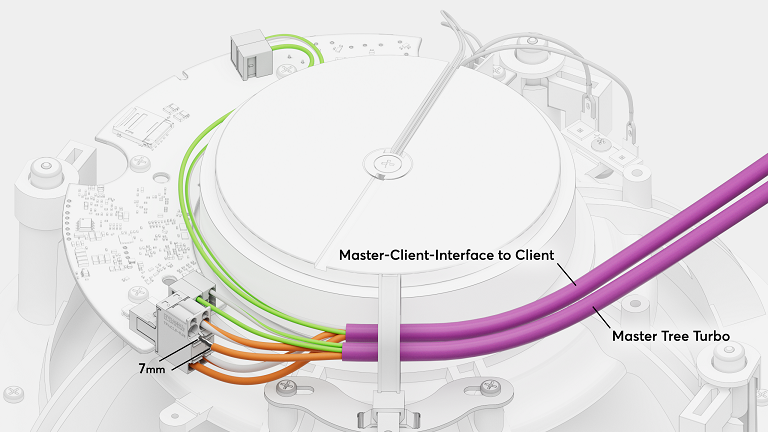
Client Install Speaker (Install Speaker 7 Client, Install Speaker 10 Client, Install Sub 10 Client):
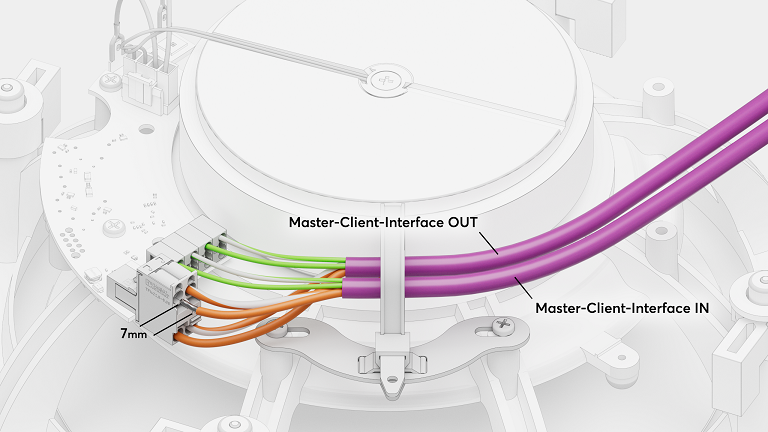
Satellite Speaker IP64 Master:
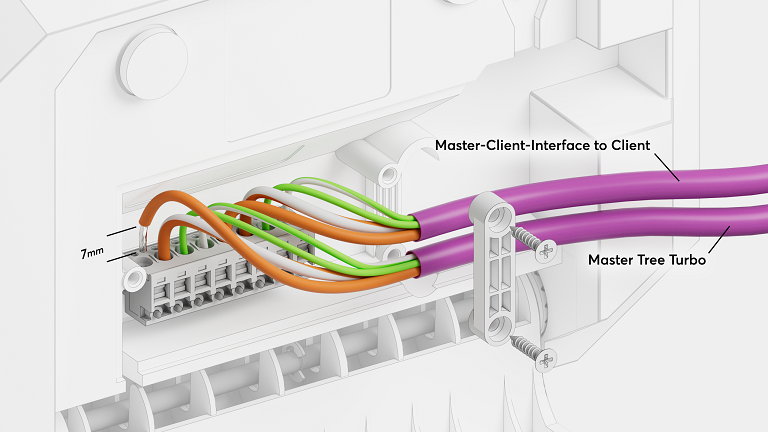
Satellite Speaker IP64 Client:
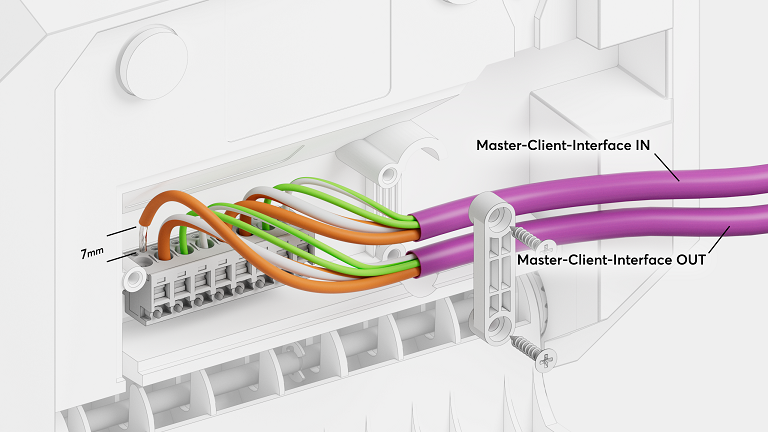
Stereo Extension:
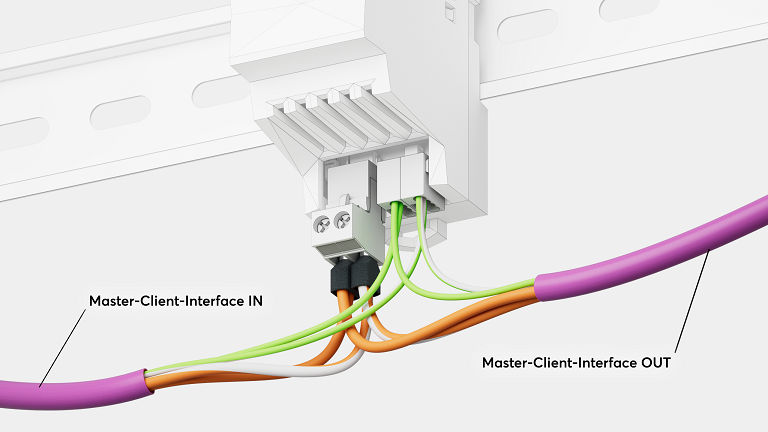
 | The Tree Turbo interface is based on a completely different technology than the well-known Tree interface. Therefore, the Tree and the Tree Turbo interface must not be connected! The Tree Turbo data lines should not be run together with other data or signal lines in the same cable. |
The Tree Turbo communication is IP based, therefore IP addresses for all Tree Turbo devices will appear on the network.
Tree Turbo Speed Requirements for Audio Devices↑
For reliable audio playback over Tree Turbo, it is important to verify data throughput using the Health Check diagnostic tool in Loxone Config.
Recommended speed values:
Above 180 Mbit/s – Optimal performance
100–150 Mbit/s – May cause audio dropouts, especially when using services such as Spotify Connect, Bluetooth, or AirPlay
Below 100 Mbit/s – Can negatively affect all audio streams, depending on the number of clients and active streams
If the Tree Turbo speed is too low, please verify the following:
We recommend using the Loxone Tree or Loxone Audio Cable
We recommend using the Weidmüller terminals available in our webshop.
Avoid parallel routing of Tree Turbo cables from different Audioservers or Miniserver Compacts. These cables must not be installed in close proximity to each other to prevent crosstalk.
Observe the maximum cable length of 150 m /492 ft.
The number of Tree Turbo devices is limited to 10 devices per Tree Turbo interface.
Separate Stereo Outputs↑
The option to split one stereo output of the Audioserver or of a Stereo Extension into two separate channels allows you to cover two different rooms or areas with one speaker each. The two outputs can be used independently on separate Audio Player blocks.
To separate the channels, first click on the output of an Audioserver or a Stereo Extension in the Periphery tree, then click on the menu bar button Separate Stereo Output. Now two individual outputs are available in the Periphery tree. In order to merge the two outputs into a stereo output again, click on the button Merge to Stereo Output.
Note: If the outputs are separated, there can be slight crosstalk between the two channels.
This means that at a volume of 65% or higher, you may hear the audio signal on the adjacent channel, even if it is switched off.
For directly adjacent rooms, this effect is usually not noticeable, since at this volume the music from the adjacent room can also be heard through the walls.
The Line Out and SPDIF Out options are not available for separated outputs.
SPDIF Out↑
The SPDIF Out (black jack socket) is a digital electrical SPDIF output. AV devices like amplifiers or active speakers can be connected to this output. Use a 3.5mm to RCA cable, the electrical SPDIF signal is output on the left (white) RCA plug. Connect this plug to a digital coaxial audio input.
The output volume is variable and corresponds to the volume that is currently set on the Audio Player.
For a fixed output volume, select external volume mode in the settings of a Stereo Output set to SPDIF.
Equalizer settings are not applied to the SPDIF Out.
Use high-quality shielded cables and run them separately from other cables.
The SPDIF Out can be activated in the properties of the respective output:
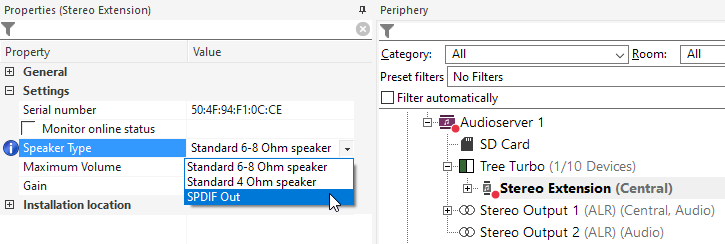
When SPDIF Out is selected for an output, the speaker outputs are disabled and the signal is output at the SPDIF Out instead.
The SPDIF Out option is not available for separated outputs.
Status LEDs Description↑
Left LED:
Orange flashing: Extension has started, but has not yet been paired with the Audioserver/Miniserver Compact, or can no longer reach it.
Green flashing: Everything OK, device is online.
Quick red/green flashing: Device was selected in Loxone Config and is identifying.
Not flashing: Check power supply and Tree Turbo connection.
Continuous green/orange: Extension tries to boot from the Audioserver/Miniserver Compact, but cannot reach it. Check Tree Turbo connection and Audioserver/Miniserver Compact.
Right LED:
Permanent orange: Extension is booting.
Speaker Installation Planning↑
More information about speaker planning can be found here.
Loxone Install Speakers require installation in a closed enclosure or a cavity, such as in ceilings or walls, to fully develop their sound volume.
Suitable mounting enclosures for drywall or concrete installation are available in the Loxone Shop.
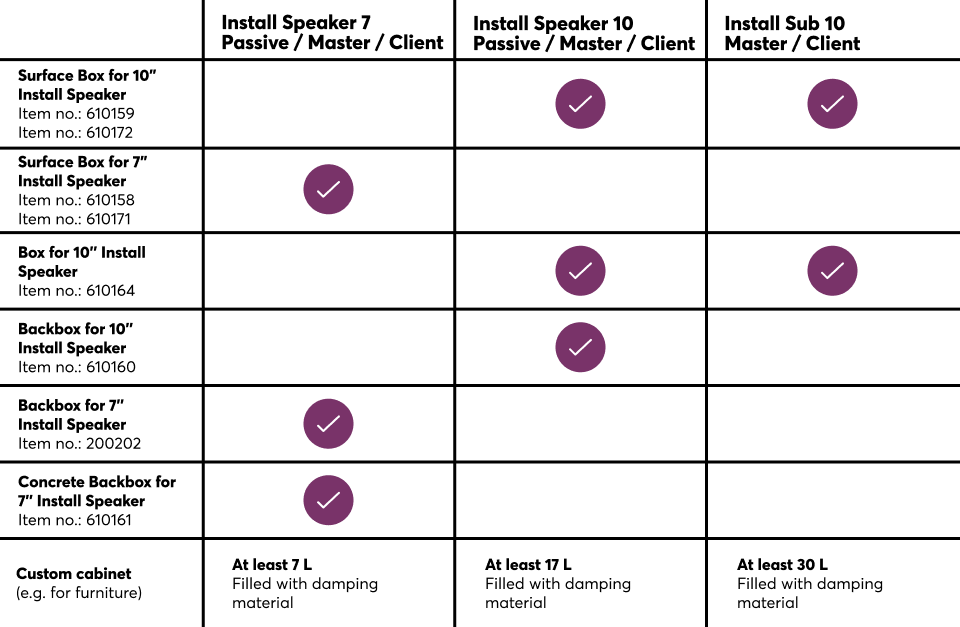
While an enclosure is not strictly required for fully enclosed surfaces, speakers must be installed in a rear mounting enclosure when used in open surface structures, such as acoustic ceilings.
The required acoustic installation volume varies based on the speaker size and type:
| Speaker type | Minimal volume | Recommended volume |
|---|---|---|
| Install Speaker 7 | 7.2l | 9l or more |
| Install Speaker 10 | 14.5l | 18l or more |
| Install Sub 10 | 18l | 30l |
Larger enclosures or cavities may also be used, provided they are closed.
Speaker Quantity
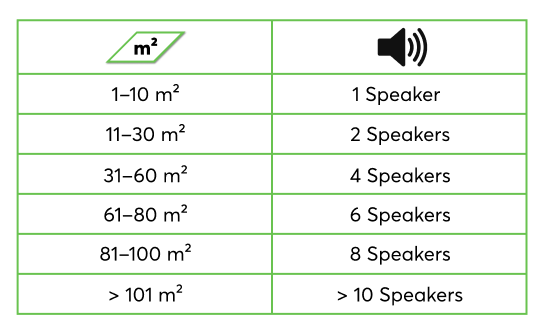
In main living areas, at least two speakers should be used to achieve good sound quality. For small rooms or ancillary spaces, a single speaker is usually sufficient.
Depending on the room size, we recommend planning the following number of speakers per room:
Ceiling installation
Plan the speaker installation positions to be evenly distributed throughout the room. A minimum distance of 50cm/20″ from walls should be maintained to avoid sound reflections.
In ceiling installations, the stereo effect is barely noticeable and can often be neglected. Therefore, a full stereo signal is later assigned to each individual speaker via the connection to the Audio Player block (Downmix).
Wall installation
At the most frequently used listening position, at least two speakers should be arranged to achieve a good stereo effect.
The left-right assignment of the speakers is made later through the connection to the Audio Player block.
Diagnostic Inputs↑
| Summary | Description | Unit | Value Range |
|---|---|---|---|
| Amplifier limit | If the temperature of the amplifier reaches a critical point, the volume of the zone is reduced. This may be due to overloading or excessively high ambient temperature. | - | 0/1 |
| Online Status Stereo Extension 1 | Indicates whether the device can be reached by the Miniserver. Diagnostics for Air devices Diagnostics for Tree devices Diagnostics for Extensions | Digital | 0/1 |
| Temperature Shutdown | Input is active, when the outputs of the device have been switched off due to high device temperature. Possible reasons: Ambient temperature too high, outputs overloaded. | Digital | 0/1 |
Properties↑
| Summary | Description | Unit | Value Range | Default Value |
|---|---|---|---|---|
| Serial Number | Specifies the serial number of the device. | - | - | - |
| Monitor Online Status | If checked, you will be notified via System Status or the Mailer if the device is no longer available or goes offline. | - | - | - |
| Speaker Type | Speaker type used in this zone to find the optimal sound settings. | - | - | - |
| Maximum Volume | Determines the maximum (physical) output power of the amplifier in percent, thus limiting the maximum possible volume for this output. The volume values from 0-100% of the Audio Player or App are scaled accordingly. | % | 0...100 | 100 |
| Gain | Adjusts the volume of this output in decibels. This control helps balance the sound levels across different speakers or environments, ensuring consistent audio output. The volume is scaled and limited according to the specified maximum volume. | - | -6...6 | 0 |
Safety Instructions↑
Installation must be carried out by a qualified electrician in accordance with the applicable regulations.
This device must be mounted on a DIN rail in an electrical distribution enclosure to ensure protection against contact, water and dust.
Only mount the device on a horizontal DIN rail to ensure heat dissipation by convection.
Documents↑
Datasheet Install Speaker 7 Passive
Datasheet Install Speaker 10 Passive