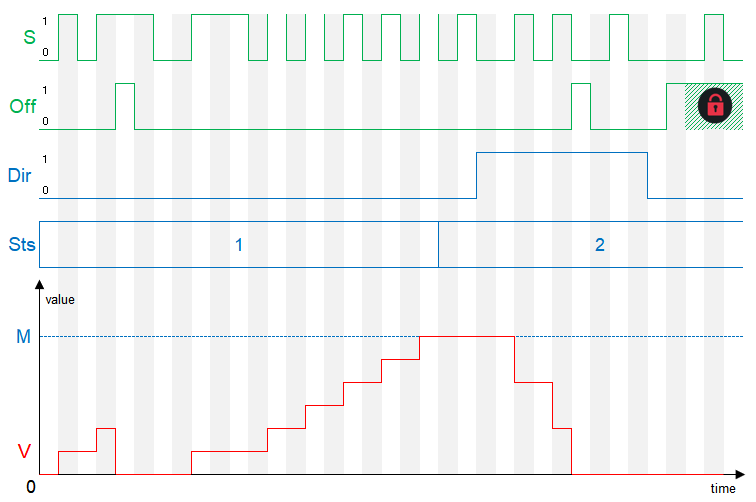
With the stepper, an analog value can be increased or decreased by a defined step size with each pulse on the Step.
Table of Contents
Inputs↑
| Abbreviation | Summary | Description | Value Range |
|---|---|---|---|
| S | Step | 0/1 | |
| Off | Off | Pulse: Outputs are reset / switched off. On: Block is locked. Dominating input. | 0/1 |
Outputs↑
| Abbreviation | Summary | Value Range |
|---|---|---|
| V | Set value | ∞ |
Parameters↑
| Abbreviation | Summary | Description | Value Range | Default Value |
|---|---|---|---|---|
| Rem | Remanence input | Remanence input: If active, the function block retains its previous state after a Miniserver reboot. The state of the function block is saved: – When saving to the Miniserver – At a planned reboot – Before a backup – Once per hour The data is saved on the SD card. | 0/1 | 0 |
| Dir | Direction | 0 = up, 1 = down | 0/1 | 0 |
| Sts | Step size | ∞ | 1 | |
| M | Maximum | Maximum of output (V) | ∞ | 10 |
Timing Diagram↑