The Loxone Presence Sensor Tree is used to detect presence, motion and brightness in a room. In addition to the passive infrared sensor, it also has an acoustic presence detection.
The Presence Sensor is also available as a flush-mounted in-ceiling version, matching the design of our LED spots. The functions of both Presence Sensor versions are identical.
 | The Presence Sensor can also detect some pets. Although the sensitivity of the sensor can be reduced, there is no dedicated technology that excludes the detection of pets. |
Datasheet Presence Sensor Tree
Datasheet Flush-mounted Presence Sensor Tree
Table of Contents
- Mounting
- Commissioning
- Usage and Functionality
- Set volume thresholds
- Inputs, Outputs, Properties
- Safety Instructions
- Documents
Mounting↑
Switch off the supply voltage before installation.
Presence Sensor Tree:
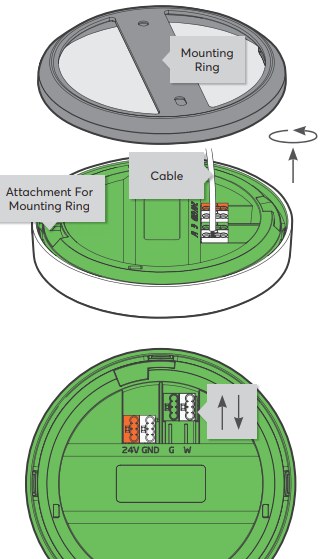
Connect the power supply (orange/white terminal) and Tree communication wires (green/white terminals).
Then attach the Presence Sensor to the mounting ring.
Flush-mounted Presence Sensor Tree:
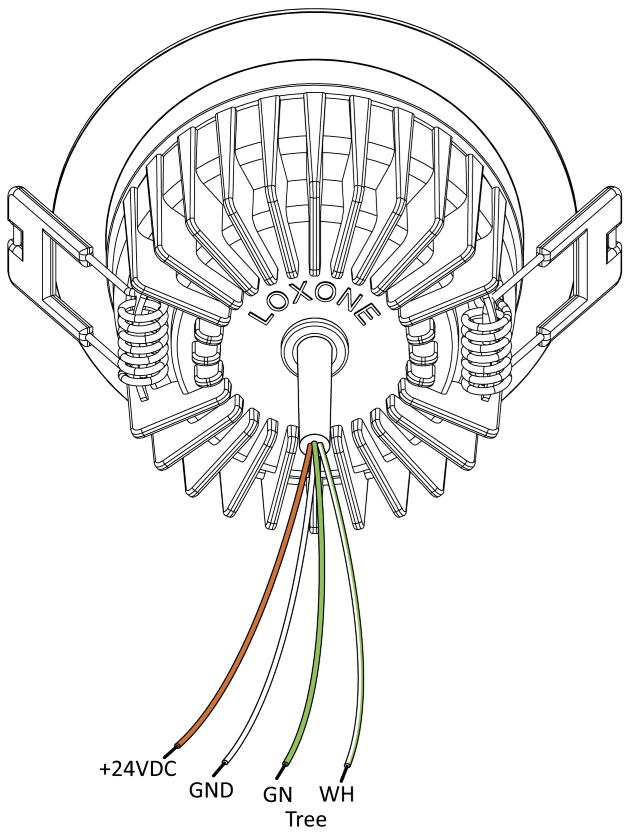
Connect the power supply (orange/white wire) and Tree communication wires (green/white wire).
Flip the spring clips back and snap the device into the mounting hole. Make sure that no wires are jammed.
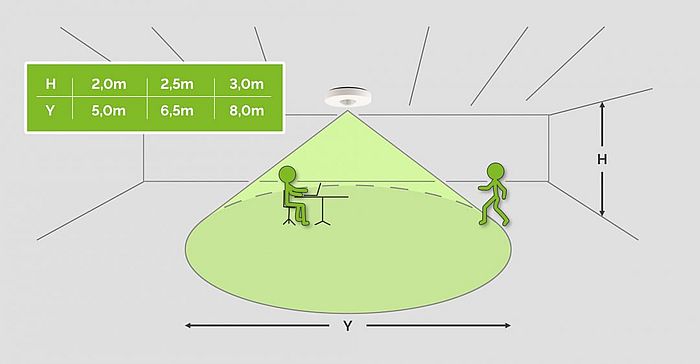
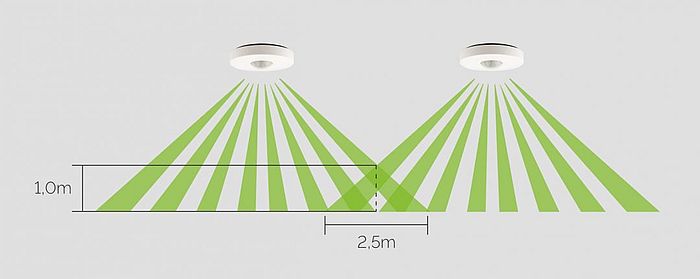
 | For motion to be detected accurately, correct placement of the Presence Sensor on the ceiling is essential. The following drawings can assist with this: |
| Sensitivity does not create a strict cutoff for the detection range; instead, it adjusts internal parameters that influence the range. To create blind spots or define specific detection zones, please use the stickers provided in the package. |
Commissioning↑
Shortly after power-up, the status LED will blink orange if the wiring is correct (connection to Tree Extension and Miniserver is established).
Then follow the pairing procedure on the Tree Interface.
Usage and Functionality↑
The presence input of the sensor is used on function blocks with presence input (P). It can also be used for blocks with motion sensor (Mo) inputs, e.g. Lighting Controller. However, the overrun time is then no longer specified in the blocks but via the Presence Sensor. The overrun time (Moet) of the blocks is set to 0.1s when using the presence input. As a result, lighting, for example, remains active for as long as the sensor indicates presence.
In a quiet setting, it may happen that no presence is detected although a person is in fact present. For example, if you do not move for a long time when reading and no sounds occur. As a result, the lighting is switched off. Within 10 seconds of the end of presence, it is possible to reactivate the presence input using sound alone. You could shout "Hey", for example, and switch the lighting back on. It is not necessary to move during this time.
Set volume thresholds↑
From the Presence Sensor's properties you can open a diagram for setting the volume thresholds:

A graph is drawn using the current ambient volume of the selected Presence Sensor. Use the graph to adjust the volume thresholds for presence and sound level alarm to the specific location.
When doing so, also take into account intermittent sounds that could trigger presence or an alarm even when no one is present. For example, dishwashers (extending presence) or high levels of noise from outside such as construction sites, heavy traffic or the like (sound level alarm).
Sensors↑
| Summary | Description | Unit | Value Range |
|---|---|---|---|
| Volume Minimum | Provides the minimum volume periodically based on the value set in "Volume Transmission Cycle". | - | 20...2000 |
| Volume Maximum | Provides the maximum volume periodically based on the value set in "Volume Transmission Cycle". | - | 20...2000 |
| Brightness | Measured value of the current brightness | Lx | 0...32000 |
| Motion | Input is active when motion is detected | - | 0/1 |
| Presence | Input is active as long as presence is detected. Motion activates the input, volume and motion keep it active. | - | 0/1 |
| Sound Level Alarm | Input provides a pulse when the volume exceeds the threshold for the sound level alarm. 1 pulse per 10s. | - | 0/1 |
Diagnostic Inputs↑
| Summary | Description | Unit | Value Range |
|---|---|---|---|
| Online Status Presence Sensor Tree | Indicates whether the device can be reached by the Miniserver. Diagnostics for Air devices Diagnostics for Tree devices Diagnostics for Extensions | Digital | 0/1 |
Properties↑
| Summary | Description | Unit | Value Range | Default Value |
|---|---|---|---|---|
| Monitor Online Status | If checked, you will be notified via System Status or the Mailer if the device is no longer available or goes offline. | - | - | - |
| Serial Number | Specifies the serial number of the device. Enter 'Auto' to automatically pair a Tree device with unknown serial number. This can only be used if there is only one Tree device of the same type on a standalone Miniserver (not in a Client-Gateway setup). Save in the Miniserver to pair the Tree device. Afterwards the program must be loaded from the Miniserver to transfer the actual serial number of the Tree device into the program. | - | - | - |
| Presence Volume Threshold | Minimum sound level to detect presence | - | 20...2000 | 250 |
| Sound Level Alarm Volume Threshold | Minimum volume to trigger sound level alarm | - | 20...2000 | 1000 |
| Volume thresholds | Configure the volume thresholds using a graph of the current volume | - | - | - |
| Overrun Time Presence | Overrun time for presence input. | s | 2...60000 | 300 |
| Overrun time motion | The 'Motion (Mo)' input remains active following the last detected motion for the set time. A higher value means less packets have to be sent via Tree and Link. If the motion detector is used for the alarm system, the time is automatically set to 3 seconds when the alarm system is armed. | s | 2...900 | 60 |
| Volume Transmission Cycle | Transmission cycle for minimum and maximum volume (1-3600 sec, 0=off) | s | 0...3600 | 300 |
| Brightness transmission cycle | The brightness is transmitted periodically at the set transmission cycle (0=OFF). In addition, the brightness is transmitted when presence is detected or when there is a change of at least 30%. If the brightness is used by a Constant Brightness Controller, it is transmitted at a change of 5%. | s | 0...7200 | 900 |
| Presence duration without motion | Presence ends when no motion has been detected for this duration. This prevents constant ambient noise from keeping presence active. Before using this function, check if the volume threshold for presence is set accordingly. 0 = Disables this function. | s | 0...60000 | 1800 |
| Sensitivity | Effects the sensitivity and thus also the distance over which motion can be sensed | - | - | - |
Safety Instructions↑
The installation must be carried out by a qualified technician in accordance with all applicable regulations.
Ensure that the device is protected from water.
Documents↑
Datasheet Presence Sensor Tree
Datasheet Flush-mounted Presence Sensor Tree