The Loxone IR Meter Reader Air allows the direct reading of compatible electronic electricity meters or heat meters with infrared interface.
 | List of supported meters |
 | The IR Meter Reader Air supports the measurement of current, voltage, and power, and supports OBIS IDs 1.8.x and 2.8.x. |
Table of Contents
Mounting↑
The IR Meter Reader Air magnetically attaches to the circular infrared interface of the meter. The device is supplied with power (12-24VDC) either by using the enclosed Micro USB power adapter or via the terminals. Position the device on the meter so that the USB port points downwards and the Loxone logo is displayed correctly.
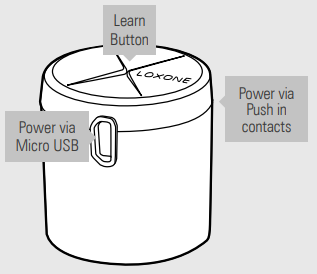
A magnetic ring in the Meter Reader holds the device to the meter's IR interface.
Some meters may already be equipped with a built-in magnetic ring. Depending on the magnet's polarity, the two magnets may repel each other.
In such a case, the Loxone IR Meter Reader Air can be opened to adjust the orientation of the magnetic ring.
Commissioning↑
In delivery state, pairing mode will be active after the power supply has been established. This is indicated by the status LED flashing red/green/orange.
Then follow the pairing procedure on the Air Interface.
To activate the pairing mode manually, hold down the pairing button for at least 5 seconds after establishing power supply. The pairing button and status LED are located centrally on the top of the device.
M-Bus Meters↑
The Meter Reader supports the M-Bus protocol. To learn in a new meter, choose the M-Bus meter type in the dropdown and save into the miniserver. Start the device search by clicking the ribbon button at the top. When a M-Bus device is added, all analog inputs offered by the meter will be created dynamically.
Sensors↑
| Summary | Description | Unit | Value Range |
|---|---|---|---|
| Energy import | Provides the value of the imported energy. | kWh | 0...∞ |
| Energy export | Provides the value of the exported energy. | kWh | 0...∞ |
| Power | Provides the value of the current power. | kW | -∞...0 |
Diagnostic Inputs↑
| Summary | Description | Unit | Value Range |
|---|---|---|---|
| Online Status IR Meter Reader Air | Indicates whether the device can be reached by the Miniserver. Diagnostics for Air devices Diagnostics for Tree devices Diagnostics for Extensions | Digital | 0/1 |
Properties↑
| Summary | Description | Value Range | Default Value |
|---|---|---|---|
| Monitor Online Status | If checked, you will be notified via System Status or the Mailer if the device is no longer available or goes offline. | - | - |
| Serial Number | Serial number of Air device. Automatic pairing can be enabled on the Air Base. Automatic pairing can be enabled on the Airbase for a set time. | - | - |
| Meter Type | Type of Meter Please note that depending on your supplier not all data may be available. Often power readings are not available! | - | - |
| Send Interval [s] | Interval after which the meter interface sends all available data to the miniserver. Minimum is 10 seconds but consider setting it higher to reduce air traffic. Value 0 disables interval sending, i.e. data is only sent when changes higher than 5% occur. | ∞ | 300 |
| AES Key | For meters with an encrypted interface (e.g. AMIS), this AES key (customer key) must be requested from the energy supplier and entered here. No key is required for unencrypted meters. | - | - |
Safety Instructions↑
The installation must be carried out by a qualified technician in accordance with all applicable regulations.
Ensure that the device is protected from water.