The Irrigation function block is used to control an irrigation system, for example in your garden.
It is able to factor in weather data such as precipitation and weather forecasts, allowing for demand-based irrigation.
Table of Contents
Properties↑
| Summary | Description | Value Range | Default Value |
|---|---|---|---|
| Configuration | Configuration of the irrigation zones | - | - |
| Number of Entries | Maximum number of saved messages. | 1...50 | 50 |
Inputs↑
| Abbreviation | Summary | Description | Unit | Value Range |
|---|---|---|---|---|
| Act | Activation | Activates irrigation. Starts only if there was insufficient rain, and no sufficient amount of rain is expected. | - | 0/1 |
| Sel | Select valve | Activates valve (V1-8). 0 - deactivates all valves 9 - activates all valves | - | 0...9 |
| Raf | Rain forecast | Input for the expected amount of precipitation in the next hours | l/m² | 0...∞ |
| Ra | Rain | Input for a rain sensor or equivalent information. Used to determine the rain duration. | - | 0/1 |
| Off | Off | Pulse: Outputs are reset / switched off. On: Block is locked. Dominating input. The name of the connected sensor is used in the user interface. | - | 0/1 |
Outputs↑
| Abbreviation | Summary | Description | Value Range |
|---|---|---|---|
| P | Pump | Output for pump control | 0/1 |
| V1-8 | Valve 1-8 | Output for valve control | 0/1 |
| Av | Active valve | Currently active valve 0 - All off 9 - All on | 0...9 |
| API | API Connector | Intelligent API based connector. API Commands | - |
Parameters↑
| Abbreviation | Summary | Description | Unit | Value Range | Default Value |
|---|---|---|---|---|---|
| MaxR | Maximum precipitation in the next set hours | If the precipitation forecast (Raf) is greater than this value, irrigation is no longer activated via input (Act). | l/m² | 0...∞ | 2 |
| MaxRa | Maximum rain duration in the last 24 hours | If it rained for longer than this time in total in the last 24 hours, irrigation is no longer activated via input (Act). | s | 0...∞ | 1800 |
| Tv1-8 | Valve Time 1-8 | Duration of how long the valve is active until the next one is activated. | s | 0...∞ | 600 |
Application Example↑
By double-clicking on the block or via its settings, the configuration can be accessed, in which irrigation zones can be named and an irrigation duration can be set for each zone.
Each of these zones can control valves or valve groups via a separate output:
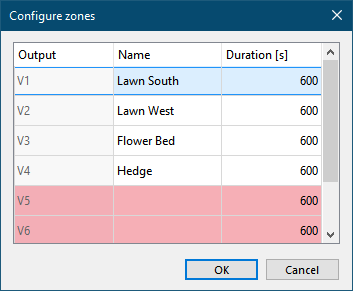
In this example, there are four irrigation zones that cover two lawns, one flower bed and a hedge. Up to 8 zones can be configured in the function block.
Next, the inputs and outputs of the function block are connected in programming:
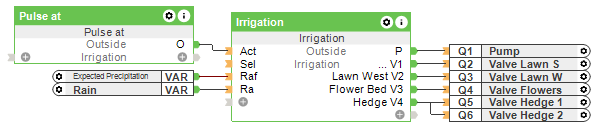
The block's (V1-8) outputs are used to control the irrigation valves. Once the first output is connected, additional outputs will be displayed.
The (P) output is used to control the irrigation pump.
Depending on the application, additional logic may be required, e.g. to disable the pump when the water level is low.
A rain sensor is connected to the (Ra) input in order to determine rain duration. In the example, the system variable for rain is used.
The (Raf) input is used to provide the block with a forecast of the expected precipitation for the next few hours. The Loxone Weather Service is ideal for this, in the example the system variable for the expected precipitation is used.
The input (Act) enables the irrigation, for example by a pulse at a certain time.
However, the irrigation will only start if there was insufficient rain in the recent past (input Ra, parameter MaxR) and if the expected amount of rain is also insufficient (input Raf, parameter MaxR).
When irrigation starts, the pump is switched on, and the outputs for the valves are switched on one by one for the set time (Tv1-8).
Alternatively, a specific valve output can be selected by an analog value via input (Sel), or all valve outputs (value 9) can be activated.
The irrigation can be started manually in the user interface, and the irrigation duration can be changed:
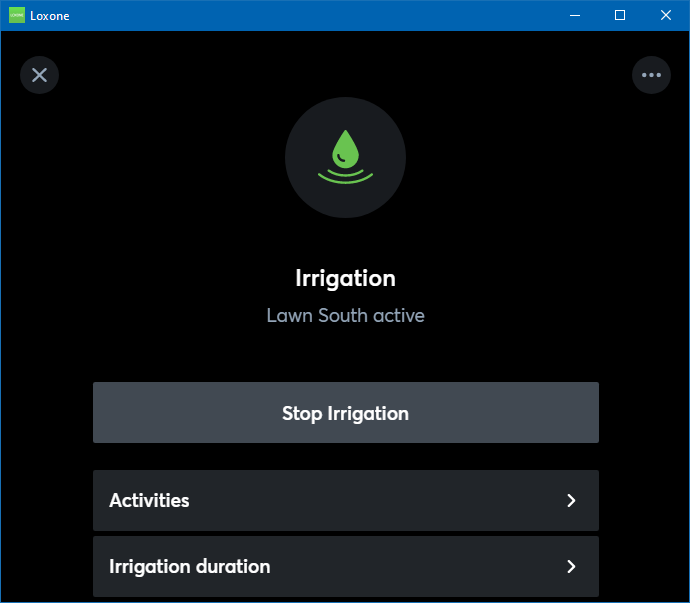
Unlike activation by logic via the function block input (Act), activating the irrigation manually in the user interface will start the irrigation in any case, even if there was sufficient rain or it is expected.
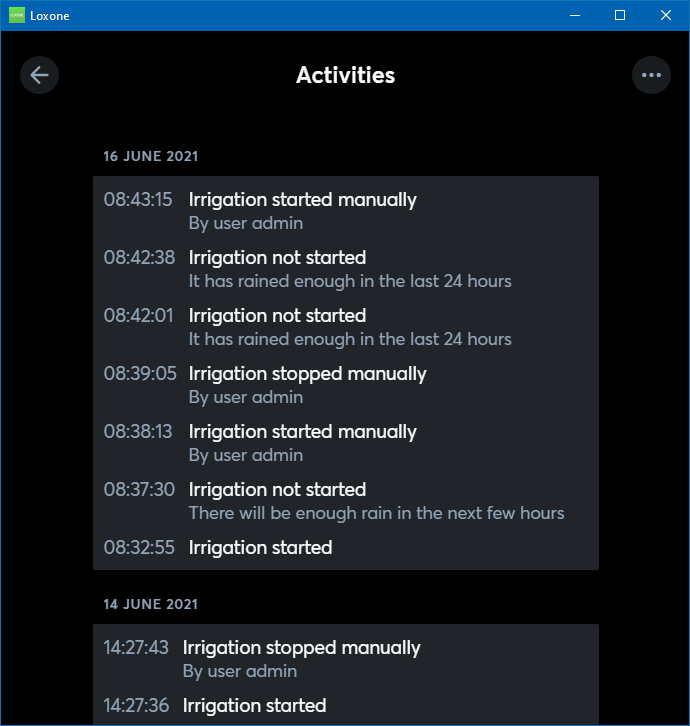
A history of recent activities is also available: