The Intelligent Room Controller maintains a set room temperature and automatically switches between heating and cooling.
Optionally, various heating or cooling sources such as Heating and Cooling Controllers and Room Ventilation Controllers can be configured.
The block offers a Comfort mode with various adjustable temperatures for heating and cooling, which can also be changed via the User Interface.
A timer is available for scheduling the set temperatures.
Outside the scheduled Comfort temperature times, the Eco temperature is active to save energy, automatically adjusting the setpoint to a lower room temperature for heating (Eco Min) and higher room temperature for cooling (Eco Max).
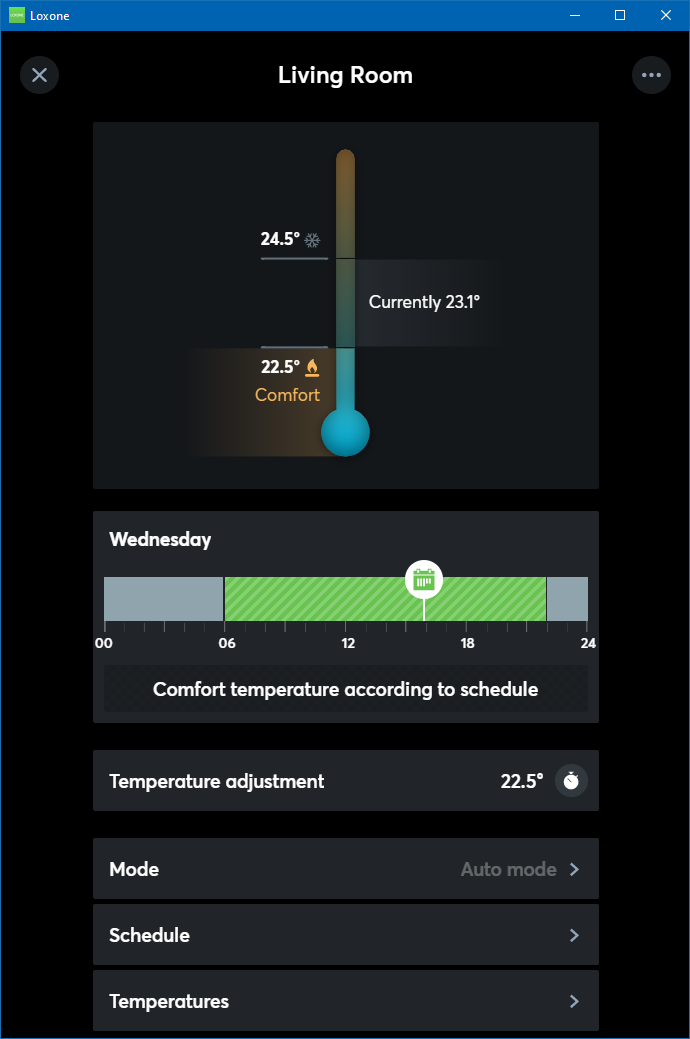
Table of Contents
- Properties
- Inputs
- Outputs
- Parameters
- Application Example
- Automatic heat up and cool down process
- Configurable heating and cooling sources
- Source outputs
- Outside Temperature
- Target temperature surplus heat / cooling
- Automatic Mode Selection
- AC Unit Controller Integration in Intelligent Room Controller
- Changes as of Release 12.1
- History
Properties↑
| Summary | Description | Value Range | Default Value |
|---|---|---|---|
| Configure Sources | Configure available Heating/Cooling sources. Supported sources can be created, prioritized, and set per Heating/Cooling/PWM Source. | - | - |
| Schedule | Temperature schedule for heating and cooling | - | - |
| Use single comfort temperature | If checked, the Intelligent Room Controller uses a single comfort temperature instead of separated heating/cooling comfort temperature | - | - |
| Allow surplus heating | If checked, the Intelligent Room Controller will adapt the target temperatures if an assigned Heating and Cooling Controller signals that surplus heating energy is available. | - | - |
| Allow surplus cooling | If checked, the Intelligent Room Controller will adapt the target temperatures if an assigned Heating and Cooling Controller signals that surplus cooling energy is available. | - | - |
| Use all configured sources at the same time | If checked, the heating or cooling demand is sent to all linked sources. If unchecked, the demand is sent to the first available source and all lower priority sources that have been defined as 'cheap'. | - | - |
| Enable PWM Outputs | If checked, the outputs H, C, and HC are used as PWM outputs | - | - |
| Monitor Temperature | If checked, you will be notified if there is a large difference between the room temperature and the target temperature, which could indicate possible errors in the heating/cooling system. | - | - |
| Activity Log Entries | Number of entries in the activity log. 0: log is disabled The activity log tracks relevant changes since program start. | 0...100 | 20 |
Inputs↑
| Abbreviation | Summary | Description | Unit | Value Range |
|---|---|---|---|---|
| Mode | Mode | -1 = Intelligent Room Controller is turned off. 0 = Automatic according to schedule: Heating or cooling based on current temperature and target temperatures. 1 = Automatic according to schedule: Heating only if required; cooling outputs deactivated. 2 = Automatic according to schedule: Cooling only if required; shading outputs active, heating outputs deactivated. 3 = Fixed setpoint: Target temperature set by input (ϑt), heating or cooling based on current temperature and target temperatures. 4 = Fixed setpoint: heating only; target temperature set by input (ϑt); cooling outputs deactivated; shading output deactivated if the temperature is lower then Temperature heat protection (ϑhp). 5=Fixed setpoint: target temperature set by input (ϑt); heating outputs deactivated; cooling and shading outputs active when exceeding target temperature. | - | -1...5 |
| ϑt | Target temperature | Target temperature in fixed setpoint mode | ° | ∞ |
| ϑc | Current room temperature | ° | ∞ | |
| Dwc | Door / window contact | 0 = closed, 1 = open; For automatic modes (0-2) only! If the current outdoor temperature is lower (while heating) or higher (while cooling) than the current room temperature, the system switches to "Off" (Building protection) after delay according to parameter (Ddwc) for as long as the window remains open. The input is only considered closed if all connected windows are closed. | - | 0/1 |
| C | Comfort | Starts "Comfort" when ON (rising edge) and activates the timer (Cet) when OFF (falling edge). After time (Cet) expires, the set automatic mode will continue. The temperature is kept at (ϑch) when heating, or (ϑcc) when cooling. The presence button in the app starts "Comfort" until the next schedule entry, but for a maximum of 48 hours. | - | 0/1 |
| E | Eco | Start "Eco" when ON (rising edge) and activates the timer (EBpet) when OFF (falling edge). After timer (EBpet) expires, the set automatic mode will continue. If timer (EBpet) is 0, the timer runs until the next change in the schedule. The temperature is kept at ϑch-ϑeh (Eco Min) when heating, or ϑcc+ϑec (Eco Max) when cooling. | - | 0/1 |
| Bp | Building protection | Starts Building protection when ON (rising edge) and activates the timer (EBpet) when OFF (falling edge). Heating/cooling is only used to keep the temperature above ϑfp (frost protection), or below ϑhp (heat protection). After timer (EBpet) expires, the set automatic mode will continue. If (EBpet) is 0, the timer runs until the next change in the schedule. | - | 0/1 |
| P | Presence | Extends Comfort when ON and activates the timer (Pet) when OFF (falling edge). If Eco is currently active, a comfort timer is started after 30 minutes of continuous motion / presence. After (Pet) expires, the set automatic mode will continue. | - | 0/1 |
| Off | Off | Pulse: Timers started by inputs (C), (E), (Bp) or (P) are cancelled. Timers started via the user interface remain active. On = Block is locked and all heating and cooling outputs set to 0. The name of the connected sensor is used in the user interface. | - | 0/1 |
| DisP | Disable presence | Disables input (P) when 1. | - | 0/1 |
| ϑo | Outdoor temperature | Used by input (Dwc). If this input is not connected, the system variable "Outdoor temperature" is used. If variable "Outdoor temperature" is not available, the value -1000 is displayed. | ° | ∞ |
| CO2 | CO2 | Current CO2 Level. Value is not used for calculations but is forwarded as information to the app and to the configured targets, such as Heating and Cooling Controller, HVAC Controller, or Room Ventilation Controller. | ppm | ∞ |
| H | Humidity | Relative humidity. Value is not used for calculations but is forwarded as information to the app and to the configured targets, such as Heating and Cooling Controller, HVAC Controller, or Room Ventilation Controller. | % | ∞ |
| Fan | Fan speed 0-7 | 0 = Off 1 = Auto 2 = Silent 3 = Very Low 4 = Low 5 = Medium 6 = High 7 = Very High Available fan speeds can be set in the fan speed settings of the block. | - | 0...7 |
| ADir | Airflow direction up/down 1-8 | 1 = Auto 2-6 = Position 1-5 7 = Swing 8 = No Swing Available airflow directions can be set in the airflow direction settings of the block. Vertical vane adjustment is not supported on any AC Control Air type. This limitation is primarily due to restrictions in the interfaces used to communicate with the air conditioning units. While some models could theoretically support this feature, it has not been implemented to maintain consistency in controls across all types. | - | 1...8 |
| Rtd | Reset to default | Resets parameters and settings of the block to the default values as specified in the block preset. | - | 0/1 |
Outputs↑
The outputs used affect the display in the user interface.
If the setting "Enable PWM Outputs" is used, the outputs H, C, and HC are switched on/off according to Parameter (Pwm).
For source outputs, PWM can be activated in the "Configure Sources" dialog of the block.
| Abbreviation | Summary | Description | Unit | Value Range |
|---|---|---|---|---|
| H | Heating | Output for valves or actuators that can only heat. | - | 0...10 |
| C | Cooling | Output for valves or actuators that can only cool. | - | 0...10 |
| HC | Heating/Cooling | Output for valves or actuators that can heat and cool. | - | 0...10 |
| H1-3 | Heating source 1-3 | Source outputs for valves or actuators that can only heat, for use with a heating source provided by the Heating and Cooling Controller block. This output is only visible in certain configurations. | - | 0...10 |
| C1-3 | Cooling source 1-3 | Source outputs for valves or actuators that can only cool, for use with a cooling source provided by the Heating and Cooling Controller block. This output is only visible in certain configurations. | - | 0...10 |
| HC1-3 | Heating/Cooling source 1-3 | Source outputs for valves or actuators that can heat and cool, for use with a heating and cooling source provided by the Heating and Cooling Controller block. This output is only visible in certain configurations. | - | 0...10 |
| Shd | Shading demand | Can be connected to the input Sps of the Automatic Shading function block for cooling support: - On as soon as the current temperature is above (ϑsc) while in cooling mode. - On as soon as the current temperature is above (ϑsh) while in heating mode. - Will be switched Off when the current temperature is 0.41°C below ϑsh in heating mode or ϑsc in cooling mode (hysteresis of 0.4°C to prevent frequent switching). | - | 0/1 |
| HCm | Heating / Cooling mode | Current mode: 1 = heating mode, -1 = cooling mode, 0 = off | - | ∞ |
| Error | Error | Active as long as one of the following errors are present: - The temperature exceeds the temperature of frost (ϑfp) / heat (ϑhp) protection. - The current temperature differs from the target temperature by at least 2.7°F after heating or cooling. The Miniserver program must be running for at least 20 minutes to allow this output to be active. | - | 0/1 |
| TxErr | Error text | Provides a description for the error occured. | - | - |
| ϑt | Target temperature | ° | ∞ | |
| Om | Current operating mode | Current operating mode ID of the schedule. | - | ∞ |
| Boost | Boost | Output is active during preparation phase or when difference between actual and target temperature is greater than 1.5°C/2.7°F | - | 0/1 |
| Os | Current temperature mode | Current active Temperature Mode. -1=Off, 0=Eco, 1=Comfort, 2=Building Protection, 3=Manual Target Temperature, 4=Manual Calendar Temperature | - | ∞ |
| API | API Connector | Intelligent API based connector. API Commands | - | - |
Parameters↑
Please note:
Some default values vary, as they depend on the type of room set.
| Abbreviation | Summary | Description | Unit | Value Range | Default Value |
|---|---|---|---|---|---|
| ϑch | Temperature comfort heating | Absolute Comfort temperature in heating mode. This parameter is only visible in certain configurations. | ° | ∞ | 22,5 |
| ϑcc | Temperature comfort cooling | Absolute Comfort temperature in cooling mode. This parameter is only visible in certain configurations. | ° | ∞ | 24,5 |
| ϑchc | Temperature comfort heating and cooling | Absolute Comfort temperature for heating and cooling This parameter is only visible in certain configurations. | ° | ∞ | 22 |
| ϑd | Allowed Deviation | Allowed deviation between target and actual temperature in comfort mode If this range is exceeded for more than 1 minute, switching between heating and cooling is required This parameter is only visible in certain configurations. | ° | 0.5...5 | 1.5 |
| ϑeh | Temperature eco heating | Temperature Eco heating relative to temperature Comfort heating. Target temperature (Eco Min) = ϑch - ϑeh. | ° | 0.5...∞ | 3 |
| ϑec | Temperature eco cooling | Temperature Eco cooling relative to temperature Comfort cooling. Target temperature (Eco Max) = ϑcc + ϑec. | ° | 0.5...∞ | 3 |
| ϑe | Allowed Deviation eco mode | Temperature Eco heating and cooling relative to comfort temperature | ° | 0.5...∞ | 2 |
| ϑsh | Temperature shading heating | Above this temperature, shading is activated while in heating mode (only used when Mode = 0,1,2). | ° | ∞ | 27,5 |
| ϑsc | Temperature shading cooling | Above this temperature, shading is activated while in cooling mode (only used when Mode = 0,1,2). | ° | ∞ | 23,5 |
| ϑfp | Temperature frost protection | Absolute frost protection temperature. Value must be at least 3° lower than (ϑch). | ° | ∞ | 5 |
| ϑhp | Temperature heat protection | Absolute heat protection temperature. Value must be at least 3° greater than (ϑcc). | ° | ∞ | 28 |
| Vs | Valve standstill | Maximum actuator standstill in days. If the valves have not operated in set time, they will be moved automatically. Time should be set as specified by the manufacturer! 0 = function is disabled. | d | ∞ | 14 |
| Cet | Comfort extend time | When input (C) is 0 (falling edge), the comfort temperature is extended for set time. | s | ∞ | 3600 |
| EBpet | Eco / Building protection extend time | When input (E) or (Bp) is 0 (falling edge), the Eco / Building protection is extended for set time. | s | ∞ | 3600 |
| Pet | Presence extend time | When input (P) is 0 (falling edge), the comfort temperature is extended for set time. | s | ∞ | 1800 |
| Hs | Heating up speed | Time required to raise the room temperature by 1°C/1.8°F. If the value is 0, the value learned by the room controller is used. | min/°C | ∞ | 120 |
| Cs | Cooling down speed | Time required to lower the room temperature by 1°C/1.8°F. If the value is 0, the value learned by the room controller is used. | min/°C | ∞ | 60 |
| Pwm | PWM interval | Time for On-Off cycle when an output is configured as PWM. Value 0: automatic determination of the interval based on the current heating rate. In this case the PWM interval will equal between 10 minutes (1°/min) and 60 minutes (0.1°/min and slower). The interval is a complete on/off cycle. With a calculated opening of 80%, the PWM output will be ON for 80% of the PWM interval. The minimum duration is 1 minute. | min | 0...1440 | 0 |
| Ddwc | Delay door/window contact | Delay until activating building protection after opening a window / door. | s | 0...∞ | 300 |
| ϑExc | Temperature offset Excess Heating/Cooling | When a Heating and Cooling Controller signals surplus heating or cooling, the target temperature is adapted by this value. This parameter only applies when using single comfort temperature or when a fixed heating or cooling mode (1,2,4,5) is set. - When using a single comfort temperature, the maximum allowed value is the ϑd - 0.5° - When using two comfort temperatures, the maximum allowed value is (ϑcc - ϑch) / 2 | ° | 0...∞ | 1 |
Application Example↑
The following example illustrates basic programming of the block:
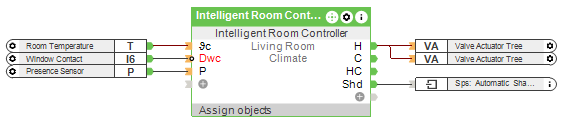
The current room temperature is transmitted to the function block via input (ϑc). A window contact at (Dwc) allows the function block to respond to open windows. A presence sensor is connected to the (P) input to activate the comfort temperature without a schedule.
The actuators are connected to the (H) output, so this room can only be heated.
The output (Shd) can request shading support on the Automatic Shading block, according to the temperatures specified in parameters (ϑsh) and (ϑsc).
In this example, the block does not influence the heating/cooling source; it only controls the room temperature with the valve actuators. By using additional blocks (Heating and Cooling Controller, HVAC Controller, Flow Temperature Calculator, Mixing Valve Controller or additional logic) a full integration of the heating/cooling system is possible.
Automatic heat up and cool down process↑
The controller starts the heat up and cool down process ahead of schedule, in order to reach the target temperature at the beginning of the set schedule entry.
The starting time depends on the difference between setpoint and actual temperature, and the time that is required for the room to reach the target temperature.
The block automatically learns the time required for the room to heat up or cool down during operation. The median of the last 8 heating and cooling operations is used.
If no heating or cooling operations have been recorded yet, the controller uses a value of 600 min/°C for heating and 120 min/°C for cooling.
The heating or cooling operation may therefore start too early or too late, depending on the type of system.
The speed can also be set manually via the parameters (Hs) and (Cs). In this case, the block continues to learn the actual speeds in the background, but does not use them.
If (Hs) or (Cs) are set back to automatic (value 0), the learned values are used again.
Configurable heating and cooling sources↑
Up to three heating / cooling sources can be configured. The module sends its requirements to these sources depending on the configuration. For each source, the ability to heat or cool can be configured. If the respective source is configured to heat only, no cooling request will be sent, even if required. For each mode, a freely configurable priority list is set. The module's requests are then sent in the respective order. The list will go to the first source which can be used to supply the desired energy (Heating / Cooling). If the parameter "Use all Sources Simultaneously" is set, the request is also sent to all subsequent sources, otherwise it is only sent to those that are configured as "Economy" for the respective operation. Available sources are cyclically checked in order to be able to react to changes in active operation.
Source outputs↑
For each source there are outputs for heating, cooling, and heating + cooling. The source outputs only set the control value when the source is in the same mode, ie heating or cooling. In systems that can Heat and Cool (such as ventilation systems or heat pumps), this prevents temperature fluctuations from developing in the room. If the value falls below the switch-on threshold of the Heating and Cooling Controller, a minimum opening can be forced until the device has been switched off, after the minimum running time has elapsed.
Outside Temperature↑
The system variable for outdoor temperature is automatically used, if available. The function block only switches to building protection when a window is open and the outdoor temperature would affect the current heating/cooling process negatively.
Target temperature surplus heat / cooling↑
If the Eh or Ec input (surplus heating/cooling) is active on an assigned Heating and Cooling Controller, the target temperature is increased(heating) or reduced(cooling)
The default target temperature is the exact center between ϑcc and ϑch.
When using a single target temperature, or a mode which does not allow switching between heating and cooling (1,2,4,5), the offset is taken from parameter ϑExc
Surplus heating/cooling is only applied in Comfort and Eco mode.
Automatic Mode Selection↑
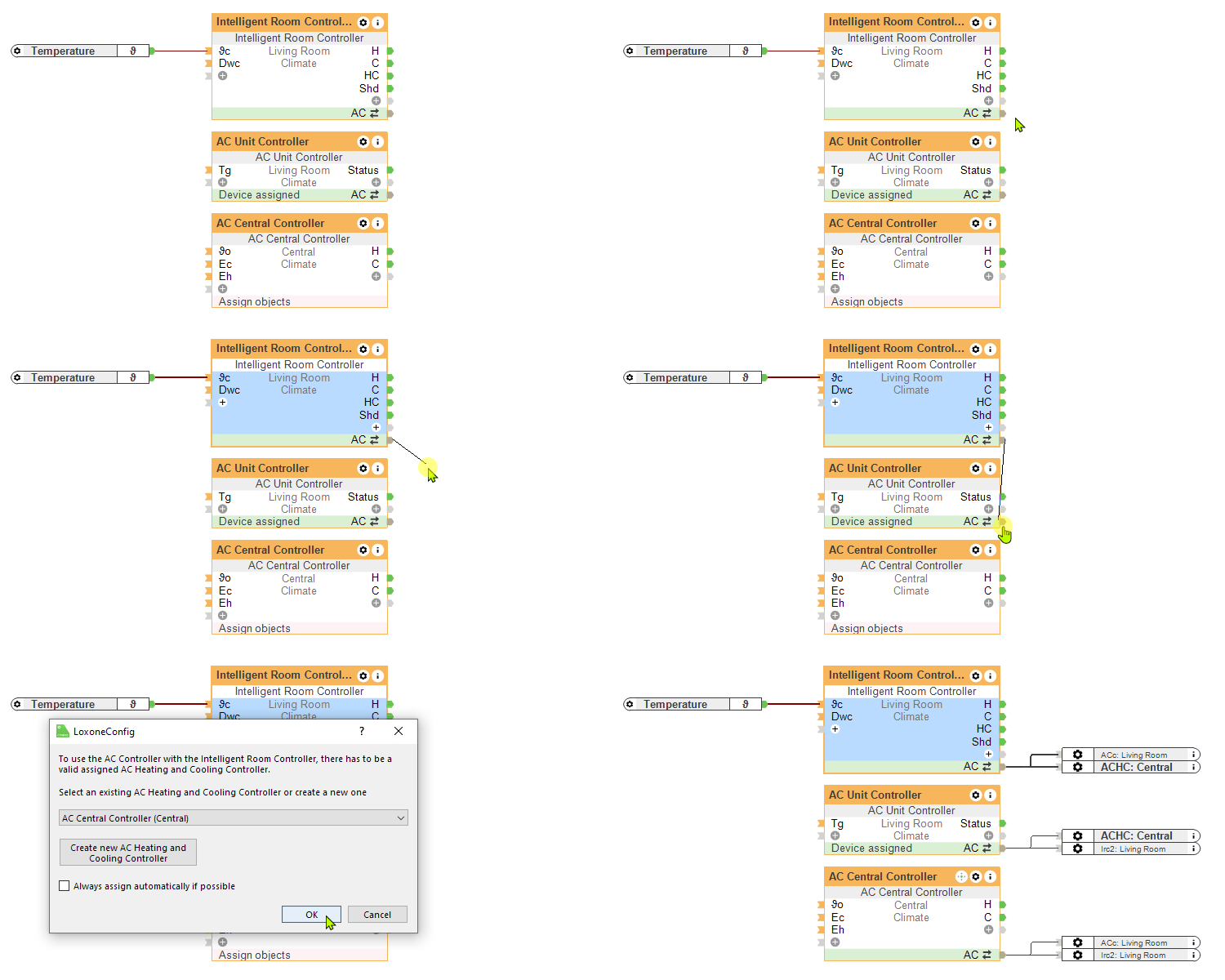
The Intelligent Room Controller (IRC) automatically determines its operating mode based on the configuration of connected outputs. The mode is selected according to following logic:
Actuator connected to heating output (H, H1): Mode is set to 1.
Actuator connected to cooling output (C, C1) or only Shd connected: Mode is set to 2.
Actuator connected to heating/cooling output (HC, HC1): Mode is set to 0.
Actuator connected to heating output (H, H1) and shading output (Shd) is connected to Automatic Shading block: Mode is set to 0.
The selected mode, which is automatically applied during the initial setup of the block, adjusts both the user interface and the available parameters. When Mode is set to 1, 2, 4, or 5, the ϑExc parameter requires configuration. However, in Mode 0 or 3, this parameter does not require any configuration.
AC Unit Controller Integration in Intelligent Room Controller↑
Changes as of Release 12.1↑
In response to frequent requests and as a result of gained experience, the block has been revised with versions 12.0 and 12.1.
The following changes have been made compared to previous versions:
2 Comfort temperatures
The block now supports two comfort temperatures, one for heating mode and one for cooling mode. If the actual temperature falls below the heating comfort temperature, the room control switches to heating mode. If the cooling comfort temperature is exceeded, the room switches to cooling mode. The range between the cooling and heating comfort temperature is the "floating zone". The cooling comfort temperature must be higher than the heating comfort temperature. The parameter Td (allowed deviation) has been removed, the value is used to set the cooling and heating comfort temperature when converting existing blocks to the new version.
Heating/cooling deactivation
If there is a call for cooling but no source (HVAC Controller, Heating and Cooling Controller) is currently able to providing cooling, the room controller will no longer switch to cooling mode in automatic mode. If a source reports that cooling is available, the room controller will be able to cool.
Shading
There are two new parameters that are used to activate shading (Temperature shading heating, and Temperature shading cooling). These allow to specify the room temperature at which the shading output Shd is activated. The current mode determines whether the cooling or heating temperature is used. The 'Use sunshine' option was removed from the Room Controller and moved to the Automatic Shading block. The Shd output of the Room Controller now activates regardless of sunshine. Automatic shading on the Automatic Shading block via Sps is now only activated if the system variable Sunshine is also active (provided the option 'Use sunshine' is enabled).
Activate schedule entries by presence
It is now possible to have schedule entries activated only if there is presence/motion in the room. This option can be enabled for an entry with 'Activation by presence'. Schedule entries that have this option enabled are activated via the (P) input of the Room Controller.
Activating comfort mode by presence without schedule entry
If the room is currently in Eco mode and presence/motion is detected for 30min, comfort mode is automatically enabled for the time of presence/motion + parameter (Pet).
Naming
For temperature inputs and parameters, the symbol for temperature (ϑ) is now used to distinguish between temperature and time (T).
History↑
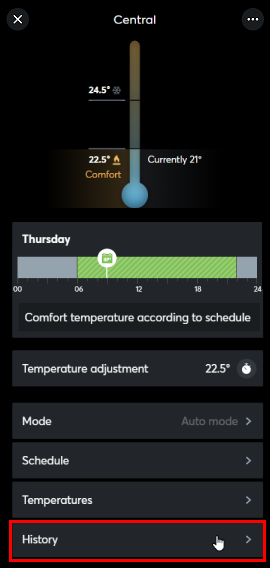
In the user interface, the history of the function block can be displayed.
A maximum of 100 entries can be shown.
When you restart or save to the Miniserver, the history is cleared.