The Door and Window Monitor can be used to display the status of doors, windows and garage/gates.
Apart from Loxone Door and Window contacts, conventional contacts can also be used.
Table of Contents
Inputs↑
| Abbreviation | Summary | Description | Value Range |
|---|---|---|---|
| Hpos | Handle position | Current position of the handle 1=closed 2=tilted 3=open 4=closed and not secured 5=closed and secured 0=unknown/offline | 0...∞ |
| Dwco | Door/window contact open | Used for door or window contacts that detect opening. (0 = closed, 1 = open) Usually used inverted. | 0/1 |
| Dwct | Door/window contact tilt | Used for door or window contacts that detect tilting. (0 = closed, 1 = tilted) Usually used inverted. | 0/1 |
| Dwcs | Door/window contact secured | Used to detect if doors or windows are secured (locked). (0 = unlocked, 1 = locked) | 0/1 |
Outputs↑
| Abbreviation | Summary | Description | Value Range |
|---|---|---|---|
| Open | Number of open windows or doors | ∞ | |
| Tilt | Number of tilted windows or doors | ∞ | |
| Closed | Number of closed windows or doors | ∞ | |
| Offline | Number of offline sensors | ∞ | |
| Secured | Number of secured windows or doors | ∞ | |
| Unlocked | Number of unlocked windows or doors | ∞ | |
| Txlt | Text last triggered | Name of last triggered sensor | - |
| Txu | Text unsecure | Name of opened/tilted/unlocked doors and windows or connected Door and Window Monitor | - |
| API | API Connector | Intelligent API based connector. API Commands | - |
Parameters↑
| Abbreviation | Summary | Description | Value Range | Default Value |
|---|---|---|---|---|
| Rem | Remanence input | Remanence input: If active, the function block retains its previous state after a Miniserver reboot. The state of the function block is saved: – When saving to the Miniserver – At a planned reboot – Before a backup – Once per hour The data is saved on the SD card. | 0/1 | 0 |
Properties↑
| Summary | Description | Default Value |
|---|---|---|
| Configuration | Configuration of the available Inputs and Outputs. | - |
Basic Programming↑
Double-click on the block to select Loxone Door and Window Contacts, as well as the blocks Combined Window Contact, Garage/Gate and Door and Window Monitor.
Additional window contacts and window handles can be connected to the block inputs.
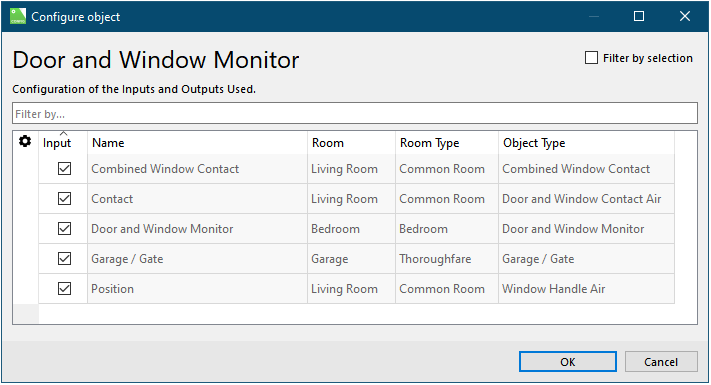
Of course, other window contacts and window handles can be used. The contacts are connected to the inputs (Dwco) or (Dwct). If the window contacts are normally closed contacts, the inputs (Dwco), (Dwct) must be inverted. Window handles are connected to the input (Hpos). The number of open, tilted, and closed windows is output at the outputs (Open), (Tilt), and (Closed). Output (Txlt) displays the name of the last triggered sensor.