Controlla i livelli di luminosità del Touch Pure Flex Air e Tree.
I valori per la luminosità del display e della retroilluminazione sono calcolati in base alla Presenza (P) e se l'ambiente è illuminato dalla luce naturale o dall'illuminazione artificiale (L). Il display si illumina quando CBrB non è 0 o quando gli ingressi P o Don sono attivi.
Un ambiente è considerato buio se né la luce naturale né l'illuminazione artificiale (L) sono attive o se l'attuale luminosità è al di sotto della soglia. L'illuminazione artificiale (L) ha la priorità sulla luce naturale nel calcolo della luminosità (CBrB).
La luce diurna è considerata attiva quando la luminosità attuale dell'ambiente supera la soglia di luminosità (Soglia di Luminosità (Brt)) e nessuna fonte di luce artificiale (L) è accesa.
Quando l'uscita dell'API è collegato al Comando Luci, fornisce i valori per illuminazione artificiale (L), luminosità dell'ambiente (Br) e soglia di luminosità (Brt), disattivando gli ingressi del Controller Touch Pure Flex.
I valori predefiniti per i parametri di luminosità sono configurati in base al tipo di stanza quando il blocco viene creato o quando viene collegato il primo Touch Pure Flex.
Contenuto
- Ingressi
- Parametri
- Uscite
- Proprietà
- Integrazione del Controller Touch Pure Flex con il Comando Luci
- Buio, Illuminazione o Luce del giorno
- Diagramma dei tempi
Ingressi↑
| Alias | Descrizione breve | Descrizione | Unità | Campo di valore |
|---|---|---|---|---|
| P | Presence | La presenza è attiva. Attiva il display. | - | 0/1 |
| DnD | Do not Disturb | Il display e la retroilluminazione rimangono spenti quando il dispositivo è inattivo. | - | 0/1 |
| LbT | Light by Touch | Quando attivo, il primo tocco attiva il display ma non esegue un comando. | - | 0/1 |
| L | Lighting active | La stanza è illuminata da illuminazione artificiale. Questo ingresso non viene utilizzato quando un Comando Luci è connesso tramite il Connettore API. | - | 0/1 |
| Br | Room brightness | La luminosità attuale della stanza. Questo input non viene utilizzato quando un Comando Luci è connesso tramite il Connettore API. | lux | ∞ |
| Set | Set Brightness | Luminosità del display individuale. Il valore rimarrà attivo fino al rilevamento di cambiamenti nella presenza, nella luminosità ambientale o nell'illuminazione artificiale. | % | ∞ |
| Off | Off | Blocca il blocco. Ingresso dominante. | - | 0/1 |
| Don | Display On | Attiva display. Verrà utilizzata la luminosità del display BrD. L'ingresso è sovrascritto da DnD | - | 0/1 |
| Bl | Backlight On | Attiva retroilluminazione. Se la luminosità attuale CBrB è 0, verrà utilizzata la luminosità predefinita BrDef. L'ingresso è sovrascritto da DnD | - | 0/1 |
| Txt | Display Text | Imposta testo visualizzazione personalizzato. Utilizzerà la luminosità del display BrD. L'ingresso è sovrascritto da DnD | - | - |
Parametri↑
| Alias | Descrizione breve | Descrizione | Unità | Campo di valore | Valore predefinito |
|---|---|---|---|---|---|
| BrDP | Dark and Presence Brightness | Luminosità per ambienti con presenza, senza luce naturale o illuminazione artificiale. | % | 0...100 | 10 |
| BrDnP | Dark and no Presence Brightness | Luminosità per ambienti senza presenza, senza luce naturale o illuminazione artificiale. | % | 0...100 | 0 |
| BrLP | Lighting and Presence Brightness | Luminosità per ambienti con presenza e illuminazione artificiale ma luminosità effettiva della stanza al di sotto della soglia Brt. | % | 0...100 | 70 |
| BrLnP | Lighting and no Presence Brightness | Luminosità per ambienti senza presenza con illuminazione artificiale ma luminosità effettiva della stanza al di sotto della soglia Brt. | % | 0...100 | 0 |
| BrBP | Bright and Presence Brightness | Luminosità per ambienti con presenza e luminosità ambientale sopra la soglia Brt. | % | 0...100 | 70 |
| BrBnP | Bright and no Presence Brightness | Luminosità per ambienti senza presenza e luminosità della stanza sopra la soglia Brt. | % | 0...100 | 0 |
| BrDef | Default Brightness | Luminosità predefinita utilizzata come fallback per la retroilluminazione CBrB o la luminosità del display BrD se la luminosità calcolata CBrB è 0. | % | 0...100 | 70 |
| Brt | Brightness threshold | Se la luminosità della stanza supera il valore massimo, vengono attivate le impostazioni per la luce naturale. Questo parametro non viene utilizzato quando un Comando Luci è connesso tramite il Connettore API. | lux | 0...∞ | 30 |
Uscite↑
| Alias | Descrizione breve | Descrizione | Unità | Campo di valore |
|---|---|---|---|---|
| CBrB | Current Brightness Backlight | Luminosità attuale della retroilluminazione per i dispositivi connessi. Quando la retroilluminazione Bl è attiva, BrDef viene utilizzato come fallback se il valore è 0. | - | ∞ |
| P | Presence | La presenza è attiva. | - | 0/1 |
| L | Lighting Active | L'illuminazione è attiva. | - | 0/1 |
| B | Bright | Attivo quando la luminosità ambiente è al di sopra della soglia. | - | 0/1 |
| Br | Room brightness | Attuale luminosità della stanza. | lux | ∞ |
| BrD | Brightness Display & status LEDs | Luminosità utilizzata per il display quando il display è attivo e per i LED di stato quando un LED è attivo. La luminosità è uguale a CBrB. Se CBrB è 0, viene utilizzato BrDef. Garantisce che il display e i LED rimangano visibili anche quando la retroilluminazione è inattiva. | - | ∞ |
| API | API Connector | Connettore intelligente basato su API. Comandi API | - | - |
Proprietà↑
| Descrizione breve | Descrizione | Valore predefinito |
|---|---|---|
| Preset di luminosità | Impostare il valore di luminosità su un livello consigliato in base al colore del Touch Pure Flex. | - |
Integrazione del Controller Touch Pure Flex con il Comando Luci↑
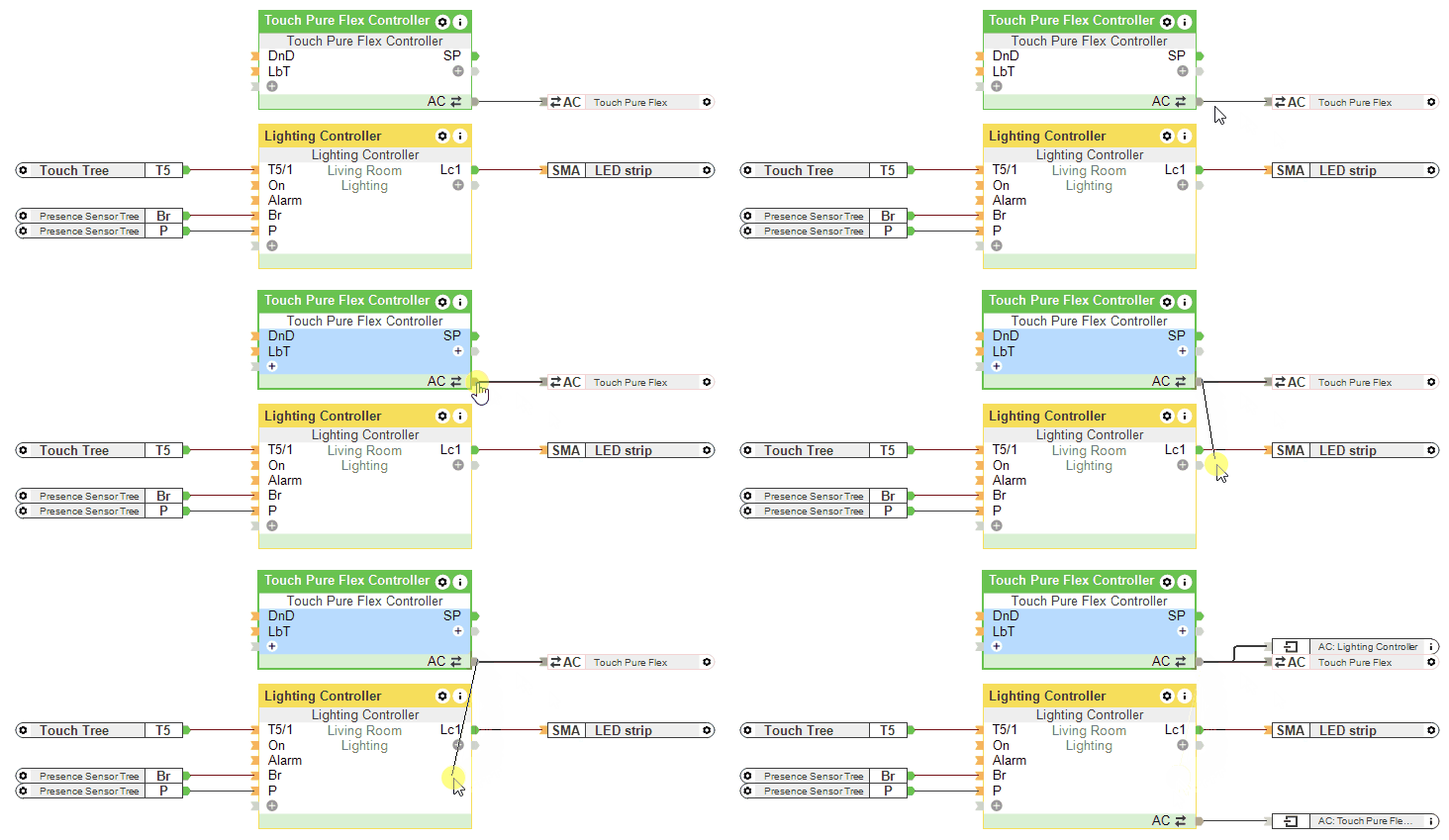
Se un Comando Luci è collegato tramite il Connettore API, gli ingressi L, Br e il parametro Brt del Controller Touch Pure Flex non vengono utilizzati.
Buio, Illuminazione o Luce del giorno↑
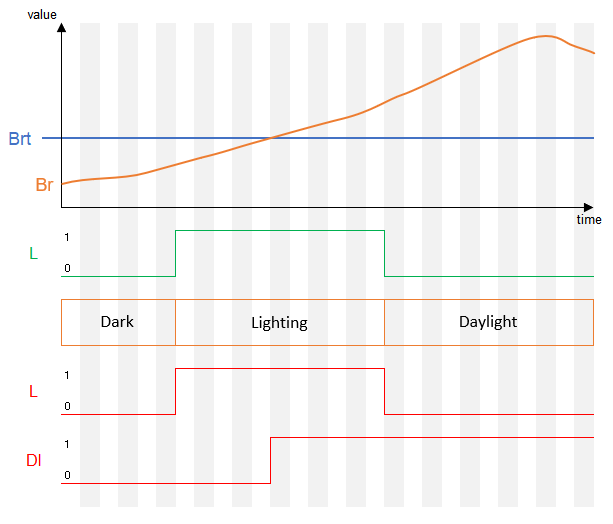
Diagramma dei tempi↑
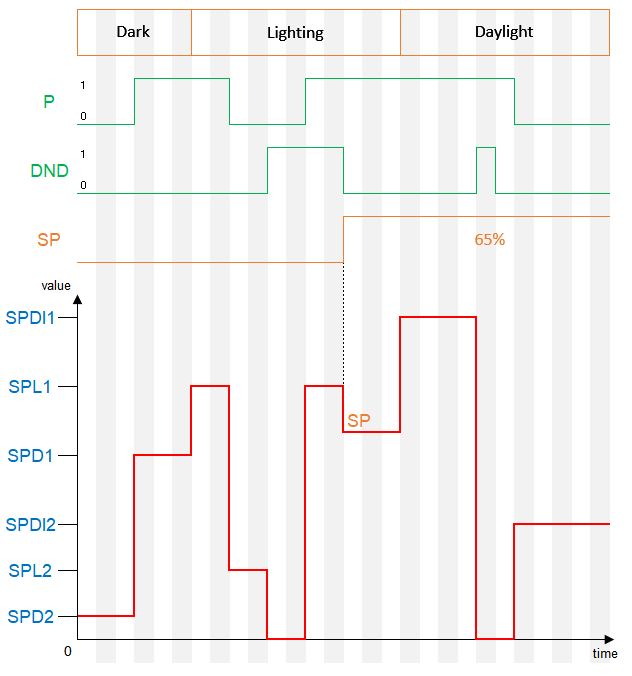
Quando la luminosità è impostata allo 0% tramite un parametro del blocco e l'ingresso LbT è attivo, verrà utilizzata la luminosità definita nelle proprietà del dispositivo quando il display viene toccato.