Controla los niveles de brillo de Touch Pure Flex Air y Tree.
Los valores para el brillo de la pantalla y la retroiluminación se calculan en base a Presencia (P) y si la habitación está iluminada por luz natural o iluminación artificial (L). La pantalla se ilumina cuando CBrB no es 0 o cuando las entradas P o Don están activas.
Se considera que una habitación está oscura si ni la luz natural ni la iluminación artificial (L) están activas o si la luminosidad actual está por debajo del umbral. La iluminación artificial (L) tiene prioridad sobre la luz natural al calcular la luminosidad (CBrB).
Se considera que la luz diurna está activa cuando la luminosidad actual de la habitación supera el umbral de luminosidad (Umbral de luminosidad (Brt)), y ninguna fuente de luz artificial (L) está encendida.
Cuando la salida de la API se conecta al Controlador de Iluminación, proporciona los valores para iluminación artificial (L), brillo de la habitación (Br) y umbral de brillo (Brt), silenciando las entradas del Controlador Touch Pure Flex.
Los valores predeterminados para los parámetros de brillo se configuran en función del tipo de habitación cuando se crea el bloque, o cuando se conecta el primer Touch Pure Flex.
Contenido
- Entradas
- Parámetros
- Salidas
- Propiedades
- Integración del Controlador Touch Pure Flex con el Controlador de Iluminación
- Oscuro, Iluminación o Luz del día
- Diagrama temporal
Entradas↑
| Abreviatura | Resumen | Descripción | Unidad | Rango de valores |
|---|---|---|---|---|
| P | Presence | La presencia está activa. Activa la pantalla. | - | 0/1 |
| DnD | Do not Disturb | La pantalla y la retroiluminación permanecen apagadas cuando el dispositivo está inactivo. | - | 0/1 |
| LbT | Light by Touch | Cuando está activo, el primer toque activa la pantalla, pero no ejecuta ningún comando. | - | 0/1 |
| L | Lighting active | La habitación está iluminada por luz artificial. Esta entrada no se utiliza cuando un Controlador de Iluminación está conectado a través del Conector API. | - | 0/1 |
| Br | Room brightness | Brillo actual de la habitación. Esta entrada no se utiliza cuando un Controlador de Iluminación está conectado a través del Conector API. | lux | ∞ |
| Set | Set Brightness | Brillo individual de la pantalla. El valor permanecerá activo hasta que se detecten cambios en la presencia, la luminosidad de la habitación o la iluminación artificial. | % | ∞ |
| Off | Off | Bloquea el bloque. Entrada dominante. | - | 0/1 |
| Don | Display On | Activar pantalla. Se utilizará el brillo de pantalla BrD. La entrada es anulada por el modo No Molestar | - | 0/1 |
| Bl | Backlight On | Activar retroiluminación. Si el brillo actual CBrB es 0, se utilizará el brillo predeterminado BrDef. La entrada es anulada por No Molestar (DnD) | - | 0/1 |
| Txt | Display Text | Establecer texto de visualización personalizado. Se utilizará el Brillo de Pantalla BrD. La entrada es anulada por el No Molestar (DnD) | - | - |
Parámetros↑
| Abreviatura | Resumen | Descripción | Unidad | Rango de valores | Valor por defecto |
|---|---|---|---|---|---|
| BrDP | Dark and Presence Brightness | Brillo para habitaciones con presencia, sin luz natural o iluminación artificial. | % | 0...100 | 10 |
| BrDnP | Dark and no Presence Brightness | Brillo para habitaciones sin presencia, sin luz natural o iluminación artificial. | % | 0...100 | 0 |
| BrLP | Lighting and Presence Brightness | Brillo para habitaciones con presencia e iluminación artificial pero con un brillo real de la habitación por debajo del umbral Brt. | % | 0...100 | 70 |
| BrLnP | Lighting and no Presence Brightness | Brillo para habitaciones sin presencia con iluminación artificial pero con un brillo real de la habitación por debajo del umbral Brt. | % | 0...100 | 0 |
| BrBP | Bright and Presence Brightness | Brillo de pantalla para habitaciones con presencia y brillo de la habitación por encima del umbral 'Brt'. | % | 0...100 | 70 |
| BrBnP | Bright and no Presence Brightness | Brillo para habitaciones sin presencia y brillo de la habitación por encima del umbral Brt. | % | 0...100 | 0 |
| BrDef | Default Brightness | Brillo predeterminado utilizado como alternativa para la retroiluminación CBrB o el brillo de la pantalla BrD si el brillo calculado CBrB es 0. | % | 0...100 | 70 |
| Brt | Brightness threshold | Si el brillo de la habitación supera el valor máximo, se activan los ajustes de luz diurna. Este parámetro no se utiliza cuando un Controlador de Iluminación está conectado a través del Conector API. | lux | 0...∞ | 30 |
Salidas↑
| Abreviatura | Resumen | Descripción | Unidad | Rango de valores |
|---|---|---|---|---|
| CBrB | Current Brightness Backlight | Brillo de retroiluminación actual para dispositivos conectados. Cuando la retroiluminación Bl está activa, BrDef se utiliza como valor de reserva si el valor es 0. | - | ∞ |
| P | Presence | Presencia activa. | - | 0/1 |
| L | Lighting Active | Iluminación activa. | - | 0/1 |
| B | Bright | Activo cuando la luminosidad de la habitación está por encima del umbral. | - | 0/1 |
| Br | Room brightness | Luminosidad actual de la habitación. | lux | ∞ |
| BrD | Brightness Display & status LEDs | Brillo utilizado para la pantalla cuando la pantalla está activa y para los LED de estado cuando algún LED está activo. El brillo es igual a CBrB. Si CBrB es 0, se utiliza BrDef. Asegura que la pantalla y los LED permanezcan visibles incluso cuando la retroiluminación está inactiva. | - | ∞ |
| API | API Connector | Conector inteligente basado en comandos API. | - | - |
Propiedades↑
| Resumen | Descripción | Valor por defecto |
|---|---|---|
| Preajuste de brillo | Establece el valor de brillo en un nivel recomendado basado en el color del Touch Pure Flex. | - |
Integración del Controlador Touch Pure Flex con el Controlador de Iluminación↑
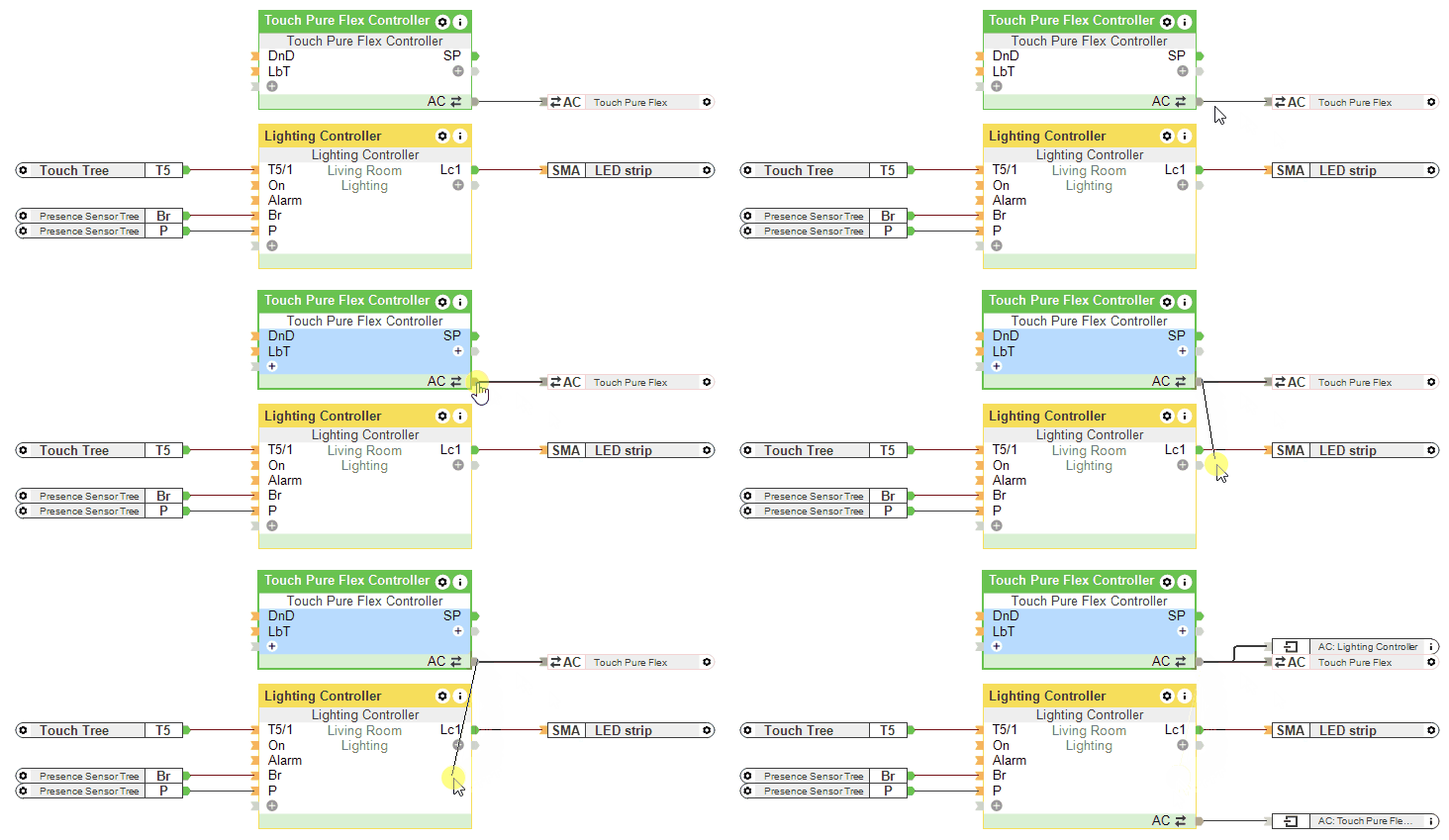
Si un Controlador de Iluminación está conectado a través del Conector API, las entradas L, Br y el parámetro Brt del Controlador Touch Pure Flex no se utilizan.
Oscuro, Iluminación o Luz del día↑
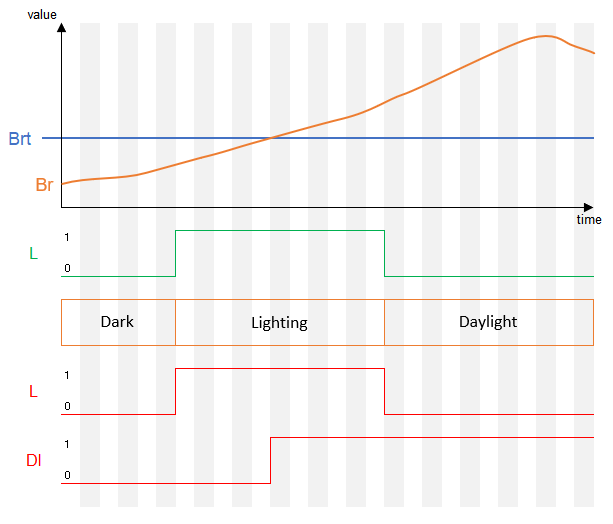
Diagrama temporal↑
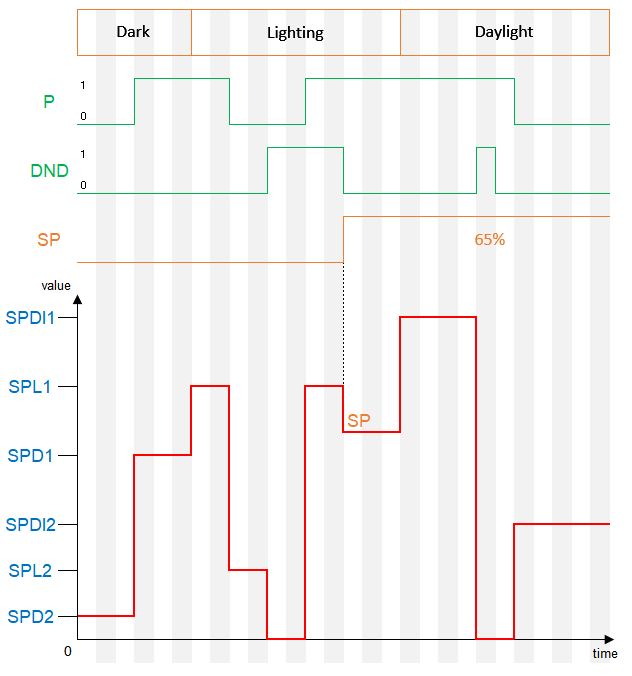
Cuando el brillo se ajusta al 0% a través de un parámetro de bloque y la entrada LbT está activa, se utilizará el brillo definido en las propiedades del dispositivo cuando se toque la pantalla.