The Loxone Wallbox is a charging station which enables dynamic charging from 1.38kW to 7.4kW for electric vehicles.
With the robust Air interface, the device seamlessly integrates into the Loxone system, offering complete flexibility for energy management.
To measure electrical energy, a Loxone Energy Meter Tree can be easily mounted on the integrated DIN rail and connected to the Tree Interface. Additionally, a Modbus meter can be installed and connected to the Modbus interface inside the device.
Optionally, products like the NFC Code Touch, Touch Pure Flex,... can be mounted directly on the device to set your charging mode or execute any other control.
Datasheet Wallbox 7.4kW 32A Air
Table of Contents
- Mounting
- Commissioning
- Programming
- LED Status
- Charging Cable
- Limiting charging power
- Testing the Wallbox
- Air2Tree
- Modbus Data Reading
- Inputs, Outputs, Properties
- Safety Instructions
- Documents
Mounting↑
Attach the Wallbox vertically by screwing it onto a solid, even and closed surface.
Select screws and fastening material according to the surface.
Make sure that the mounting frame rests flush on the surface without any gaps.

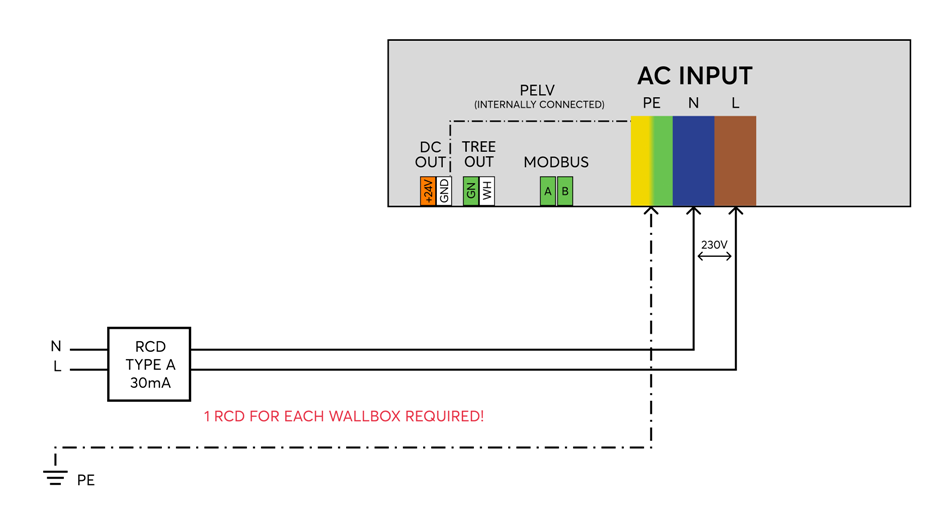
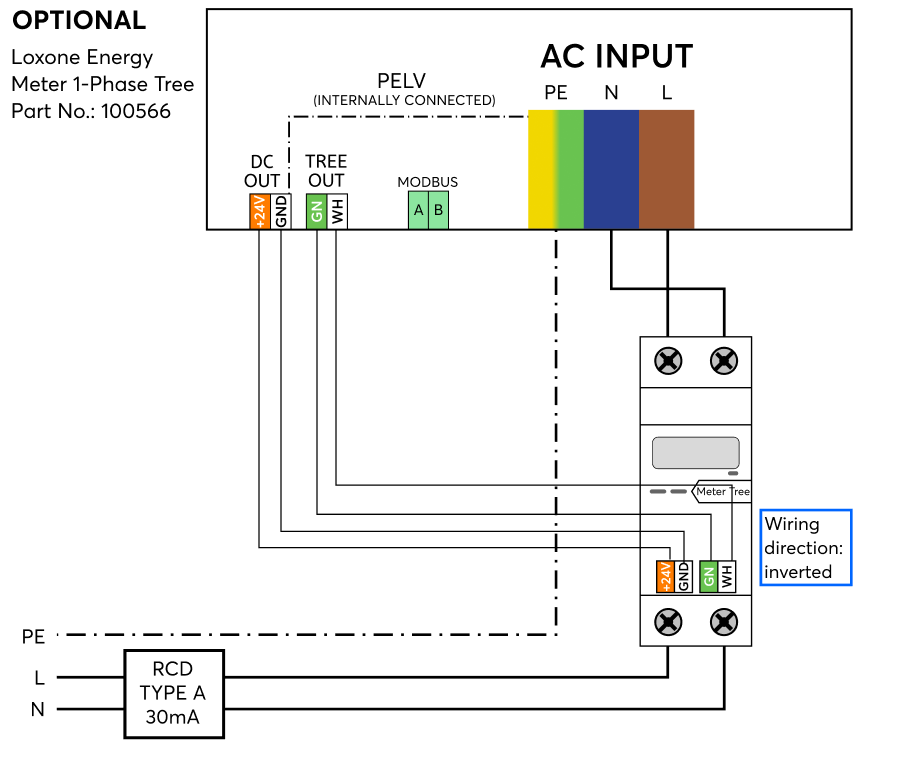
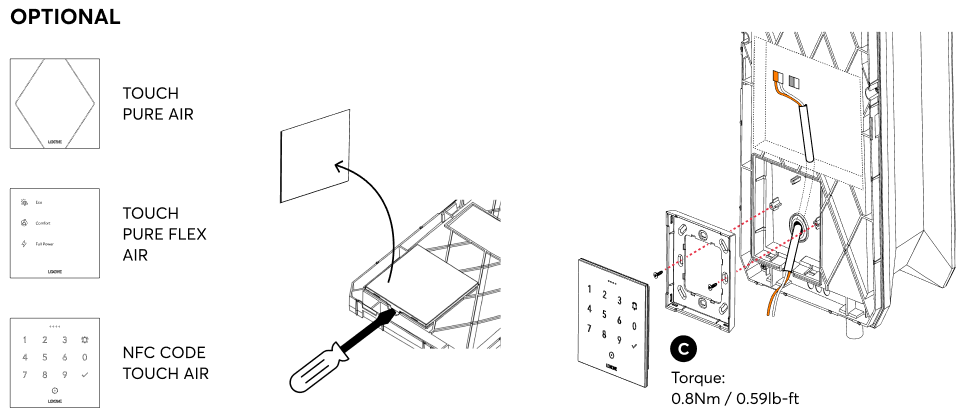
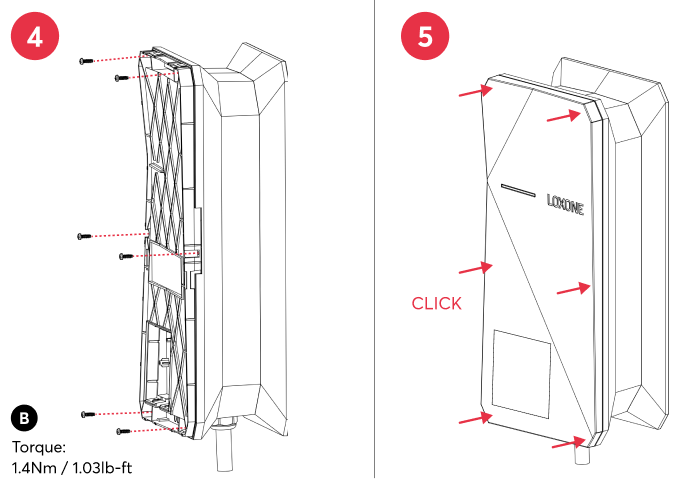
After mounting, the mains voltage is switched on and the Wallbox is ready for pairing.
Note: Do not install the Wallbox using magnets or place it near magnetic sources (closer than 0.5 meters). Magnetic fields may interfere with the internal residual current device, potentially affecting the charging functionality.
Commissioning↑
Then follow the pairing procedure on the Air Interface.
Programming↑
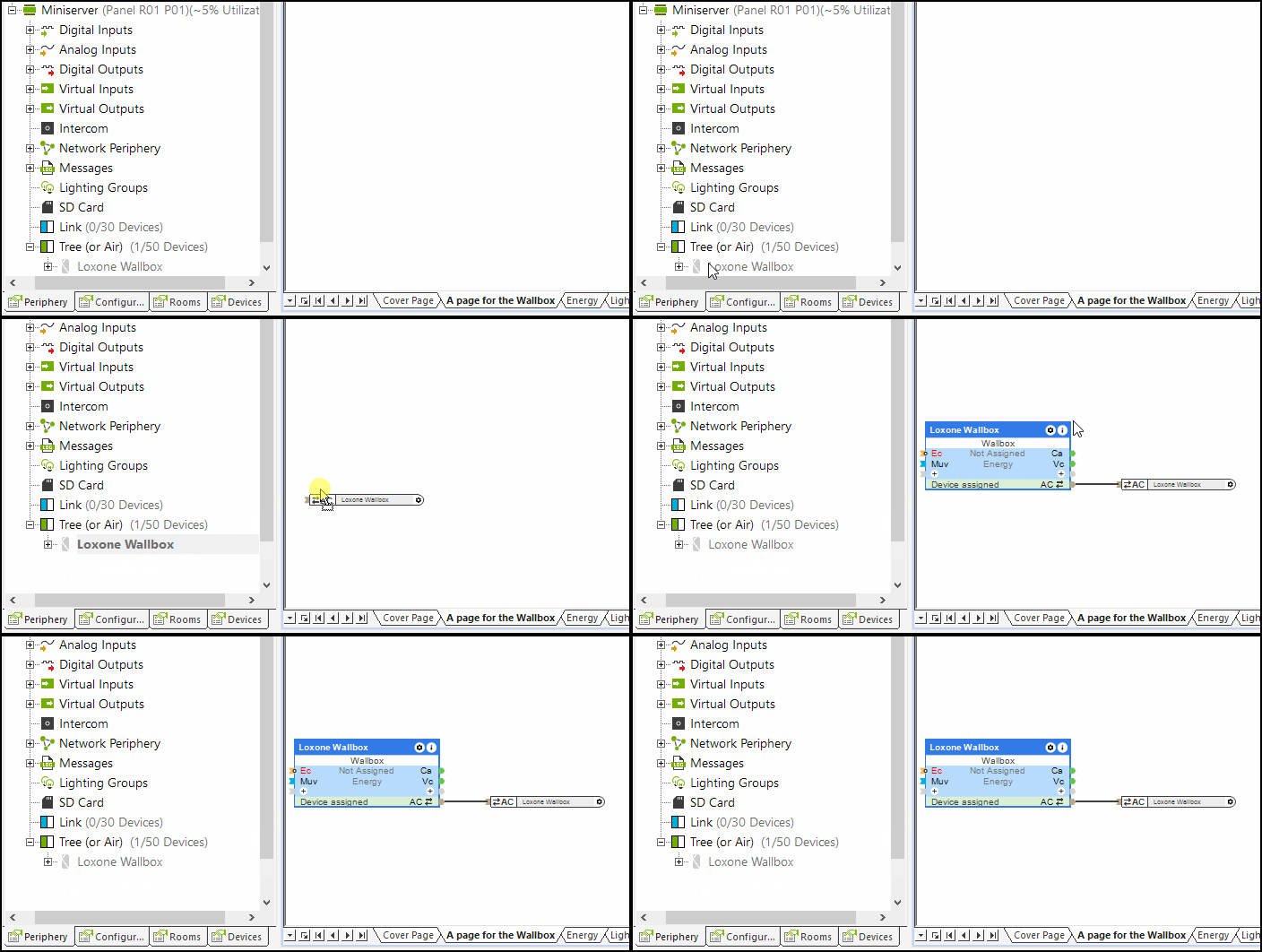
The Loxone Wallbox is programmed and set up using the Wallbox function block in Loxone Config:
LED Status↑
| Status LED | Description |
|---|---|
| Device is in pairing mode, ready for pairing. |
| Device has just been paired or has restarted and is now online. |
| Device cannot establish a connection to the Miniserver via the Air wireless interface, or is no longer paired. |
| Device was selected in Loxone Config and is identifying. |
| Charging started. |
| Charging paused. |
| Charging Error. |







Charging Cable↑
If it is necessary to replace the charging cable, this must be installed and tested by a specialist in accordance with national regulations.
For this purpose, a charging cable with the same properties must be used; this may also be shorter or longer (max. 7.5 meters).
Extending the charging cable in any other way is not permitted.
Limiting charging power↑
The Loxone Wallbox is able to limit the charging power by transmitting the permitted maximum current to the vehicle.

The actual charging power depends on the vehicle, supply voltage, and battery level, and may be above or significantly below the target charging power (Tp).
Testing the Wallbox↑
Note on testing the Wallbox with EVSE Testers:
Due to the testing of the internal residual-current sensor, a waiting period of at least 10 seconds is required when switching from Position B (vehicle connected) to Position C (vehicle ready to charge). Also, charging power for the charging process must be authorised to the wallbox. Otherwise, an unknown charging error may occur.
Air2Tree↑
The Tree interface in the Wallbox Air allows you to connect and manage a variety of Tree devices directly within the Wallbox. This interface makes it easy to integrate energy meters, touch controls, and other compatible Tree devices, providing seamless communication and control within your Loxone system.
Limitations
A maximum of 3 Tree devices can be connected to one Wallbox Air.
Connecting a Tree to Air Bridge is not supported.
Tree Intercommunication between devices is not supported.
Supported Tree Devices
The following devices are supported on the Tree interface of the Wallbox Air:
Energy Meter
Touch devices (e.g. Touch, Touch Pure Flex, NFC Code Touch)
All other Tree devices not officially supported but can be connected at your own risk.
Tree Wiring and Power Supply
Tree devices must be installed directly inside the Wallbox housing.
Running Tree lines outside of the Wallbox is not recommended.
The maximum 24VDC output of the Wallbox Air is 2.4W.
Automatic serial number assignment for Tree devices is not supported.
Recommendations
A maximum of 3 Wallbox Air units with Tree interface should be used per Air Base.
If multiple Wallbox Air units with Tree devices are installed, it is strongly recommended to:
Use a dedicated Air Base
Assign a separate Air channel exclusively for these Wallboxes
Troubleshooting and Stability
In environments with high Air traffic, the following issues may occur:
The Wallbox Air may temporarily go offline
Tree devices connected to the Wallbox may also go offline
Recommended solution: Use a dedicated Air Base with its own Air channel for all Wallboxes with Air2Tree interface to ensure stable communication.
Modbus Data Reading↑
Only the values that are actually sent to the Miniserver are displayed in the Modbus Monitor.
This means that only values that have changed are shown. The data is not displayed in the monitor with every polling cycle.
Diagnostic Inputs↑
| Summary | Description | Unit | Value Range |
|---|---|---|---|
| Charging error | Reports a charging error. | - | 0/1 |
| Fault current | Reports a fault current. | - | 0/1 |
| Online Status Wallbox Air | Indicates whether the device can be reached by the Miniserver. Diagnostics for Air devices Diagnostics for Tree devices Diagnostics for Extensions | Digital | 0/1 |
| System temperature | Provides the internal device temperature. This is often the temperature of the CPU or another location in the device. | ° | ∞ |
| Error Code | - | ∞ |
Actuators↑
| Summary | Description |
|---|---|
| API Connector | Intelligent API based connector. API Commands |
Properties↑
| Summary | Description | Default Value |
|---|---|---|
| Monitor online status | If checked, you will be notified via System Status or the Mailer if the device is no longer available or goes offline. | - |
| Disable Repeater functionality | Disable repeater functionality of this Air device. Loxone Air is based on mesh technology. Any air device connected to the power supply can repeat packets from other Air devices, thus extending the range and stability of the overall system. In large systems with a large number of air devices in a confined space, the communication between the air devices can lead to a very high radio channel utilization. A reliable accessibility of the air devices can not be guaranteed. Disabling repeater functionality on individual Air devices can help. Do not disable this function recklessly as this may affect the range and stability of the system. | - |
| Serial number | Serial number of Air device. Automatic pairing can be enabled on the Air Base. Automatic pairing can be enabled on the Airbase for a set time. | - |
Safety Instructions↑
Installation must be carried out by a qualified electrician in accordance with the applicable regulations.
Only mount on a solid, even and closed surface.
The selection of conductor cross-sections and associated overcurrent protection devices is dictated by national and international standards and installation guidelines. This requires choosing a conductor cross-section suitable for the loads rated current, as well as considering the insulation material of the cable, method of installation, and ambient temperature.
Documents↑
Datasheet Wallbox 7.4kW 32A Air