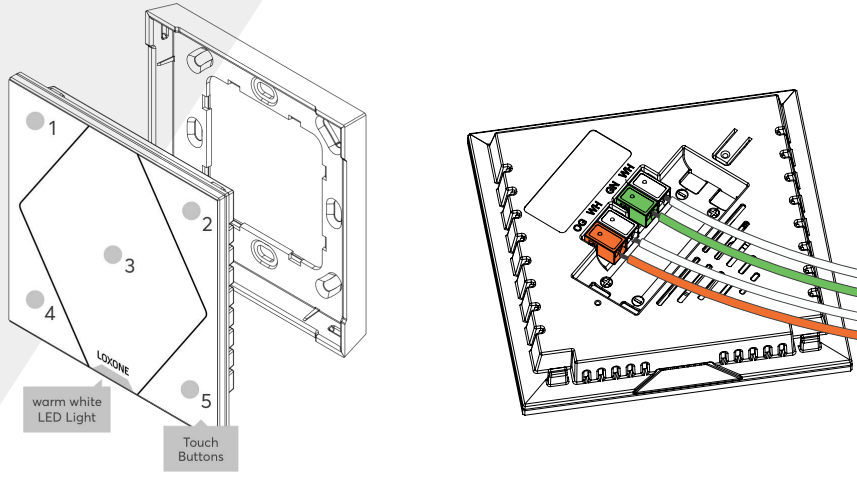
The Loxone Touch Pure Tree features five touch points on a glass surface to control the most important functions of a room. When a button is touched, an audible click confirms the action.
The large center touch zone is ideal for controlling the lighting, while the corner zones are suitable for controlling music and shading. It is based on the Loxone switch standard. The buttons can also be freely used for other applications.
It also features a controllable orientation light and the integrated sensor measures temperature and relative humidity.
Please note that there is a certain delay when measuring humidity due to the housing. The Room Comfort Sensor is better suited for a fast detection of changes in humidity.
Datasheet Touch Pure Tree White / Anthracite / Gold
Datasheet Touch Pure Classic Tree
Datasheet Touch Pure Tree Gen. 1
Table of Contents
Mounting↑
Install the mounting frame at the desired location.
Connect the power supply (orange/white terminal) and Tree communication wires (green/white terminals). Shortly after power-up, the status LED will blink orange if the wiring is correct (connection to Tree Extension and Miniserver is established).
Mount the device by snapping it onto the mounting frame.
Commissioning↑
Then follow the pairing procedure on the Tree Interface.
Sensors↑
| Summary | Description | Unit | Value Range |
|---|---|---|---|
| T5 | Combined input for the 5 touch points according to the Loxone Switch Standard. | - | ∞ |
| Temperature | Provides the air temperature. | ° | -40...125 |
| Humidity | Provides the air humidity. | % | 0...100 |
Actuators↑
| Summary | Description | Value Range |
|---|---|---|
| Orientation light | Digital output to control the orientation light. | 0/1 |
Diagnostic Inputs↑
| Summary | Description | Unit | Value Range |
|---|---|---|---|
| Online Status Touch Pure Tree | Indicates whether the device can be reached by the Miniserver. Diagnostics for Air devices Diagnostics for Tree devices Diagnostics for Extensions | Digital | 0/1 |
Properties↑
| Summary | Description | Unit | Value Range | Default Value |
|---|---|---|---|---|
| Monitor online status | If checked, you will be notified via System Status or the Mailer if the device is no longer available or goes offline. | - | - | - |
| Serial number | Specifies the serial number of the device. Enter 'Auto' to automatically pair a Tree device with unknown serial number. This can only be used if there is only one Tree device of the same type on a standalone Miniserver (not in a Client-Gateway setup). Save in the Miniserver to pair the Tree device. Afterwards the program must be loaded from the Miniserver to transfer the actual serial number of the Tree device into the program. | - | - | - |
| Show Button 1 | Show individual button | - | - | - |
| Show Button 2 | Show individual button | - | - | - |
| Show Button 3 | Show individual button | - | - | - |
| Show Button 4 | Show individual button | - | - | - |
| Show Button 5 | Show individual button | - | - | - |
| Audible confirmation | Audible confirmation on button press | - | - | - |
| Transmission cycle | Specifies how often analog values from sensors are transmitted [s] 0 ... Values are updated at least every 60 min, or if temperature deviates by 0.2 °C or humidity deviates by 2% to the last transmitted value | s | 0...3600 | 0 |
Safety Instructions↑
The installation must be carried out by a qualified technician in accordance with all applicable regulations.
Ensure that the device is protected from water.
Documents↑
Datasheet Touch Pure Tree White / Anthracite / Gold
Datasheet Touch Pure Classic Tree
Datasheet Touch Pure Tree Gen. 1