To manage Android and iPad-OS tablets with a Miniserver, these can be integrated similarly to Air or Tree devices.
Managed tablets can be further integrated with this function block.
Table of Contents
Inputs↑
| Abbreviation | Summary | Description | Value Range |
|---|---|---|---|
| Ds | Default screen | Input can be used to launch the specified Default Screen on the Tablet by triggering this input. | 0/1 |
| P | Presence | As long as the input is active the display will stay on and the Screensaver stays off, even if the tablet is idle and there is no user interaction. | 0/1 |
| Dnd | Do not disturb | All notifications will be silenced. Fully dims the display or dims to the value specified via parameter SBr, depending on the screensaver settings, as long as there is no user interaction. Overrides input (P). | 0/1 |
Parameters↑
| Abbreviation | Summary | Description | Unit | Value Range | Default Value |
|---|---|---|---|---|---|
| DBr | Display brightness | Specifies the brightness of the display. | % | 0...100 | 80 |
| SBr | Screensaver brightness | Specifies the brightness of the display when the Screensaver is on. | % | 0...100 | 10 |
Outputs↑
| Abbreviation | Summary | Description | Unit | Value Range |
|---|---|---|---|---|
| DBr | Current display brightness | % | 0...100 | |
| Cac | Charging active | On when charging | - | 0/1 |
| Blvl | Battery level | Current battery level | % | 0...100 |
| Ui | User interaction | Stays ON as long as the tablet is in use. Goes Off after the user interaction overrun duration has ended. | - | 0/1 |
| API | API Connector | Intelligent API based connector. API Commands | - | - |
Programming example↑
The App's display on the tablet can be adjusted in the properties window:

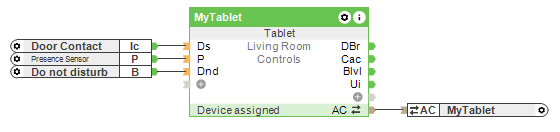
In this example, the tablet switches back to the defined standard screen when the user leaves the room and closes the door.
If the defined operating mode "Do not disturb" is active, notifications on the tablet are muted and the screensaver is activated as long as it is not being operated.
The current Miniservers can each manage up to 64 tablets, Gen. 1 variants up to 31.