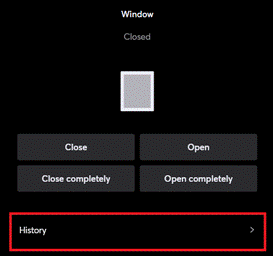
Controls a window.
Table of Contents
Inputs↑
| Abbreviation | Summary | Description | Unit | Value Range |
|---|---|---|---|---|
| Co | Complete open | If in motion, stops. | - | 0/1 |
| Cc | Complete close | If in motion, stops. | - | 0/1 |
| Tg | Toggle | Toggles between open, stop, close. For single button control. | - | 0/1 |
| Pos | Position of window | Move window to specified position. | % | 0...100 |
| Po | Partial open with push & hold | - | 0/1 | |
| Pc | Partial close with push & hold | - | 0/1 | |
| Wp | Weather protection | Window is closed and locked for further operation when on. Control via user interface is still possible. | - | 0/1 |
| Off | Off | Pulse stops movement. On locks the block. Dominating input. The name of the connected sensor is used in the user interface. | - | 0/1 |
| Io | Is open | Input is used to report the “fully opened” position via a limit switch or similar. | - | 0/1 |
| Ic | Is closed | Input is used to report the “fully closed” position via a limit switch or similar. | - | 0/1 |
| CPos | Current position | Input indicating the current tilt position or opening width of the window. | % | 0...100 |
| So | Slightly Open | Moves window to slightly open position if current position is different. | - | 0/1 |
Outputs↑
| Abbreviation | Summary | Description | Unit | Value Range |
|---|---|---|---|---|
| Op | Open | - | 0/1 | |
| Cl | Close | - | 0/1 | |
| Pos | Position of Window | Position of the window (0.0 = closed, 1.0 = open) | - | 0...1 |
| TPos | Target position | Output for target tilt position or target opening width (Schüco). - When input (Po) is ON (rising edge), the target position is set to 100. - When input (Pc) is ON (rising edge), the target position is set to 0. - If either input (Po) or input (Pc) are OFF (falling edge), the target position adopts the value of input (CPos). If input (CPos) is not connected, the target position will be calculated. | % | 0...100 |
| API | API Connector | Intelligent API based connector. API Commands | - | - |
Parameters↑
| Abbreviation | Summary | Description | Unit | Value Range | Default Value |
|---|---|---|---|---|---|
| Opd | Opening duration | s | 0...∞ | 5 | |
| Cld | Closing duration | s | 0...∞ | 5 | |
| minTd | Minimum travel time | Minimum travel time at pulse on input (Po) or (Pc). | s | 0...∞ | 0,4 |
| Mld | Motor lock duration | Duration of motor lock between direction changes | s | 0...∞ | 0,5 |
| SoPos | Slightly Open Position | Target position for input So | % | 0...100 | 50 |
Properties↑
| Summary | Description | Value Range | Default Value |
|---|---|---|---|
| Activity Log Entries | Number of entries in the activity log. 0: log is disabled The activity log tracks relevant changes since program start. | 0...100 | 20 |
History↑
In the user interface, the history of the function block can be displayed.
A maximum of 100 entries can be shown.
When you restart or save to the Miniserver, the history is cleared.