Up to 8 radio buttons, only one output can be active at a time. E.g. pulse at input (I3) activates output (O3).
Table of Contents
Inputs↑
| Abbreviation | Summary | Description | Value Range |
|---|---|---|---|
| I1-8 | Input 1-8 | Switches the respective output 1-8 On | 0/1 |
| + | Next output | 0/1 | |
| - | Previous output | 0/1 | |
| Sel | Select output | Switches to specific output. | ∞ |
| Off | Off | Pulse: Outputs are reset / switched off. On: Block is locked. Dominating input. The name of the connected sensor is used in the user interface. | 0/1 |
| DisPc | Disable periphery control | Disables all inputs when On. (e.g Child lock, cleaning) Control via user interface is still possible. | 0/1 |
Outputs↑
| Abbreviation | Summary | Description | Value Range |
|---|---|---|---|
| O1-8 | Output 1-8 | 0/1 | |
| N | Number of active output | ∞ | |
| API | API Connector | Intelligent API based connector. API Commands | - |
Parameters↑
| Abbreviation | Summary | Description | Value Range | Default Value |
|---|---|---|---|---|
| Rem | Remanence input | Remanence input: If active, the function block retains its previous state after a Miniserver reboot. The state of the function block is saved: – When saving to the Miniserver – At a planned reboot – Before a backup – Once per hour The data is saved on the SD card. | 0/1 | 0 |
| Max | Max. outputs | Maximum number of selectable outputs. Example: Max=4 -> only outputs 1-4 can be activated via block inputs. In the user interface, all labeled outputs can be activated regardless of this setting. | 1...8 | 8 |
| Sk0 | Skip 0 | 'All-off' (0) is skipped when switching with +/- when On. Applies only to object inputs, not to the buttons in the user interface. | 0/1 | 0 |
Properties↑
| Summary | Description | Default Value |
|---|---|---|
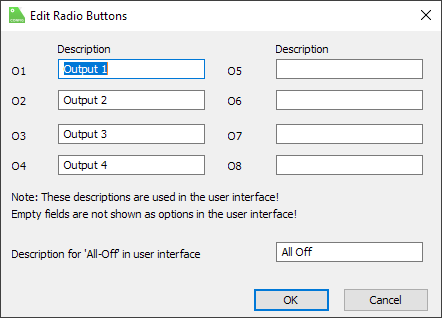
| Edit outputs | Edit output names | - |
Labelling Outputs↑
Outputs can be labeled by double-clicking on the block.
Labeled outputs are also displayed in the user interface and can be activated there.