The Loxone Nano Dimmer Air is used for the dimming of line voltage lamps, both conventional and electronic. Depending on the load, dimming can be controlled via forward phase or reverse phase dimming.
Table of Contents
- Mounting
- Commissioning
- Setting the correct dimming mode
- Touch for Nano
- Inputs, Outputs, Properties
- Safety Instructions
- Documents
Mounting↑
Install the device in a suitable installation box. Connect the device according to the following wiring diagram:
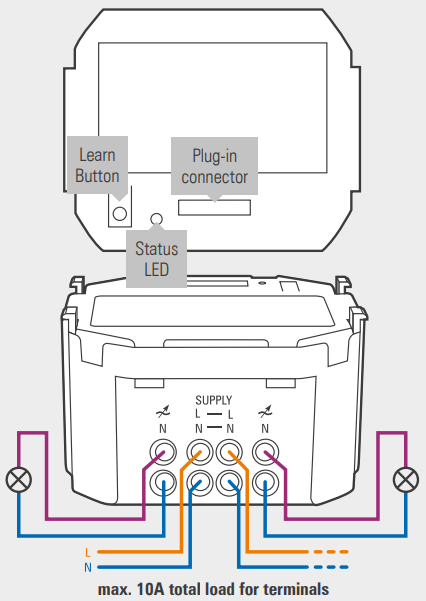
The device has two connection terminals, however, they are the same output, the terminals are bridged internally.
Before commissioning, it must be ensured that there is neither a short circuit nor an overload at the output.
When installing the device and when replacing lamps, always disconnect the line voltage for safety reasons. Failure to do so may result in personal injury or damage to property.
Commissioning↑
In delivery state, pairing mode will be active after the power supply has been established. This is indicated by the status LED flashing red/green/orange.
Then follow the pairing procedure on the Air Interface.
To activate the pairing mode manually, hold down the pairing button for at least 5 seconds after establishing power supply.
Setting the correct dimming mode↑
 | Please observe the recommended dimming type and load limits! |
| Only use luminaires that marked as dimmable! |
| Load type | Dimming type | Maximum load | Minimum load |
|---|---|---|---|
| Incandescent bulbs | Trailing edge | 200W | 30W |
| Line voltage halogen lamps | Trailing edge | 200W | 30W |
| Low voltage halogen lamps with electronic transformer (ELV) | Trailing edge | 110VA* | 15VA |
| LED light bulb with driver | Trailing edge | 110VA* | 15VA |
| Fluorescent lamp with electronic ballast | Trailing edge | 110VA* | 15VA |
| Line voltage LED lamps (retrofit, LED bulbs) | Trailing or leading edge (uncommon) | 110VA | 15VA, 30VA for leading edge/inductive |
| Low voltage lamps with magnetic transformer (MLV) | Leading edge | 200VA** | 30VA |
 | *The sum of the nominal load of the ballasts, LED drivers or transformers is relevant, not the nominal load of the actual light. |
| **A magnetic transformer must be loaded with at least 80% of it's capacity! |
| The ballasts, LED drivers, electronic transformers etc. used must be line voltage dimmable! |
 | If in doubt, the manufacturer of the illuminant can provide information on the load characteristics (whether inductive or capacitive) and the recommended dimming method. |
Touch for Nano↑
The optional plug-on modules Touch for Nano and Touch Pure for Nano feature five touch points to control the most important functions of a room. When a button is touched, an audible click confirms the action.
The plug-on module mounting frame is snapped onto the Nano Dimmer and then screwed onto the installation box. Finally, the Touch for Nano is plugged on along with the frame.
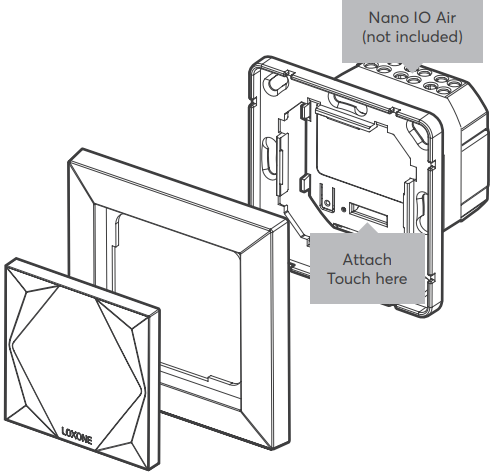
When using the Touch for Nano plug-on module, it must be activated in the properties of the Nano Dimmer Air in Loxone Config. The inputs will then be available in the peripheral tree.
| The Touch for Nano's large center touch zone is ideal for controlling the lighting, while the corner zones are suitable for controlling music and shading. It is based on the Loxone switch standard. The buttons can also be freely used for other applications. To use the individual buttons as inputs, activate the checkboxes in the Properties window. The audible confirmation can also be disabled here. |
| The NFC Code Touch for Nano is not compatible with the Nano Dimmer Air. |
Sensors↑
| Summary | Description | Value Range |
|---|---|---|
| T5 | Combined input for the 5 touch points according to the Loxone Switch Standard. | ∞ |
Actuators↑
| Summary | Description | Unit | Value Range |
|---|---|---|---|
| Smart Actuator | Smart Actuator for controlling lighting via compatible Lighting function blocks. | % | 0...100 |
Diagnostic Inputs↑
| Summary | Description | Unit | Value Range |
|---|---|---|---|
| Online Status Nano Dimmer Air | Indicates whether the device can be reached by the Miniserver. Diagnostics for Air devices Diagnostics for Tree devices Diagnostics for Extensions | Digital | 0/1 |
| System temperature | Provides the internal device temperature. This is often the temperature of the CPU or another location in the device. | ° | ∞ |
| Temperature Shutdown | Input is active, when the outputs of the device have been switched off due to high device temperature. Possible reasons: Ambient temperature too high, outputs overloaded. | Digital | 0/1 |
Properties↑
| Summary | Description | Default Value |
|---|---|---|
| Monitor online status | If checked, you will be notified via System Status or the Mailer if the device is no longer available or goes offline. | - |
| Serial number | Serial number of Air device. Automatic pairing can be enabled on the Air Base. Automatic pairing can be enabled on the Airbase for a set time. | - |
| Actuator Type | Use device with Standard Actuator(s) or Smart Actuator(s) Smart Actuators support dynamic fade times and can only be used with the Lighting Controller. | - |
| Expansion module | Expansion module for Nano IO Air | - |
| Button Behaviour | Specifies the behavior when a button is pressed. Pulse: Sends a pulse on rising edge OnOff: Sends ON on rising edge and OFF on falling edge, used for long click Automatic: Sends a pulse on rising edge for buttons 1 & 4 (shading) and 3 (lighting). Sends ON on rising edge and OFF on falling edge for buttons 2 & 5 (music) to enable volume up/down via long press | - |
| Type of Dimming | Select method of dimming. Please choose the type of dimming that is appropriate for your fittings. | - |
Safety Instructions↑
The installation must be carried out by a qualified technician in accordance with all applicable regulations.
The installation requires a suitable enclosure to ensure protection against contact, water and dust.
Documents↑
Datasheet Touch Pure for Nano White / Anthracite / Gold
Datasheet Touch Pure Classic for Nano