Following a trigger, provides adjustable pulse at the output, includes permanent on and warning-function.
Before the output is deactivated again, a short switch off prewarning (on / off) takes place
Table of Contents
Inputs↑
| Abbreviation | Summary | Description | Value Range |
|---|---|---|---|
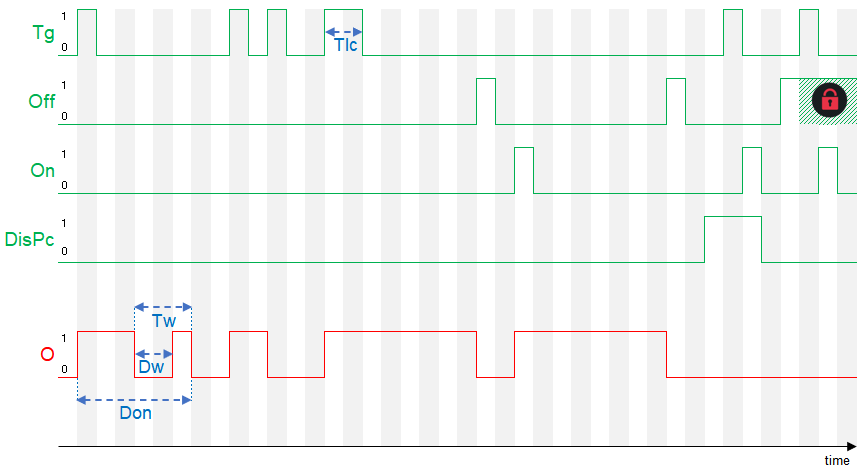
| Tg | Toggle | Pulse at input switches output (O) on for the duration set in parameter (Don). Another pulse switches output (O) off again. Long-click = Switches output (O) permanently on. | 0/1 |
| Off | Off | Pulse: Outputs are reset / switched off. On: Block is locked. Dominating input. The name of the connected sensor is used in the user interface. | 0/1 |
| On | On | Switches output (O) on. | 0/1 |
| DisPc | Disable periphery control | Disables all inputs when On. (e.g Child lock, cleaning) Control via user interface is still possible. | 0/1 |
Outputs↑
| Abbreviation | Summary | Description | Value Range |
|---|---|---|---|
| O | Output | 0/1 | |
| API | API Connector | Intelligent API based connector. API Commands | - |
Parameters↑
| Abbreviation | Summary | Description | Unit | Value Range | Default Value |
|---|---|---|---|---|---|
| Rem | Remanence input | Remanence input: If active, the function block retains its previous state after a Miniserver reboot. The state of the function block is saved: – When saving to the Miniserver – At a planned reboot – Before a backup – Once per hour The data is saved on the SD card. | - | 0/1 | 0 |
| Don | On-duration of output (O) on pulse | s | 0...∞ | 180 | |
| Tlc | Time long-click for continious-on | Defines the duration of a long click to permanently switch on the output (O) via the input (Tr). | s | 0...∞ | 0,5 |
| Tw | Switch-off warning time | Time of the switch-off warning before output (O) switches off. | s | 0...∞ | 15 |
| Dw | Switch-off warning duration | s | 0...∞ | 0,5 |
Timing Diagram↑
Presence Simulation↑
This function block has a presence simulation.
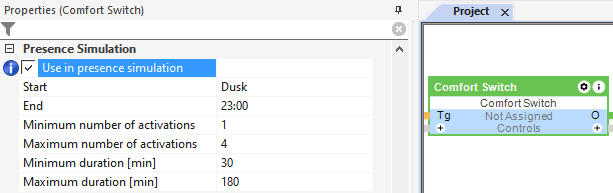
Activate and define the presence simulation in the properties window: