This block can be used to control multiple shading blocks together.
Double-click on the block to open the dialog for selecting the assigned blocks
Table of Contents
Inputs↑
| Abbreviation | Summary | Description | Unit | Value Range |
|---|---|---|---|---|
| Tg | Toggle | Toggles between open, stop, close. For single button control. | - | 0/1 |
| Po | Partial open with push & hold | - | 0/1 | |
| Pc | Partial close with push & hold | - | 0/1 | |
| Co | Complete open | Stopping not possible. | - | 0/1 |
| Cc | Complete close | Stopping not possible. | - | 0/1 |
| So | Slightly open | Venetian blinds close completely and move slats in horizontal position according to parameter (Rd). Roller blinds, curtains and awnings move into position according to parameter (Rd). | - | 0/1 |
| Sps | Sun position automatic start | Activates the sun position automatic when On at the beginning of the shading period, or also with a pulse during the shading period. The sun position automatic is deactivated for the rest of the day, if block is operated manually. Pulse on (Spr) followed by a rising edge on (Sps) or pulse on (Spr) while (Sps) is active, restarts the sun position automatic. | - | 0/1 |
| DisSp | Disable sun position automatic | Disables the sun position automatic when On. | - | 0/1 |
| Spr | Sun position automatic restart | Pulse followed by a rising edge at input (Sps) or pulse while input (Sps) is active, restarts the sun position automatic. | - | 0/1 |
| Wa | Wind alarm | Moves shading to the wind alarm position set in parameter (Wap) and locks the block(can still be operated through the App/Webinterface). Used for storm protection. Active Automatic is only suspended instead of cancelled. After Wa end, automatic is restarted with a positive edge on Sps or of the sunshine-systemvariable. Automatic conditions are not re-evaluated on end on windalarm. If both conditions are permanently active during windalarm, automatic can be restarted via pulse on Spr. The name of the connected sensor is used in the user interface. | - | 0/1 |
| Off | Off | Pulse stops movement. On locks the block. Dominating input. The name of the connected sensor is used in the user interface. | - | 0/1 |
| Pos | Position of shading | Move the shading to the specified position. | % | 0...100 |
| Slat | Position of slats | Move the slats to the specified position. | % | 0...100 |
| T5 | T5 control | Button 1: Complete open Button 4: Complete close | - | ∞ |
| DisPc | Disable periphery control | Disables inputs Tg, Po, Pc, Co, Cc, So, T5 when On. (e.g Child lock, cleaning) Control via user interface is still possible. | - | 0/1 |
Outputs↑
| Abbreviation | Summary | Description | Value Range |
|---|---|---|---|
| API | API Connector | Intelligent API based connector. API Commands | - |
| No | Open shades | Number of open shades | ∞ |
| Nc | Closed shades | Number of closed shades | ∞ |
Properties↑
| Summary | Description | Default Value |
|---|---|---|
| Selection | All selected Shading function blocks can be controlled together. | - |
Basic Programming↑
Double-click on the block to open the following window, in which compatible shading blocks can be assigned:
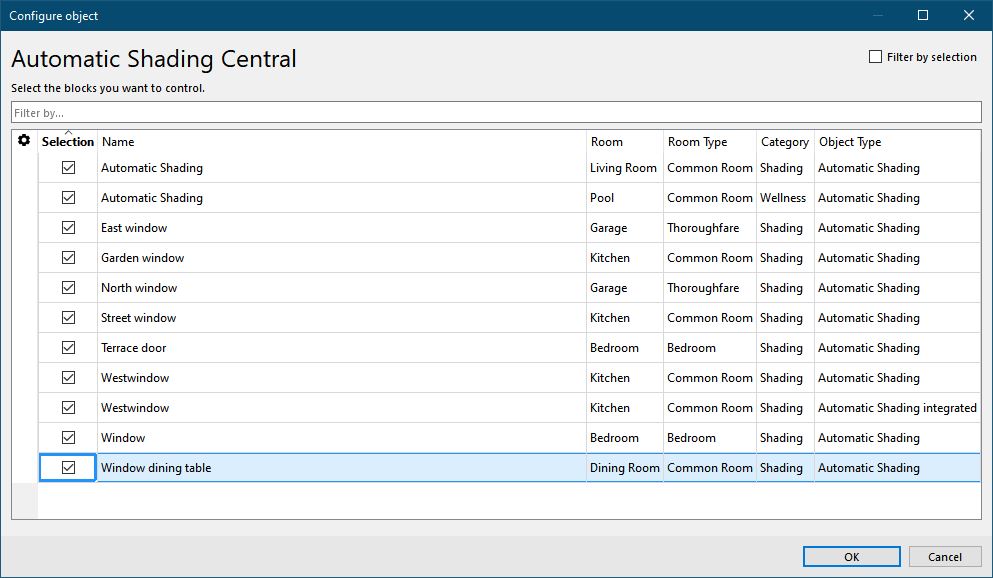
Central commands are not blocked by an active (DisPc) input at the respective function block. If a function block is used in the central block, this is indicated by the central symbol on the respective block.
The functions that can be used on the central block depend on the linked blocks and are set via their parameters. If a function block does not support a function, it cannot be controlled.
Enable Sun Position Automatic via User Interface↑
The sun position automatic can be started manually via the user interface, thereby blinds are lowered when the sun is at the window. Whether the sun is shining, it is cloudy, or the Sps input of the block is active or not is not taken into account.