The Loxone Hörmann Tree is a compact interface module for integrating Hörmann garage door operators.
An up-to-date list of compatible Hörmann operators is available online.
Tartalom
- Szerelés
- Üzembehelyezés
- Programozás
- Korlátozások
- Szoftver Index
- Diagnosztika
- Bemenetek, kimenetek, beállítások
- Dokumentumok
Szerelés↑
Hörmann Tree is connected to the BUS connector of a compatible Hörmann door opener using the provided adapter cable. Always refer to the manual to ensure you are using the correct BUS connector.

For HCP1 models, the device is immediately ready for pairing.
The door opener is automatically recognized.
For HCP2 models, the BUS-Scan must first be activated on the door opener to activate the power supply for the device to be able to pair it. Activation varies depending on the door opener model:
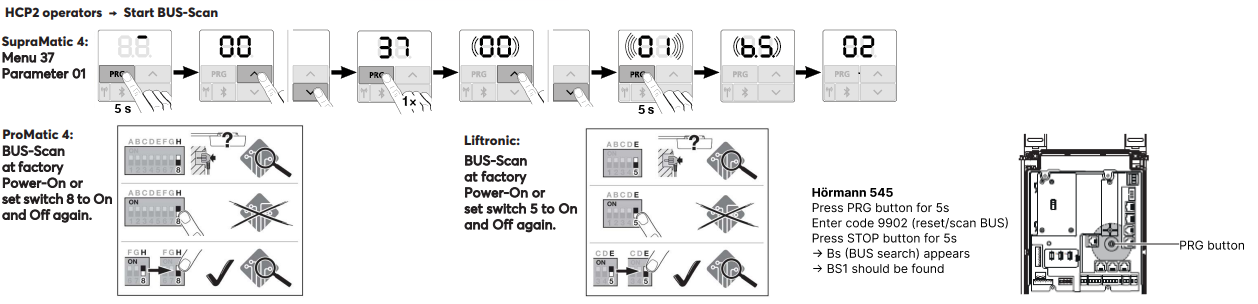
After activating the BUS-Scan (power supply), the device can be paired.
The door opener is then automatically recognized.
Üzembehelyezés↑
Az üzembehelyezéshez a készüléket árammal kell ellátni, és a Tree interfészen keresztül csatlakoztatni kell a Miniserver-hez.
Ezután kövesd a tanítási eljárást a Tree interfészen.
Programozás↑
The Loxone Hörmann Tree is programmed and set up using the Garage / Gate function block in Loxone Config:
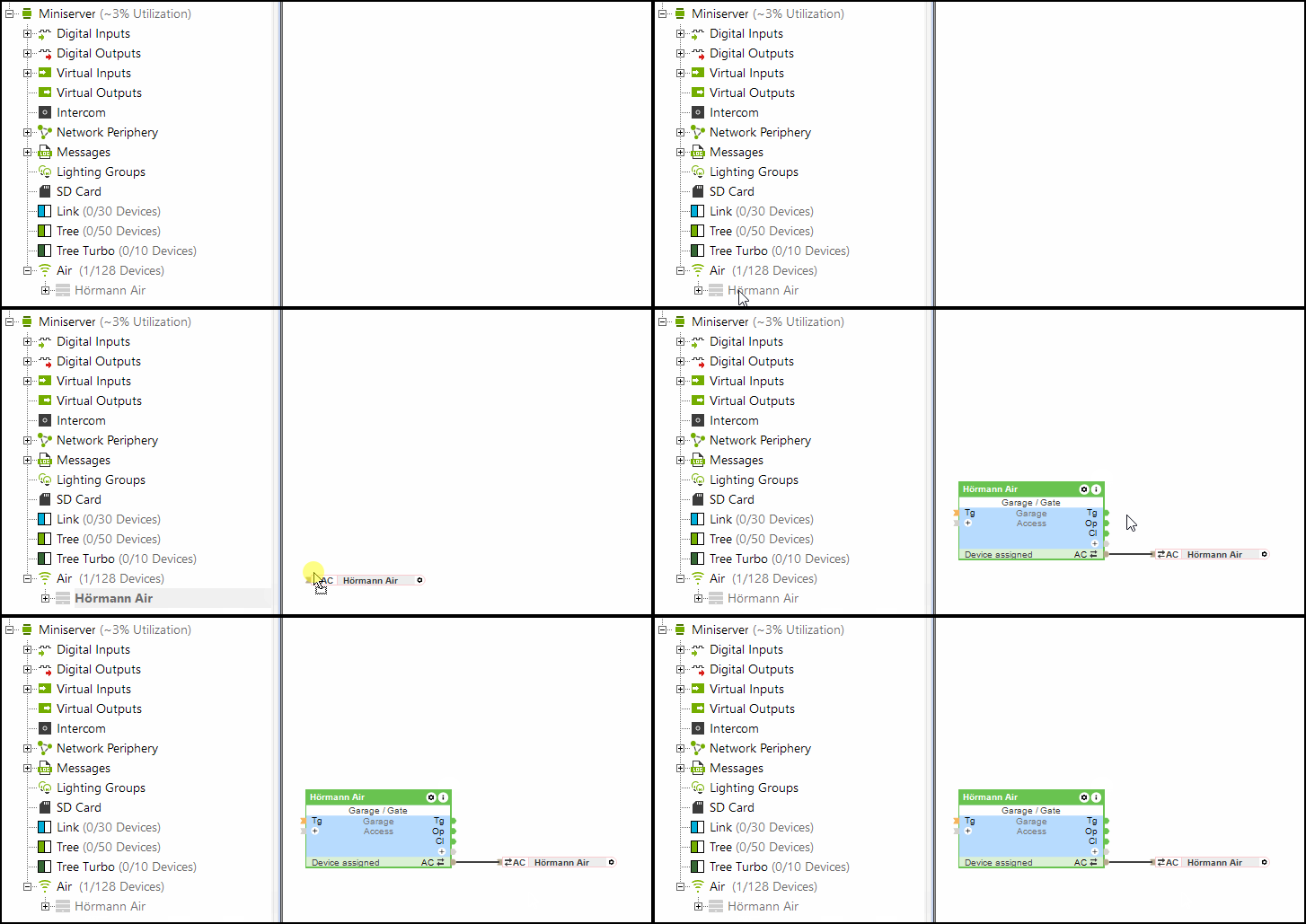
The (Po) input (partially open) of the Garage/Gate block is also supported by Hörmann Tree.
Korlátozások↑
With HCP1 openers, an error may briefly be displayed on the drive during an update. The function is not affected. After sending a command again, the error is no longer displayed.
When using the Hörmann Tree, the Hörmann HKSI climate sensor cannot be used in parallel.
Szoftver Index↑
A szoftver index segítségével ellenőrizhető a Loxone Hörmann Tree kompatibilitása, a támogatott működtetőket itt találod.
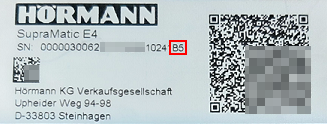
You can find the serial number along with the software index (starting with a capital letter) on the label of the Hörmann garage door opener.
Diagnosztika↑
If the Hörmann operator has detected a warning or error, a system message will be active. Please check the device directly to view the error code or status displayed. For detailed troubleshooting instructions, refer to the device’s manual based on the indicated status.
Aktorok↑
| Rövid leírás | Leírás | Értékhatár |
|---|---|---|
| API Csatlakozó | Intelligens API alapú csatlakozó. API Parancsok | - |
| Világítás | Activates the door opener lighting . The lighting is also automatically activated whenever the door opens or closes and remains on for the time specified in the opener. | 0/1 |
Diagnosztikai bemenetek↑
| Rövid leírás | Leírás | Mértékegység | Értékhatár |
|---|---|---|---|
| Online Hörmann Tree | Jelzi, ha egy eszközt elér a Miniserver. Diagnosztika Air eszközökhoz Diagnosztika Tree eszközökhoz Diagnosztika Extension-höz | Digitális | 0/1 |
| Aktor információ | Digitális | 0/1 | |
| Kommunikációs hiba | Digitális | 0/1 | |
| Nincs kapcsolat | Digitális | 0/1 |
Tulajdonságok↑
| Rövid leírás | Leírás | Alapértelmezett érték |
|---|---|---|
| Online állapot megfigyelése | Ha bejelölöd, a rendszer automatikus értesítést küld e-mailben vagy a mobil alkalmazáson keresztül, ha az eszköz nem elérhető vagy offline állapotban van. | - |
| Sorozatszám | Az eszköz sorozatszámát adja meg. Írd be az 'Auto' -t, hogy automatikusan feltanítson egy ismeretlen sorozatszámmal rendelkező Tree eszközt. Ez csak akkor használható, ha csak egy azonos típusú Tree eszköz van egy önállóan működő Miniserver-en (nem kliens-átjáró installáció). Mentsd el a programot a Miniserver-be, hogy feltanítsd a Tree eszközt. Ezek után, a programot ki kell olvasni a Miniserver-ből, hogy átvegye a program a Tree eszköz tényleges sorozatszámát. | - |
| Automatikusan megtanulja a futási időket | Automatikusan megtanulja a futási időket | - |