The Wireless Speaker is an audio solution designed for both standalone use and seamless integration into a Loxone. It's a portable speaker featuring a 2-way system with passive radiator. It is powered by 24V and receives its audio signal via Wi-Fi or Bluetooth.
Tartalom
- Üzembehelyezés
- LED állapotok
- Gyári visszaállítás
- Bemenetek, kimenetek, beállítások
- Biztonsági utasítások
- Dokumentumok
Üzembehelyezés↑
To set up the speaker, connect the power adapter and plug it into a wall outlet. When the LED turns solid orange, use your phone or tablet to join the "wspXXXX" Wi‑Fi network. If the setup page does not open automatically, open a web browser and go to 192.168.123.1 to add the speaker to your local network. Note that pairing mode is active for 30 minutes after the speaker is powered on, requiring a reboot to connect if this time has expired. After successful configuration, the speaker will restart and can then be used as a standalone player with support for AirPlay and Spotify Connect.
For integration into a Loxone system, ensure the speaker and Miniserver are connected to the same network. The speaker is ready for pairing when the Status LED cycles red, orange, and green. In Loxone Config, run an Audio Device Search, or use the LOXONE App (Device Search) to run a Network Speaker Search. Follow the prompts to complete the room assignment and configuration. You can perform the entire setup directly through the LOXONE App, with no need to access Loxone Config.
LED állapotok↑
| Állapot LED | Leírás |
|---|---|
| Bootolás |
| Wi-Fi párosítás aktív |
| Paired, no communication with system or network |
| LOXONE pairing mode |
| Hiba |
| Firmware frissítés alatt |
| Standby / playing |


Wi-Fi standalone mode
| Állapot LED | Leírás | LED Állapotok |
|---|---|---|
| Blue flashing for 10 seconds | Bluetooth csatlakoztatva |
| Green flashing for 10 seconds | AirPlay / Spotify Connect playback |


Gyári visszaállítás↑
If the Wireless Speaker was previously paired with a Miniserver and is now to be used in another installation, the pairing must first be released. Connect to the Miniserver and delete the Wireless Speaker from the programming. Then save the program into the Miniserver.
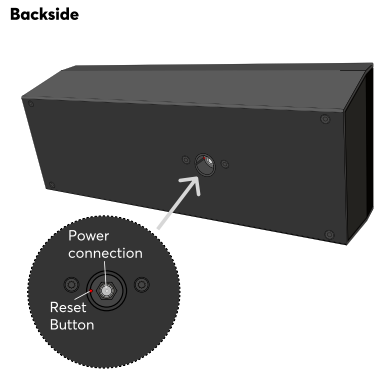
If this is not (or no longer) possible, you can reset the Wireless Speaker to factory settings. After the speaker has fully booted, press the reset button for 1 second using a paper clip or similar object. Avoid applying excessive force while pressing the button. A confirmation sound will indicate that the reset was successful. Alternatively, you can restore factory settings via the web interface. After the reset is complete, the Wireless Speaker is ready to be paired again.
 | Without these steps a previously paired Wireless Speaker cannot be paired with another Miniserver! |
The web interface of the Wireless Speaker provides access to network settings, status information, and diagnostic tools. You can access the interface using either the speaker’s IP address or its hostname. When searching for audio devices in Loxone Config, the search results include the IP address or hostname of the Wireless Speaker.
If the Wireless Speaker is not yet paired with a Miniserver, the login credentials for the web interface are admin/admin.
Once the Wireless Speaker is paired, the login credentials of a user of the user group Full Access (Administrators) of the paired Miniserver are required.
The Wireless Speaker can perform firmware updates automatically when new versions become available. This requires Automatic Updates to be enabled in the project properties. The Wireless Speaker will automatically adopt this setting.
Diagnosztikai bemenetek↑
| Rövid leírás | Leírás | Mértékegység | Értékhatár |
|---|---|---|---|
| Erősítő határérték | Ha az erősítő hőmérséklete elér egy kritikus pontot, a zóna hangereje csökkentésre kerül. Ennek oka lehet a túlterhelés vagy a magas környezeti hőmérséklet. | - | 0/1 |
| Online Wireless Speaker 1 | Jelzi, ha egy eszközt elér a Miniserver. Diagnosztika Air eszközökhoz Diagnosztika Tree eszközökhoz Diagnosztika Extension-höz | Digitális | 0/1 |
| Hőmérsékleti lekapcsolás | A bemenet aktív, ha az eszköz kimenetei kikapcsoltak az eszköz túlmelegedése miatt. Lehetséges okok: A környezeti hőmérséklet túl magas, a kimenetek túlterheltek. | Digitális | 0/1 |
| Rendszerhőmérséklet | Megadja az eszköz belső hőmérsékletét Ez gyakran a CPU hőmérséklete vagy a készülék egy másik pontjának a hőmérséklete. | ° | ∞ |
Aktorok↑
| Rövid leírás | Értékhatár |
|---|---|
| Wireless Speaker 1 audio csatorna | ∞ |
Tulajdonságok↑
| Rövid leírás | Leírás | Mértékegység | Értékhatár | Alapértelmezett érték |
|---|---|---|---|---|
| Sorozatszám | Az eszköz sorozatszámát adja meg. | - | - | - |
| Online állapot megfigyelése | Ha bejelölöd, a rendszer automatikus értesítést küld e-mailben vagy a mobil alkalmazáson keresztül, ha az eszköz nem elérhető vagy offline állapotban van. | - | - | - |
| Maximális hangerő | Meghatározza a maximális (fizikai) százalékban teljesítményét a kimenetnek, így korlátozza a kimenet maximális hangerejét. Az Audio lejátszó vagy az alkalmazás 0-100% közötti hangerő-értékei ennek megfelelően vannak méretezve. | % | 0...100 | 100 |
| Erősítés | A kimenet hangerejének állítása decibelben. Segít kiegyensúlyozni a hangszintet a különböző hangszórók vagy környezetek között, biztosítva az egyenletes hangkimenetet. A hangerő a megadott maximális hangerőnek megfelelően skálázódik és korlátozódik. | - | -6...6 | 0 |
Biztonsági utasítások↑
The device is maintenance-free and should only be cleaned with a dry cloth. It is designed for indoor use within a temperature range of -10°C to 50°C (14°F to 122°F).