The Loxone AC Control is a compact interface module for integrating air conditioning units.
Ennek érdekében, a légkondicionáló eszközhöz megfelelő termékváltozatot kell kiválasztani.
The different variants vary in the interface used, the connecting cable and the firmware. The AC Control takes over the control of the air conditioning in a Loxone installation instead of a conventional remote control.
For this reason, original remote controls of the AC unit (also IR) can no longer be used.
When adding the AC Control to Loxone Config, some modes, airflow settings, and fan speeds may not be available for certain AC Control models.
Datasheet AC Control Tree for Panasonic
Tartalom
- Szerelés
- Üzembehelyezés
- Programozás
- Diagnosztika
- Bemenetek, kimenetek, beállítások
- Biztonsági utasítások
- Dokumentumok
Szerelés↑
Elsőnek a légkondícionáló eszközt ki kell kapcsolni, majd leválasztani a tápellátásról.
A telepítéshez hozzáférésre van szükség a légkondicionáló beltéri egységének elektromos csatlakozóihoz. A fedelek eltávolításának módját, valamint a különböző csatlakozók és konnektorok helyét a beépített kondicionáló berendezés telepítési vagy szervizelési kézikönyvében találod meg.
On the circuit board of the Panasonic indoor unit, locate the CN-CNT connector. If an external communication module or accessory is connected here, it must be unplugged and can no longer be used.
 | Every Panasonic AC unit equipped with a CN-CNT connector is compatible. There may be some feature limitations depending on the specific AC model. You can find a detailed list of supported features here. To determine whether your model is supported: - Check the wiring diagram or service manual for the unit. - Some units have a CN-CNT connector on the main board. In these cases, CN-CNT will be listed in the wiring diagram. - Even if the CN-CNT connector is not present on the main board, the unit may still be supported. Be sure to also check the service manual for CN-CNT availability. |
Then connect the AC Control according to the wiring diagram below and connect the power supply (orange/white terminal) as well as the Tree data lines (green/white terminal).

Fasten the AC Control to a suitable place in the device, e.g. with a cable tie.
Make sure that the device cannot come into contact with mains voltage, hot, cold or moving components, or moisture.
Finally, reinstall the housing covers and turn on the mains supply and the air conditioner.
Ne felejtsd el eltávolítani vagy letiltani a légkondicionáló egység meglévő távirányítóit, mivel azok már nem használhatók.
Üzembehelyezés↑
Az üzembehelyezéshez a készüléket árammal kell ellátni, és a Tree interfészen keresztül csatlakoztatni kell a Miniserver-hez.
Ezután kövesd a tanítási eljárást a Tree interfészen.
Programozás↑
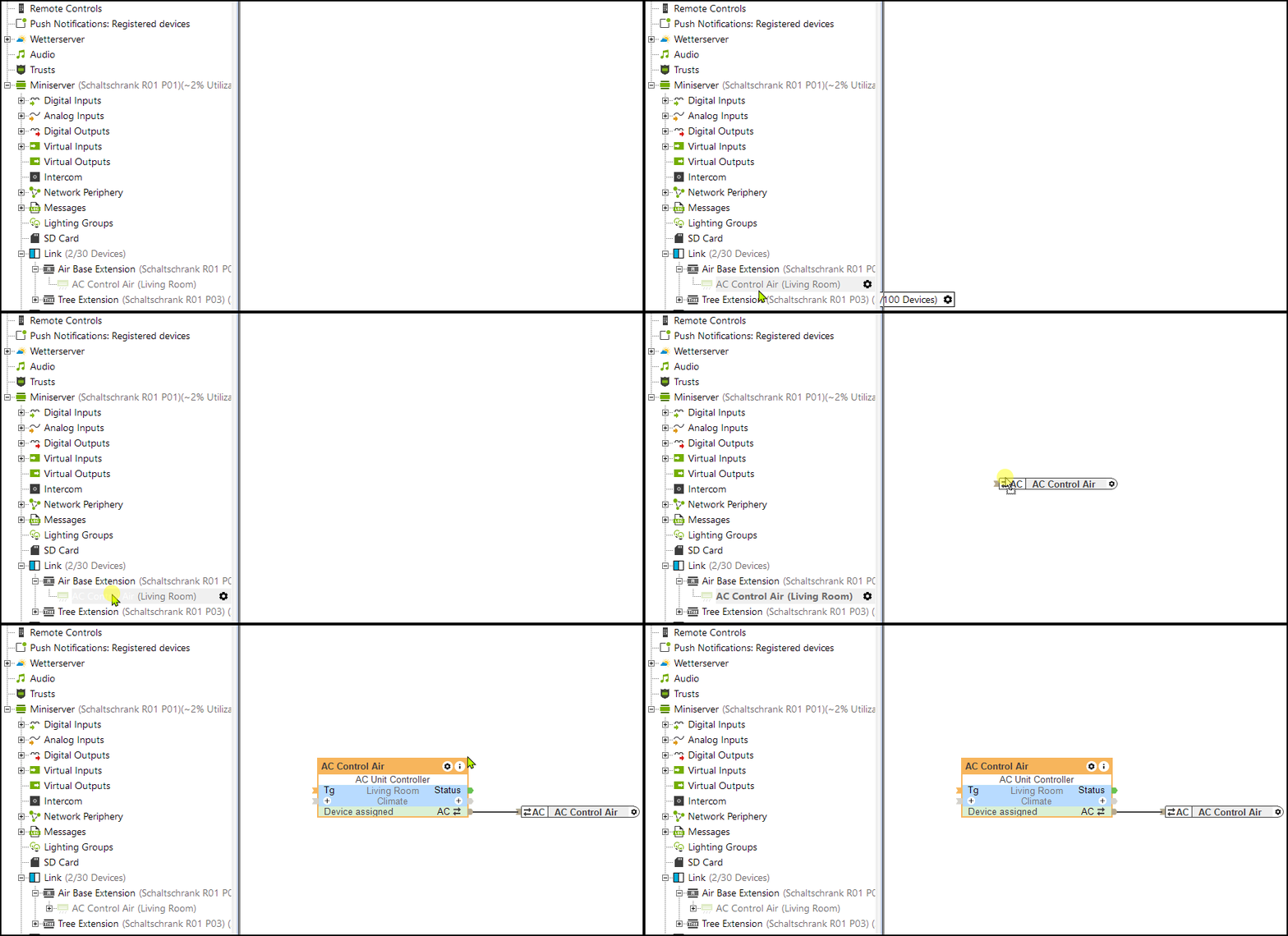
Loxone AC Control is programmed and set up using the AC Control function block in Loxone Config:
Diagnosztika↑
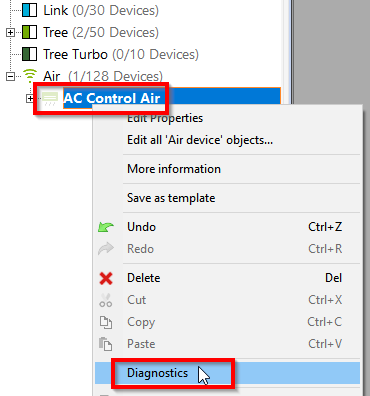
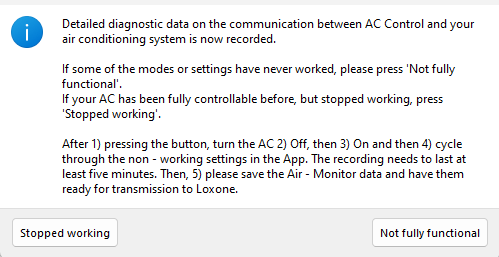
In case the communication with an air conditioner does not work (correctly), a diagnostic analysis can be started in the context menu of an AC Control. This enables communication data to be displayed and recorded:
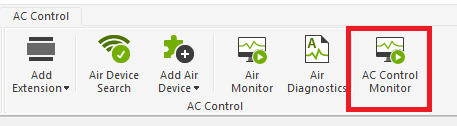
Lehetőség van továbbá indítani egy AC Control Monitort diagnosztikai céllal.
1) Kapcsold be az AC Control Monitort. 2) Kapcsold ki a klíma egységet. 3) Kapcsold be a klíma egységet. 4) Menj végig a nem működő funkciókon. A felvételnek legalább 5 percig kell futnia. 5) Mentsd el az AC Control Monitor adatait és készítsd elő a Loxone-nak való továbbításra.
Aktorok↑
| Rövid leírás | Leírás |
|---|---|
| API Csatlakozó | Intelligens API alapú csatlakozó. API Parancsok |
Diagnosztikai bemenetek↑
| Rövid leírás | Leírás | Mértékegység | Értékhatár |
|---|---|---|---|
| Online AC Control Tree Toshiba | Jelzi, ha egy eszközt elér a Miniserver. Diagnosztika Air eszközökhoz Diagnosztika Tree eszközökhoz Diagnosztika Extension-höz | Digitális | 0/1 |
Tulajdonságok↑
| Rövid leírás | Leírás | Alapértelmezett érték |
|---|---|---|
| Online állapot megfigyelése | Ha bejelölöd, a rendszer automatikus értesítést küld e-mailben vagy a mobil alkalmazáson keresztül, ha az eszköz nem elérhető vagy offline állapotban van. | - |
| Sorozatszám | Az eszköz sorozatszámát adja meg. Írd be az 'Auto' -t, hogy automatikusan feltanítson egy ismeretlen sorozatszámmal rendelkező Tree eszközt. Ez csak akkor használható, ha csak egy azonos típusú Tree eszköz van egy önállóan működő Miniserver-en (nem kliens-átjáró installáció). Mentsd el a programot a Miniserver-be, hogy feltanítsd a Tree eszközt. Ezek után, a programot ki kell olvasni a Miniserver-ből, hogy átvegye a program a Tree eszköz tényleges sorozatszámát. | - |
Biztonsági utasítások↑
A telepítést csak egy szakképzett villanyszerelő végezheti, betartva az összes szabályt.
Dokumentumok↑
Datasheet AC Control Tree for Panasonic