Tree Turbo is a high-performance interface that enables the connection of audio devices such as the Stereo Extension, Install Speaker 7 Master, Install Speaker 10 Master, Install Sub 10 Master, and Satellite Speaker IP64 Master to the Audioserver or the Miniserver Compact.
Each Tree Turbo interface supports up to 10 devices with a maximum cable length of 150 m /492 ft.
Tartalom
- Kábelezés & Topológia
- Tree Turbo eszközök tanítása
- Tree Turbo Sebesség követelmények az Audió Eszközökhöz
- Tree Turbo Signal Hygiene in Large Installations
Kábelezés & Topológia↑
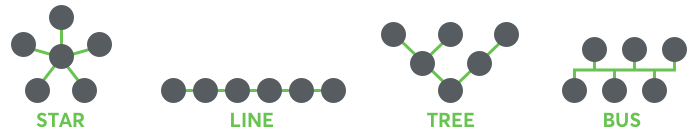
The following wiring topologies (Tree Turbo) are supported, with a maximum cable length of 150 m /492 ft:
We recommend using the Loxone Audio Cable for wiring. Use the green, green-white twisted pair for the Tree Turbo data line and the orange/white-orange pair with a cross-section of 1.5 mm² (AWG 16) for the 24 V DC power supply.
For longer cable runs or when connecting multiple Tree Turbo devices with high power consumption, additional power supplies can be installed near the devices, or multiple supply lines can be routed.
If separate power supplies are used, we recommend connecting the GNDs of all power supplies together.
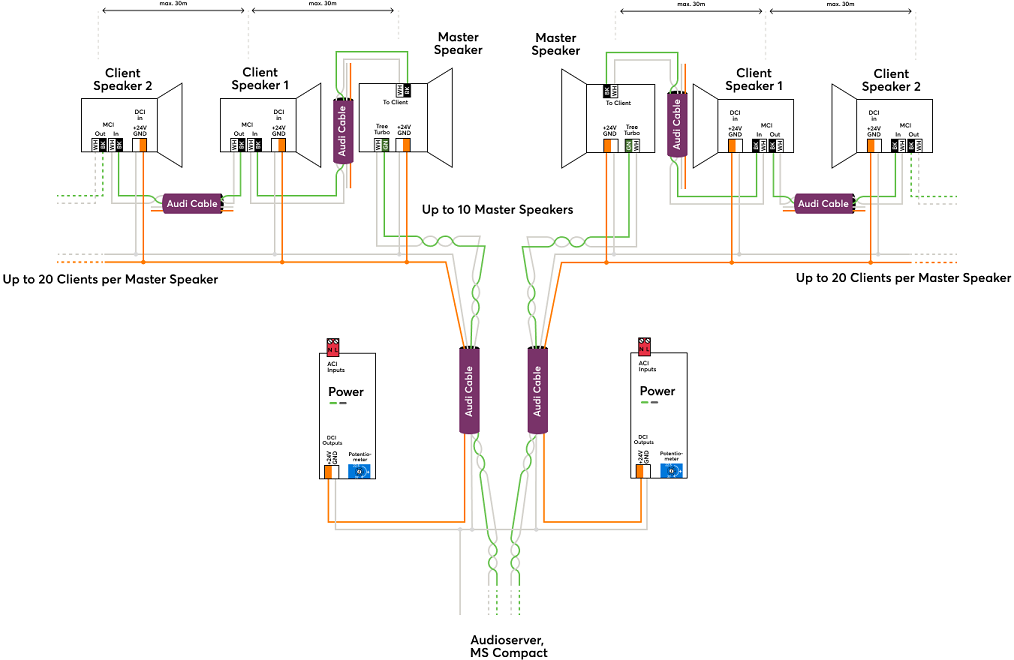
Detailed wiring with the Audio Cable
Master Install Speaker (Install Speaker 7 Master, Install Speaker 10 Master, Install Sub 10 Master):
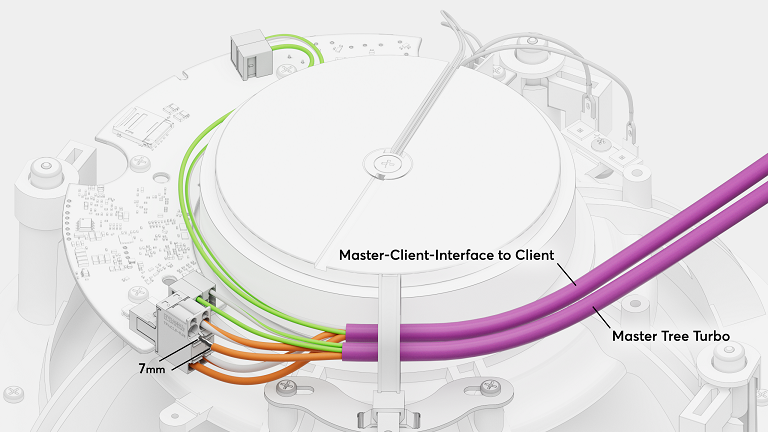
Client Install Speaker (Install Speaker 7 Client, Install Speaker 10 Client, Install Sub 10 Client):
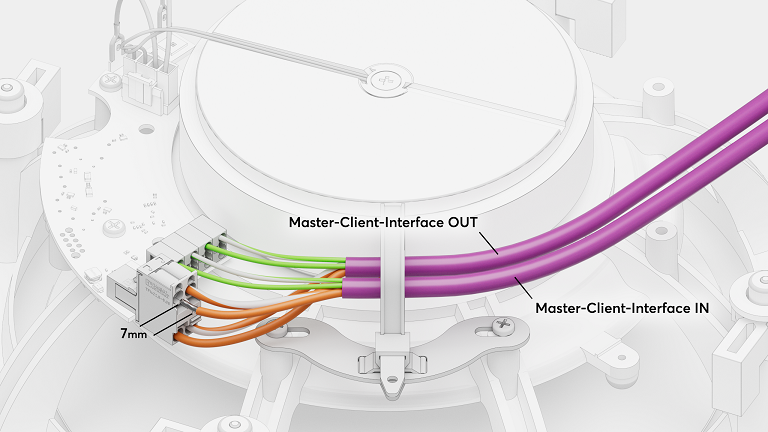
Satellite Speaker IP64 Master:
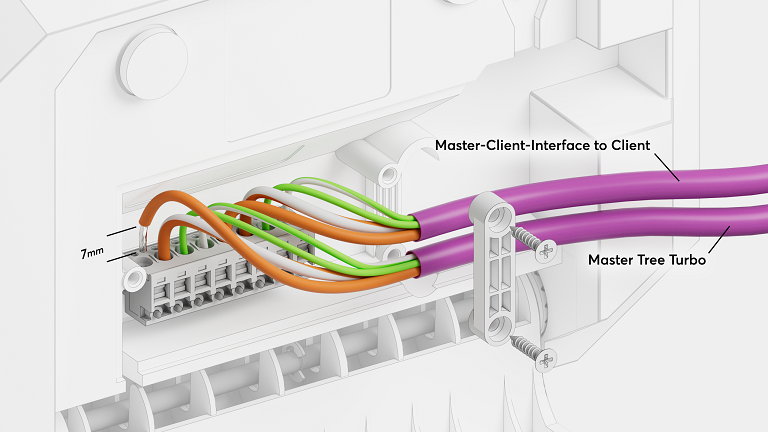
Satellite Speaker IP64 Client:
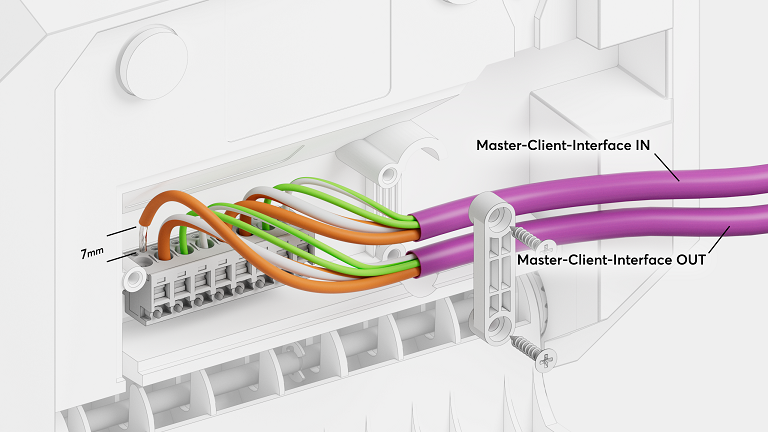
Stereo Extension:
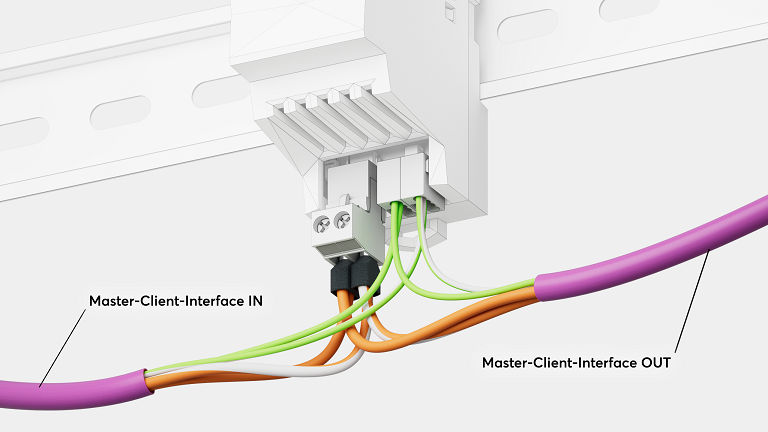
 | A Tree Turbo teljesen más technológiával működik mint a jól ismert Tree busz. Ezért a Tree és a Tree Turbo vonalat nem szabad összekötni! A Tree Turbo vonal ha lehet ne fusson más busz vonallal egy kábelben. |
A Tree Turbo kommunikáció IP alapú, ezért az összes Tree Turbo eszköz IP címe meg fog jelenni a hálózaton.
If an Audioserver or Miniserver Compact is located in a local 10.10.10.x network, the device must be set to DHCP. Only then can the network configuration be detected automatically, as Tree Turbo devices operate in this address range by default and then automatically switch to an alternative internal network circuit.
Tree Turbo eszközök tanítása↑
To add Tree Turbo devices, first click on the desired Tree Turbo interface in Loxone Config, and then on Tree Turbo Search.
A megnyíló ablakban az összes csatlakozatott Tree Turbo eszköz fel lesz sorolva ami még nem része a programnak:
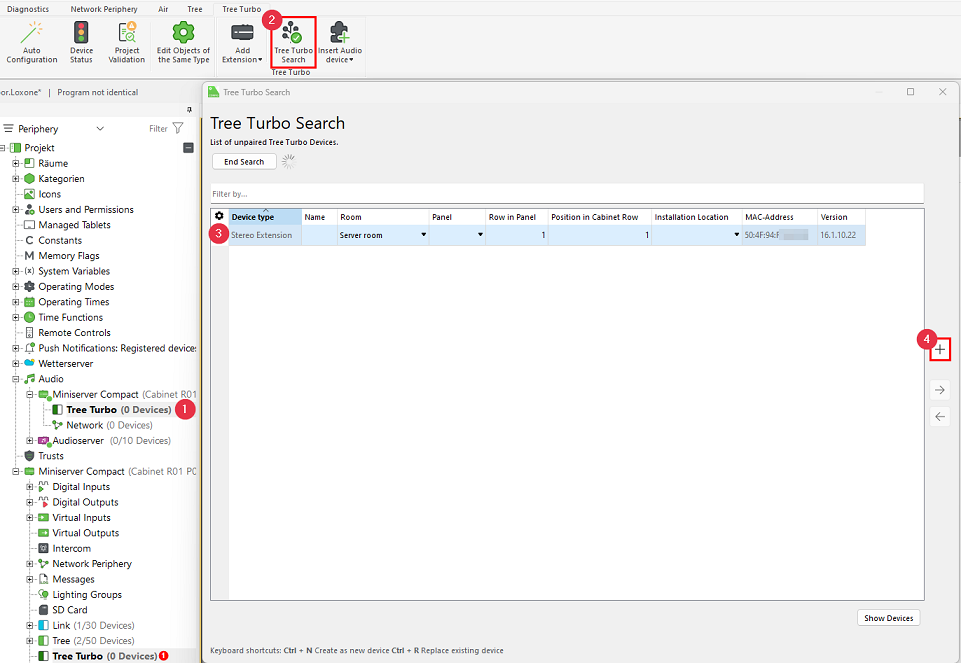
When you highlight a device, it will identify itself by flashing its status LED or by emitting an audible signal through the speakers. This allows you to easily locate and name the device.
Válaszd ki a megfelelő eszközt, nevezd el, társítsd helyiséghez, add meg a telepítési pozíciót és add hozzá a programhoz a Eszköz hozzáadása vagy a + gombbal.
The right-hand section of the window lists all devices that are already part of the program. You can display them by clicking Show my devices.
You can also replace an existing device with a new one of the same type that was found during the search. This is useful when replacing a device or adding devices to a preconfigured program. Select both the device to be added and the one to be replaced, then click the right arrow button to replace the old device in the program with the new one.
A változások mentéséhez kattint a Mentés Miniserverbe gombra.
A hozzáadott eszközök ezután készen állnak a használatra és az elérhető funkciókat megtalálod a Periféria fában, a Loxone Config-ban a Tree Turbo interfész alatt.
Tree Turbo Sebesség követelmények az Audió Eszközökhöz↑
For reliable audio playback over Tree Turbo, it is important to verify data throughput using the Health Check diagnostic tool in Loxone Config.
Javasolt sebességek:
Above 180 Mbit/s – Optimal performance
100–150 Mbit/s – May cause audio dropouts, especially when using services such as Spotify Connect, Bluetooth, or AirPlay
Below 100 Mbit/s – Can negatively affect all audio streams, depending on the number of clients and active streams
For the internet connection, a stable downstream of 0.5–1 Mbit/s per active source should be guaranteed on average
Ha a Tree Turbo sebessége túl lassú, kérlek ellenőrizd a következőket:
We recommend using the Loxone Tree or Loxone Audio Cable
We recommend using the Weidmüller terminals available in our webshop.
Avoid parallel routing of Tree Turbo cables from different Audioservers or Miniserver Compacts. These cables must not be installed in close proximity to each other to prevent crosstalk.
Observe the maximum cable length of 150 m /492 ft.
The number of Tree Turbo devices is limited to 10 devices per Tree Turbo interface.
Tree Turbo Signal Hygiene in Large Installations↑
In larger installations with more than one Audioserver or Miniserver Compact, keep the individual Tree Turbo lines physically separated from each other. Avoid crossings and parallel routing.
Due to the high data rate of Tree Turbo, mutual interference is otherwise possible.
To prevent this, install the Tree Turbo transmitters (Audioserver/Miniserver Compact) as far apart as possible.
Keep the cable routing in the control cabinet as short as possible.
If terminals are used, use Tree Turbo patch terminals instead of distribution terminals. Distribution terminals with a high rated current can act as antennas due to their large metal surface.